

Chelz.101
Participating Frequently
April 8, 2021
Answered

Video Background on a Captivate Slide

  • April 8, 2021
  • 1 reply
  • 617 views

Hi,


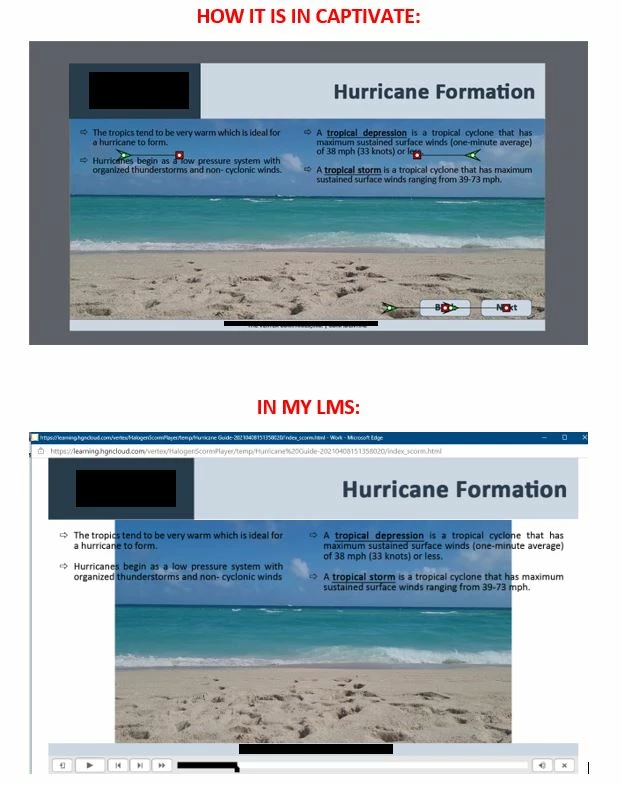
I am trying to have a video as a background on a slide in my project. When I import the video, I adjust the size of it to the slide (1280 by 540). I removed the skin and set the video to auto rewind and loop. I added to text boxes to slide that sit on top of the video.


When I preview the slide in Captivate, it works perfectly. However, when I publish the file and upload to my LMS (SABA TalentSpace), the video is not the same size. 


What am I doing wrong? Is there a setting I am overlooking? Could it be the LMS? 


The video is an mp4. Does the video need to be another format?


This topic has been closed for replies.
Correct answer Lilybiri

You could re-encode the video with Adobe Media Encoder. MP4 is a common label for multiple codecs. Set it to the size you need it in Captivate in that encoder.

Play slide is NOT a Preview method. How does it look with F11, Preview HTML in Browser? 

1 reply

Lilybiri
LilybiriCorrect answer
Legend
April 8, 2021

You could re-encode the video with Adobe Media Encoder. MP4 is a common label for multiple codecs. Set it to the size you need it in Captivate in that encoder.

Play slide is NOT a Preview method. How does it look with F11, Preview HTML in Browser? 

Chelz.101
Chelz.101Author
Participating Frequently
April 8, 2021

THANK YOU! That worked!! I'm learning Adobe Media Encoder so I was not aware of the capabilities! Again, THANK YOU!!


As for preview, I normally preview with F8 but I think F11 will be my go to going forward!

Lilybiri
Legend
April 9, 2021

Reason is that in a non-responsive project all Preview methods except F11 use a temporary SWF output, which is now obsolete. Only F11 shows you HTML output which needs a browser.