shripadcd
Known Participant
March 23, 2018
Question

Video full screen and download options to be disabled for browser

  • March 23, 2018
  • 5 replies
  • 2388 views

Hi,

I am facing an issue when SCORM output is uploaded on TalentLMS.

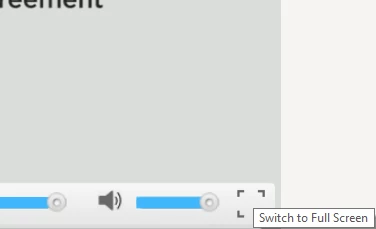
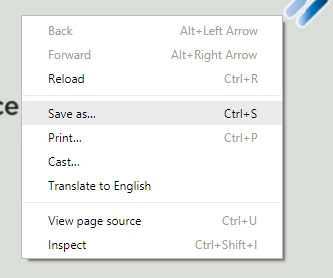
Many .mp4 videos are embedded on slides. These videos though played from LMS get full screen option and download / save as option.

I would like to disable the download option and full screen option both.

Can someone please help?
This topic has been closed for replies.

5 replies

Participant
March 29, 2019

Did any one ever solve this? This is becoming a huge issue for me.

Participant
March 29, 2019

I need a full screen option, but don't want the download option.

eLearning_Pundits
Participating Frequently
March 28, 2018

I am assuming that you have inserted an Event Video in your project. If not please correct me.

In order to disable the full screen and other options, please click your video on captivate slide, and choose Skin=None from Properties. You should not get those options anymore.

You call also try inserting a Multi slide synchronized video instead and choose Modify slide duration to accommodate video from bottom. It will also remove the full screen and diwnload option. You may choose a suitable Skin if you need play at for video.

shripadcd
shripadcdAuthor
Known Participant
March 30, 2018

Hi,

Client wants skin but not he full screen option. So we edited Scorm_HTML

We added a line #btnFSVideo_Object_93 { display:none;} which disabled full screen button. PLaybar, pause, volume buttons can still be seen and operated. 93 is video object number. Need to add this code for each video in the file.

Participant
February 1, 2019

Hi,

Where in the index_scorm.html file should this line of code be inserted?

I will be grateful if you can send me this information.

Kind regards

Lucia

shripadcd
shripadcdAuthor
Known Participant
March 28, 2018

Guys,

Can anyone share javascript code to disable right click and hide full screen options which is SCORM compliant.

When I inserted following code LMS didn't accept my output. Works perfect for chrome, firefox and IE on standalone system.

Right click disable code for index_SCORM.html sourced from internet with due respect to author:

1. Find  <body onload="onBodyLoad()">   and replace it with   <body onLoad="onBodyLoad()" oncontextmenu="return false;">

2. Find tag  </head> tag and add following code before it .

<script language="JavaScript">

  /**

    * Disable right-click of mouse, F12 key, and save key combinations on page

    * By Arthur Gareginyan (arthurgareginyan@gmail.com)

    * For full source code, visit http://www.mycyberuniverse.com

    */

  window.onload = function() {

    document.addEventListener("contextmenu", function(e){

      e.preventDefault();

    }, false);

    document.addEventListener("keydown", function(e) {

    //document.onkeydown = function(e) {

      // "I" key

      if (e.ctrlKey && e.shiftKey && e.keyCode == 73) {

        disabledEvent(e);

      }

      // "J" key

      if (e.ctrlKey && e.shiftKey && e.keyCode == 74) {

        disabledEvent(e);

      }

      // "S" key + macOS

      if (e.keyCode == 83 && (navigator.platform.match("Mac") ? e.metaKey : e.ctrlKey)) {

        disabledEvent(e);

      }

      // "U" key

      if (e.ctrlKey && e.keyCode == 85) {

        disabledEvent(e);

      }

      // "F12" key

      if (event.keyCode == 123) {

        disabledEvent(e);

      }

    }, false);

    function disabledEvent(e){

      if (e.stopPropagation){

        e.stopPropagation();

      } else if (window.event){

        window.event.cancelBubble = true;

      }

      e.preventDefault();

      return false;

    }

  };

</script>

To disable full screen option we pasted such code for every video:

#btnFSVideo_Object_93 { display:none;}

HELP PLZZZ!!!

Jeremy Shimmerman
Participating Frequently
March 28, 2018

There are a few factors at play here. Where you host your videos, and the available functionality of your LMS - for example my LMS strips out <script> tags.  

There is a simple workaround however.  You can place an invisible box (no fill, no border) in front of the video.  This will prevent the user from click anywhere behind the box.  You can put the box over top the full screen button.  Let me know if that helps.  

Thanks

Erik Lord
Inspiring
March 24, 2018

Unfortunately, that is the nature of MP4 and HTML5. With HTML5 and browsers now natively support MP4, that 'Save As' feature is just built-in to the browser for video...just as it is for images.

Two possible options:
1) most true streaming services disallow the Save As feature by the nature of true video streaming. So not only does uploading your video to a streaming service, then integrating it into CP result in a better viewer experience, but the Save As almost surely won't be an option.
YouTube/Vimeo are good, free options to do that.

2) you could try to layer an invisible hotspot overtop the video and have it respond to a right-click. So when users right-click the video, maybe the hotspot will intercept the click and...do whatever you tell it to. I've not tried that though.

shripadcd
shripadcdAuthor
Known Participant
March 25, 2018

Hi Erik,

Thanks for your comment.

Unfortunately client doesn't want to stream it from third party websites.

In case of second option, I tried.but couldn't succeed.

I am consulting a friend from programming background. if I get a solution from her, I will post it here.

shripadcd
shripadcdAuthor
Known Participant
March 24, 2018

@Lilibiry or all others, any comments?

Lilybiri
Legend
March 24, 2018

Sorry, I am unable to help you. Hope for you that a video expert can help you.