
Inspiring
April 12, 2019
Question

Videos would not play. Sometimes

  • April 12, 2019
  • 2 replies
  • 442 views

Hi there,

I use videos in the Captivate 2019 project of mine.

They are small ones - about 1 or 2 MB.

However, when I upload them on the Sharpoint LMS, sometimes they do not appear. Just the background of the slide would appear.

I believe this is only Chrome specific.

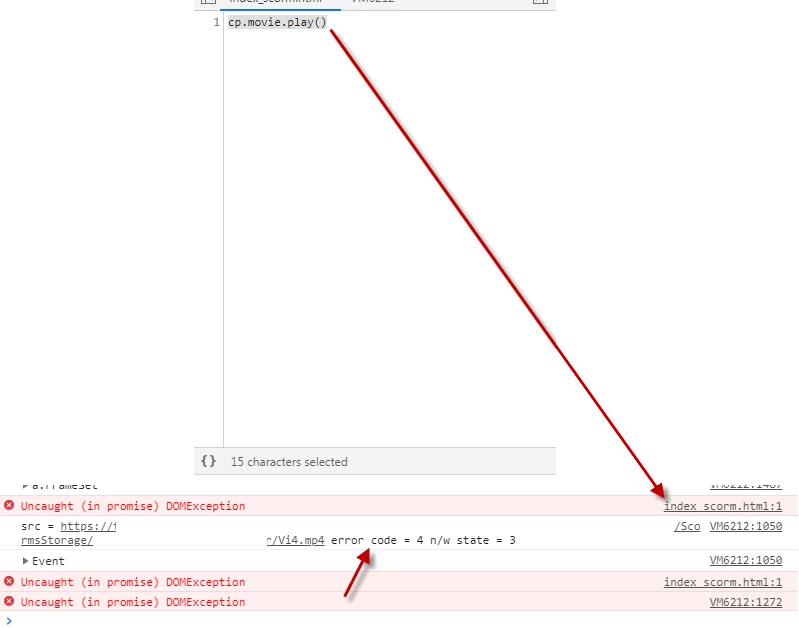
Here is what the debugger gives me. Anyone with ideas?

Thank you in advance

Bobby
    This topic has been closed for replies.

    2 replies

    Inspiring
    May 16, 2019

    This becomes a real serios issue for us. We have nice 5-sec videos done in Blender as intros for the different topics.

    Sometimes they would not play...

    Here are the details of the error I get. Anyone with ideas or similar experiences?

    Looking at the last line I think the issue refers to this one described by Joe Ganci already. Seems that it is the Autoplay issue again?

    VM11329:2657 Uncaught (in promise) DOMException

    The problem with running audio and/or video on the first slide in Chrome - eLearning

    Thanks so much in advance

    Bobby

    VM11329:2435 src = https://xxxxx/_layouts/15/efi_scorm/efiscormgetglobalresourcesashxefiscorm/course/namecourse/ScormsStorage/nameofcourse/vr/Vi11.mp4 error code = 4 n/w state = 3

    VM11329:2435 Event

    bubbles: false

    cancelBubble: false

    cancelable: truecomposed: false

    currentTarget: nulldefaultPrevented: false

    eventPhase: 0

    isTrusted: true

    path: [video#cpnvc3]

    returnValue: true

    srcElement: null

    target: null

    timeStamp: 85224.21000000031

    type: "error"

    __proto__: Event

    VM11329:2872 91384_5037026

    VM11329:2872 a.FrameSet

    afrom: undefined

    alwaysPause: true

    areDimensionsCalculated: false

    ato: undefined

    children: [cp.AutoShape]

    considerForUpdate: true

    dblClick: false

    dependents: undefined

    effectIsStarted: false

    element: div#menu_Laws.cp-frameset

    from: 2665

    hasEffect: undefined

    htmlDependents: []

    isCpObject: true

    isRegistered: false

    isStarted: false

    itemCanvasData: {b: Array(4), uid: 89725, sr: ƒ, ip: "dr/menu_Laws.png", dn: "menu_Laws", …}

    itemData: {type: 612, from: 2665, to: 2754, rp: 0, rpa: 0, …}

    keyHandler: ƒ (a,c,g)

    mAnimationList: {}

    mCurrentDisplayData: a.PptxAnimatableDisplayData {mData: Array(0), mColorLengthData: Array(0), mColorRedraw: Array(0), mRedraw: false, mDataRelative: {…}}

    mDisplayData: a.PptxAnimatableDisplayData {mData: Array(0), mColorLengthData: Array(0), mColorRedraw: Array(0), mRedraw: false, mDataRelative: {…}}

    mForceUpdateFrameData: true

    mForceUpdateFrameDataDueToResizeWindow: false

    mOrderedAnimationList: []

    mOutDisplayData: a.PptxAnimatableDisplayData {mData: Array(0), mColorLengthData: Array(0), mColorRedraw: Array(0), mRedraw: false, mDataRelative: {…}}

    mTriggerTimelineId: undefined

    mUniqueName: "menu_Laws"

    m_triggerTimelineIds: ["t_89725_91384_5037026"]

    pa: -1

    timeline: Window {postMessage: ƒ, blur: ƒ, focus: ƒ, close: ƒ, parent: Window, …}

    to: 2754

    transIn: 0

    transOut: 0

    type: 612

    __proto__: a.DisplayObject

    VM11329:2657 Uncaught (in promise) DOMException

    Lilybiri
    Legend
    April 14, 2019

    Are you sure that Sharepoint is configured as LMS? Can you try to re-encode the mp4 using the Adobe Media Encoder? Do they play when you try uploading to another webserver?

    Inspiring
    April 14, 2019

    Hi there Lieve,

    I am talking about an LMS that is called LMS 365. It is Sharepoint based LMS.

    So that is ok.

    I have tried re-enconding with Media Encoder but no change. I can not try on another server because we have limitations in the company.

    I was thinking that the error that I shared could speaks about a known issue.

    Thanks

    Bobby

    Lilybiri
    Legend
    April 15, 2019

    I have not seen a similar issue reported yet, but can have missed it of course?.