Participating Frequently
February 19, 2014
Answered

Want Different hint captions to appear

  • February 19, 2014
  • 1 reply
  • 5241 views

I am creating a knowledge check of various step by step simulations.  When a user clicks incorrectly the first time I want a text caption to come up that says Try again.  When the user clicks incorrectly a second time, I want a second caption to come up that says Click here.

I'm new to Captivate 7. I've done this type of thing in Storyline but can't figure it out here.  I'm also new to using variables and actions so if you know how to do this. PLEASE give me easy instructions to follow.

Thank you so much. 

Mischu

This topic has been closed for replies.
Correct answer Lilybiri

You didn't tell what has to happen when user is stubborn and continues clicking wrongly after second attempt, so I supposed same second hint has to appear.

  1. Create a user variable v_attempt with a default value of 0
  2. Add a click box CB_False (my label in the Timeline) that covers the whole slide, Infinite Attempts, Success action will be a conditional advanced action (see further)
  3. I labeled the click box over the correct spot CB_OK. It had 3 attempts for me (don't know how much you want). Success action = Go to Next Slide. Last Attempt action = No action. This click box has to be on top of the previous one in the stack!
  4. Create two Text containers (Tc_Hint1/Tc_Hint2) for the two Hints, that are initially hidden, I put them in exact the same location. If that is not possible, you'll have to hide the first Hint in the conditional action. Here is a screenshot of the timeline:
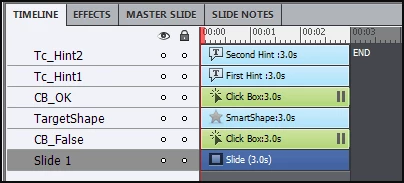
The TargetShape was just for me, so that I could see where to click on the correct spot.

The conditional advanced action will need two decisions. Here is the screenshot of the first Decision:
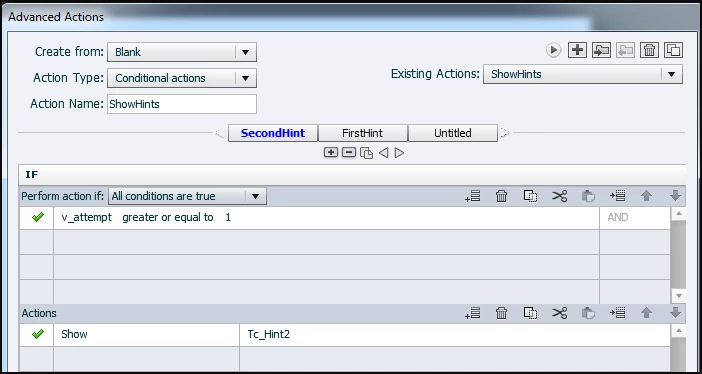
You'll see that this is the second hint appearing. Because actions in Captivate are always totally evaluated, this sequence is important. As I told before, if the second Hint is not in the same location as the first, you'll have to add Hide Tc_Hint1 to the Actions region. There is no Else action necessary.

Second decision:
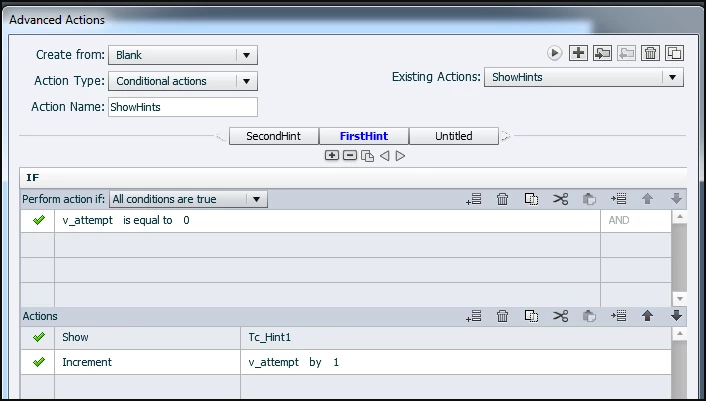
This will show the first hint AND increment the counter v_attempt, so that for the second click v_attempt will be 1 and the first decision will result in Correct, second hint will be made visible.


1 reply

Lilybiri
Legend
February 19, 2014

If you are talking about question slides, you can have different Failure captions by setting Failure levels. If you are talking about interactive objects like click boxes, you'll have to set up a conditional advanced action and use a variable to track the number of clicks, and show previously hidden text containers. But click boxes have already Hint and Failure captions, are they not sufficient?

Mischu2Author
Participating Frequently
February 20, 2014

Thank you for your reply.  I figured it was in actions but am unsure how to write one.  I probably should have been more clear.

We are creating a knowledge check on a software simulation to see if the user understands and knows the process explained.  The assessment and training modes havw the right number of captions but they appear at the wrong times. 

Here's the sequence:

1. User clicks incorrectly.

2. Hint 1 appears to guide them.

3. User clicks incorrectly again

4. Hint 2 appears to give them an explicit instruction.

Right now, the hint caption appeasr  when the user moves the mouse close to the click box.  The failure caption can only be one caption and not give the guided response and the directive response. 

Thanks for any help.

Mischu

RodWard
Community Expert
Community Expert
February 20, 2014

It appears to me that the captions you are referring to as HINT captions are actually what Captivate regards as FAILURE captions.  The caption that appears on mouseover is what Captivate regards as a HINT, and it is present BEFORE the user makes their choice and submits.  Each time the user submits an answer, if it is an incorrect answer, then they see a Failure caption (Captivate's version of it).

It would seem that what you need to do is alter the appearance of the first and second Failure captions so that they match the appearance of a HINT caption. If you only consider the user to have failed when they completed three attempts withouth getting the answer correct then make the third caption appear distinctly different from the first two.  That way, even though these are all still Failure captions according to Captivate, the user is none the wiser.

