Answered
When checkboxing "Use as Button" - how to change rollover color?
Smart shape wiht text: when checkboxing "Use as Button" - how to change rollover color?

Smart shape wiht text: when checkboxing "Use as Button" - how to change rollover color?
In the Properties panel of the Shape button, you'll find a field 'Normal', if you open the dropdown list you'll see the two other states, select and edit Fill/Color/Character...whatever you want.
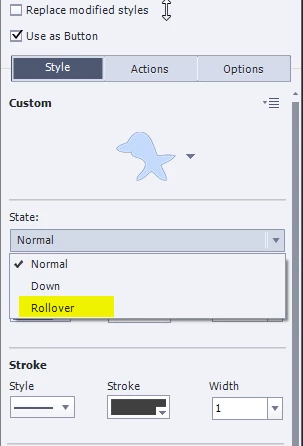
If you want to use the states for this button multiple times, I recommend to save the style or to create styles in the Object Style Manager where you can also edit the three inbuilt states: Normal, Rollover and Down.
Already have an account? Login
Enter your E-mail address. We'll send you an e-mail with instructions to reset your password.
 AdChoices