Answered
Where is the MAINOPTIONS TOOLBAR in Captivate 9?
I can't find the MAINOPTIONS TOOLBAR, mentioned in the Help file, in Captivate 9. Where is it?

I can't find the MAINOPTIONS TOOLBAR, mentioned in the Help file, in Captivate 9. Where is it?
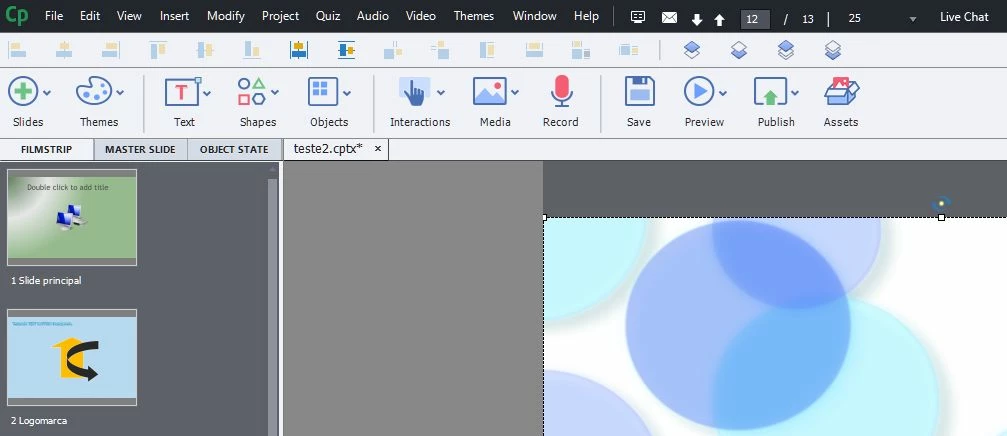
I think you mean the big RIBON, with the buttons SLIDES - THEMES - TEXT - SHAPES - OBJECTS - INTERACTIONS - MEDIA - RECORD - SAVE - PREVIEW - PUBLISH - ASSETS. But the ribon is not the mainoptions toolbar. The mainoptions toolbar is suposed to stand at the left side. There is an image in the Help file:
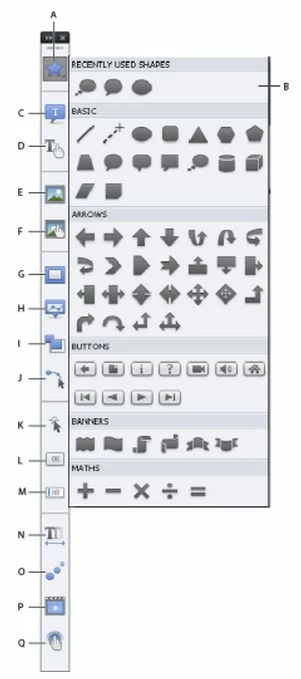
I can't find this toolbar in version 9. I only see the ribon:
The Adobe Help file can be seen at this link: Adobe Captivate Help | Toolbars
That was a toolbar in versions up till 7. Now it is replaced by that
horizontal Big Button Bar. It is not a ribbon at all, never changes its
content as a real ribbon does in MS appkications.
Help is really not up to date, was the main reason I started blogging about
Captivate.
Already have an account? Login
Enter your E-mail address. We'll send you an e-mail with instructions to reset your password.
 AdChoices