
Inspiring
August 18, 2015
Question

Why do I not have permissions to save to a current location?

  • August 18, 2015
  • 4 replies
  • 611 views

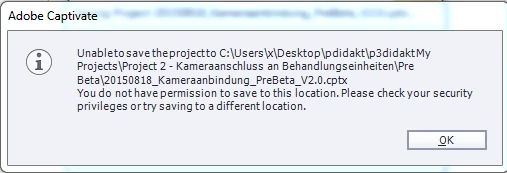
Occasionally, and more times than not I get the the following error.  I opened Captivate as administrator and I only have one Captivate open.... 

Does anyone have an idea as to whats going on?
This topic has been closed for replies.

4 replies

christian lee
Known Participant
December 20, 2017

I'm having the same problem. I've linked the folder to google drive. It's only starting doing it since I saved a downloaded template to the correct place. Any ideas?

christian lee
Known Participant
December 20, 2017

Solved it. DO NOT sync the Adobe folder (where I saved the imported template) which means I have to have two copies of templates. One where you can find it inside Captivate and another where I can back it up.)

Lilybiri
Legend
December 20, 2017

THis is a very old thread. Never use a template (cptl) anymore!

Inspiring
August 26, 2015

I am using Windows 7.  Yea, perhaps the path is too long.

RodWard
Community Expert
Community Expert
August 19, 2015

Did you perchance upgrade your OS to Windows 10 or something?

BDuckWorks
Inspiring
August 18, 2015

Apparently you don't have write permission to that folder, but it may also be that the path is too long.

I'm not sure what the path limitations for Windows 7 or Windows 8 are, but it would be worth investigating.