


Why is my widget not working?

Copy link to clipboard
Copied
Hello All,
I avoided coming here because I do not know very well speak English, but I have serious problems.
My widget does not work. No items in it and when I click "browse " and select the I want nothing happens.
I also can not insert animated text. It's the same error. Can anyone help me?


 16
Replies
16
16
Replies
16


Copy link to clipboard
Copied
Hello and welcome to the forum,
Please, could you tell us which version of Captivate you are using: 4 or 5? You are talking about widgets, which widget? The widgets that come with Captivate are located in a folder that is in the Gallery-folder. You will find this Gallery folder in the installation folder of Captivate.
If you are using Captivate 5, be sure to install the patch released at the end of 2010: Help, Updates menu.
Lilybiri
Copy link to clipboard
Copied
Thanks for trying to help me.
I'm using version 5. I speak of the widget tab as you can see in the picture. There are no options and when I import something does not work.
Maybe I need to install the patch release you talked about, where can I find it?
Thanks again!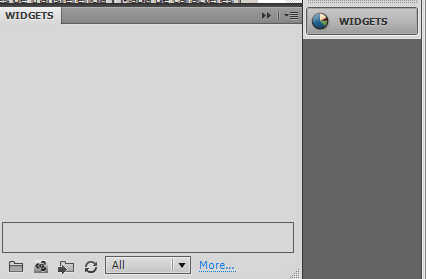
Copy link to clipboard
Copied
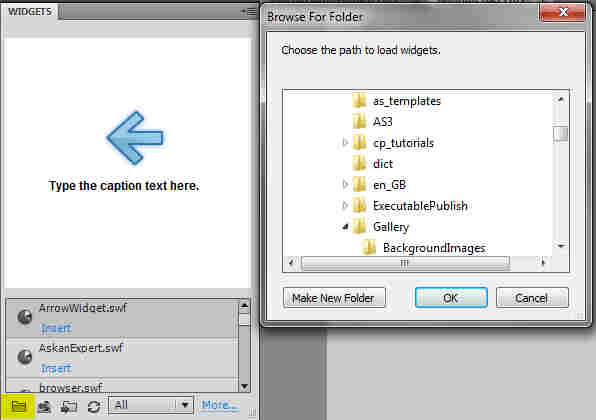 Hello,
You have to indicate the path where the Widgets are located: in ...\Captivate 5\Gallery\Widgets
Use the small folder icon (highlighted in yellow) in the Widget panel to show this path, see my screenshot. I'm planning to blog about the default Widgets coming with Captivate soonly. But I do blog in English, which is not my native language either!
The patch can normally be installed using the Help menu, option Updates. If this doesn't work you can go to the downloads page of Adobe. In this blogpost you'll find details about the patch:
Lilybiri
Copy link to clipboard
Copied
I did the first tip several times, but it did not work and about the update I already have the 5.0.1.624 version.
I quit (laughs).
Thanks!
Copy link to clipboard
Copied
Are you giving up that easily, I'm more stubborn.

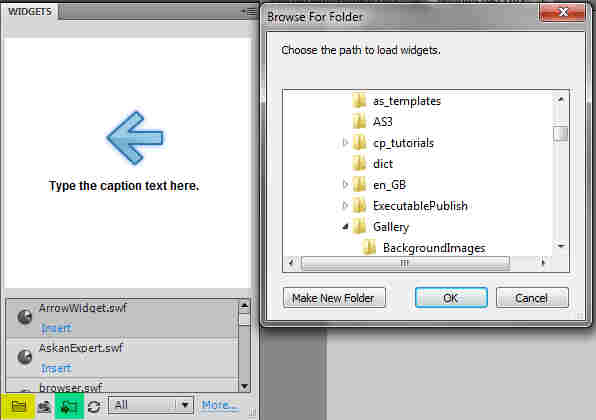
Try then the button on the Widget panel, highlighted in green in this new screenshot: it will let you navigate in the usual 'explore' way to the Gallery and choose the widgets you want to use to the panel.
Copy link to clipboard
Copied
I did it several times too. What
I did everything I could on this tab. In fact, I can include what I want like .swf through the library, but when I insert in the slide does not work.
Copy link to clipboard
Copied
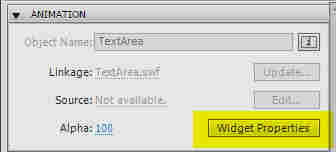
Please, how did you test the widget (which one did you try)? Did you insert it with Insert, Widget? Because a widget is not just like a simple animation (SWF). And the you will have to configure the Widget Properties, that you can find in the Properties panel, part Animation (see button highlighted in screenshot).
The widget will only be full visible when you watch the CP in Preview, preferably Preview in Browser or after publishing.
If you will tell me which widget you want to try, I could guide you more.
Copy link to clipboard
Copied
See
http://fineweb.com.br/treinamento-wordpress/movie.swf
Copy link to clipboard
Copied
Hello,
Watched your movie (you speak Spanish? - do understand some Spanish but cannot write it). Can you open the Widgets panel (because it is always minimized in your movie after pointing to the path) and look if there is now any widget? If yes can you drag it on the stage?
Secondly: are you starting Captivate as an administrator? Should have asked that first of all.
Lilybiri
Copy link to clipboard
Copied
I speak very little Spanish and some in English. My tongue is Portuguese.
As I showed in the video I can open tab widgets, but never has anything in there.
Administrator? You mean my computer's administrator or administrator's CP?
I am a administrator of my computer.
Copy link to clipboard
Copied
Hello,
Portuguese sounds so nice, but do not understand a lot....
I did see the Widget panel in the movie, but not after you had used the button Browse (highlighted in green)..
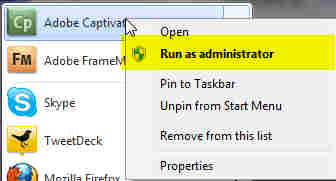
Here is another screenshot: I'm on WIN7, when starting CP, use the right-click menu and choose 'Run as Administrator'. You can also change it definitively using Properties in the same menu.
Lilybiri

Copy link to clipboard
Copied
Hi and welcome
In your movie you open the button folder.
But you should open the widget folder in there.
Try to locate the folder:
gallery > widget
Both is correct:
Locate the folder
Locate a widget inside that folder
Explanation:
Inside the gallery>buttons are only buttons, which have no widget logic.
Best TD
P.S.:
This is not about Captivate but Wordpress
Which plugin are you using in Wordpress to show the start button on top of the flash movie?

Copy link to clipboard
Copied
Hello,
I hope to be in a right forum for my request.I have just started using Captivate version 9 and trying to edit the Process Circle widget. This was created from a different person who was working on this training material. However I am not able to add the whole text description in the windows as it was to be before. It seems there is a space limit, but the longer description was there before. Moreover I would like to add some description in bold, is there any way I can do it? I saw you provided an email address for it. Thanks

Copy link to clipboard
Copied
Hi there, I'm also having some problems with the Process circle widget in Captivate version 9. When I publish my deck, the widget does not look or perform in the same way it appears in Captivate. The main issues are the colours. I have also added a button over the widget which would allow users to continue to the next slide, however once published the button does not appear. I've included some screen shots of how things look in Captivate vs Published and loaded onto our LMS. Any advice would be greatly appreciated 
In Captivate:

In LMS


Copy link to clipboard
Copied
I'm having the same issue, no widgets are showing on the widget panel. I've tried re-selecting the folder multiple times with the "change path" button, tried adding with the browse button, nothing works. I'm on Win 7 32bit running as admin, Captivate 5 version 5.0.1.624, the widgets are definitely there in the gallery folder but nothing seems to make them show up in the widget panel.
Copy link to clipboard
Copied
Tried changing the folder path to a more accessible location, copying the widgets to a folder in My Documents, still no dice. Does *anyone* have a clue about this problem?


Get ready! An upgraded Adobe Community experience is coming in January.
Learn more
 AdChoices