
Exit
  • Global community
    • Language:
      • Deutsch
      • English
      • Español
      • Français
      • Português
  • 日本語コミュニティ
  • 한국 커뮤니티
0

Yet another - Retake Button Missing - WITH PICS!

Contributor ,
Feb 26, 2013 Feb 26, 2013

I read a bunch of threads on the retake button, but still can't solve this one.  I included pics to help everyone out.  Thanks so much in advance!!

PROBLEM:

Retake button is not displaying.

SCTRUCTURE: 

SCORM Course

No points are reported to LMS until the final congrats screen.

PICTURES:

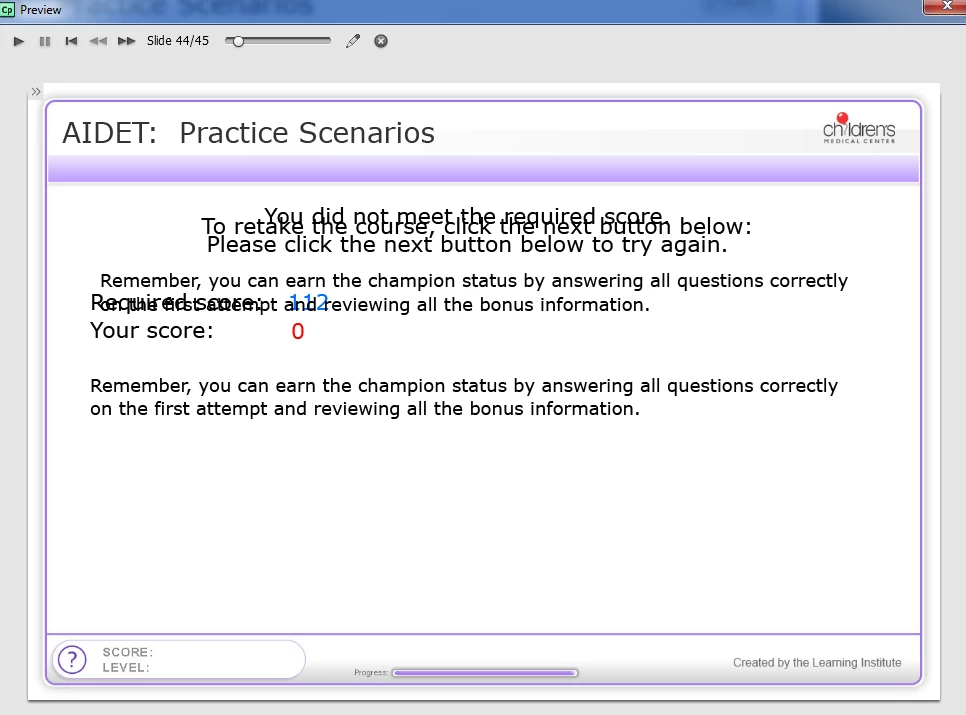
CBT - Quiz Review slide with missing Retake Button (ignore overlapping text.  i use a script to determine which phrase to display).
Retake-Troubleshooting---CBT-screenshot.png

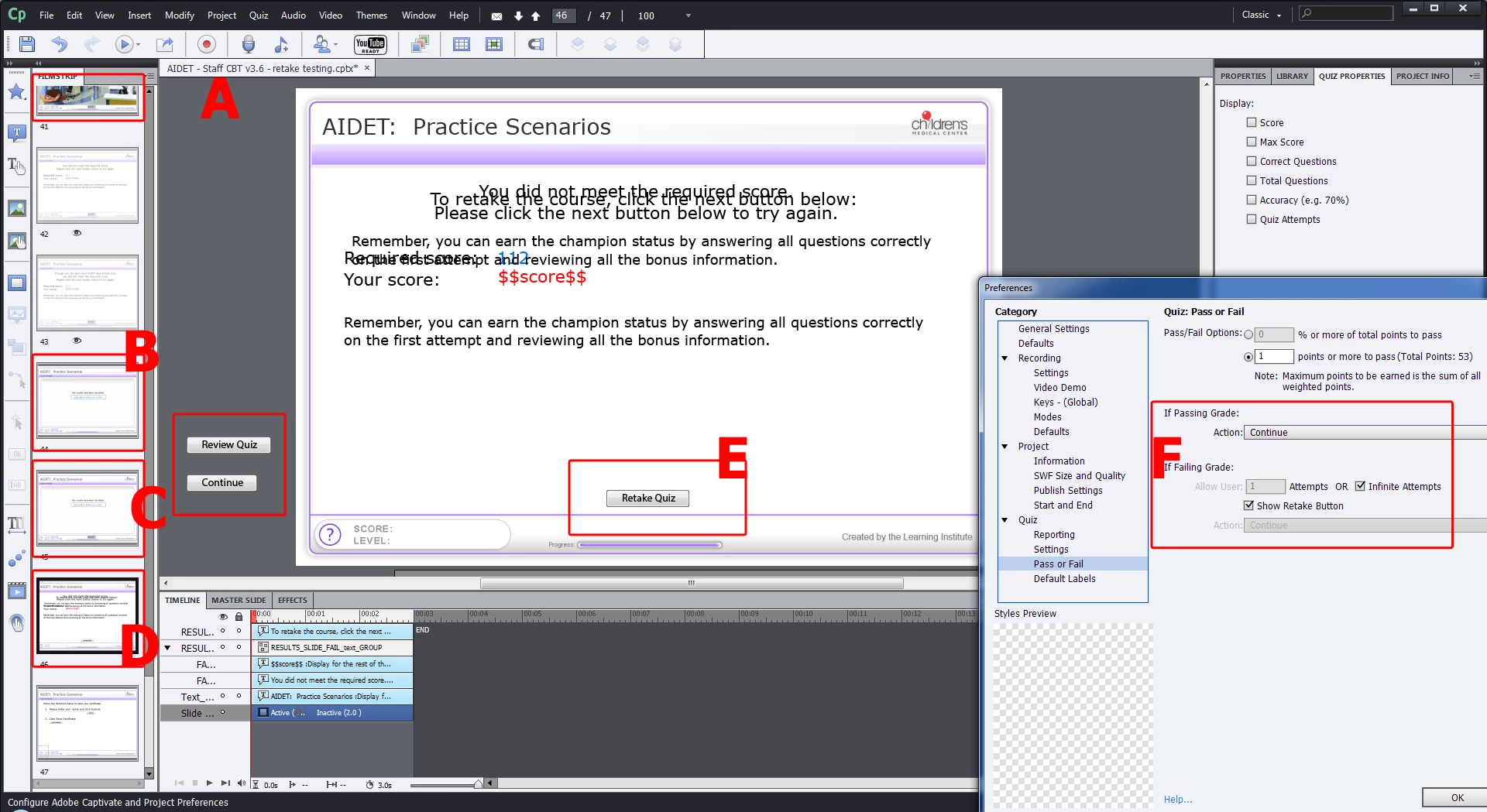
A)   At the end of the quiz, it sends them to 1 of 3 slides, based on my Score variable value:

B)  143 - You are a CHAMPION! slide.  On this slide, they click a clickbox that sends 2 points to LMS, marking them passed with perfect score.  CBT ends, marking them passed in LMS.

C)   112 - 128 - You are a MASTER! slide.  On this slide they click a clickbox that sends 1 point to LMS, marking them passed.  User has choice to advance to Quiz Results Slide, if they want to retake the quiz to try to earn a CHAMPION score.  If not CBT ends, marking them passed in LMS.

(Notice how results are only reported to the LMS at the end of the MASTER or CHAMPION branching.)

D)   0 - 111 Quiz Results Slide, where they should see a retake button. 

E)  Retake button Quiz Results Slide in slideshow

F)  Retake button is enabled in settings, with infinite chances.
Retake-Troubleshooting.png

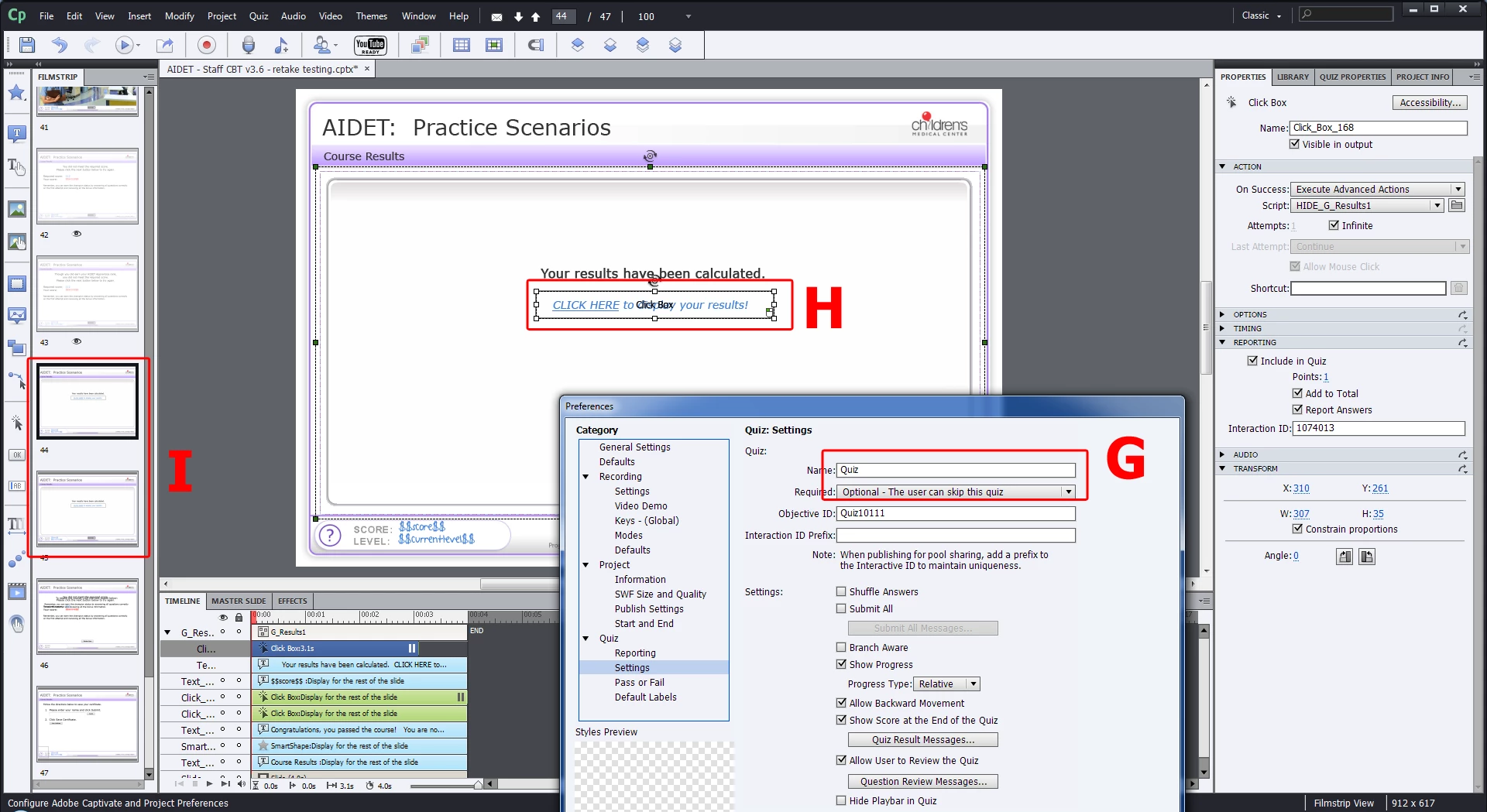
G)  Quiz set to optional.

H)  This is an example of the You are a MASTER! slide.  They have to click the click box to see their Master score.  Clicking the click box sends 1 pt to the LMS, marking them as passed.

I)  If someone does not score high enough (using our custom Score variable), they skip the MASTER and CHAMPION slides that have the click box that reports to the LMS.  They go straight to the View Quiz Results Slide with the Retake button.
Retake-Troubleshooting---2-of-2.png

TOPICS
Quizzing and LMS
789
Translate
Report
Community guidelines
Be kind and respectful, give credit to the original source of content, and search for duplicates before posting. Learn more
community guidelines

correct answers 1 Correct answer

Community Expert , Feb 26, 2013 Feb 26, 2013

Captivate's designed behavior is that you do not see the Retake Quiz button if you have achieved a passing score.

If you want it to work differently, you should submit an enhancement request.

Translate
Contributor ,
Feb 26, 2013 Feb 26, 2013

Making progress...

I had to change the points for all the Question Slides to 0.  Even though they are set to NOT report to the LMS, they were counting towards the quiz score.  Once the quiz score got above 1 (which is the passing score), the retake quiz button did not show.  I changed all the questions slides from 10 points to 0.

REMAINING PROBLEM:

Now, I still can't think of a way to let the user retake the quiz when they achieve MASTER status.  MASTER status marks them as passed, but I want them to click the Retake Quiz button to start over and try to earn the perfect CHAMPION status.

Translate
Report
Community guidelines
Be kind and respectful, give credit to the original source of content, and search for duplicates before posting. Learn more
community guidelines
Community Expert ,
Feb 26, 2013 Feb 26, 2013

Captivate's designed behavior is that you do not see the Retake Quiz button if you have achieved a passing score.

If you want it to work differently, you should submit an enhancement request.

Translate
Report
Community guidelines
Be kind and respectful, give credit to the original source of content, and search for duplicates before posting. Learn more
community guidelines
Contributor ,
Feb 27, 2013 Feb 27, 2013
LATEST

Thanks for the validation.  I'll submit the tip now.  The main reason we want to allow retakes on passing is to reward people for going above and beyond, getting all questions right and reviewing all the optional bonus information.  They will print out their CHAMPION certificates so they can enter into a drawing for a prize.

Translate
Report
Community guidelines
Be kind and respectful, give credit to the original source of content, and search for duplicates before posting. Learn more
community guidelines
Resources
Help resources