"Did you apply the AlphaFromTo with the advanced action that also shows the image?"
Hi Lilybiri, I'm not sure what you mean by this. I have and AlphaFromTo applied to the image which I am calling up from the advanced action. That image is on the timeline and is initially hidden.
I was under the impression that in the case of an image which is initially hidden and is "shown" from an advanced action, its location on the timeline does not really matter?
"Where is that image on the timeline? Where is the pausing point of the interactive object that triggers the showing+effect?"
There are four hotspots which appear after about four seconds. If there was only one, I could see how I could simply put a pause and have the timeline continue to fade in the popup. But since there are four, and since I can't tell captivate to go to a specific time on the timeline (as in Flash) I can't really use this method. That's is why I'm calling everything up in advanced actions. I know that I could go to a new slide to resolve this issue, but the problem is then that while you can exclude these "helper" slides from the TOC, if you have the playbar activated, it will go to these slides when using the forward button.
Sorry, there seems to be some misunderstanding. Will try to explain.
If you apply an effect to an object, the effect has a 'duration'. When you 'show' that object and you want to see the applied effect, the playhead needs to be able to move to show that effect. That is why I asked how you applied the Alpha effect. An effect can be applied with 3 work flows:
- Time-based: that is the one you use, effect will not be visible just with a Show command at all
- Triggered by an interactive object
- Triggered by a command in an advanced action
Look at this timeline:
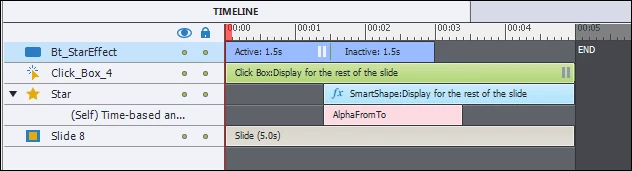
The button has the action 'Show Star' without releasing the playhead. The AlphaFromTo takes 2secs. If I put the star timeline from the beginning of the slide, when you use the command Show Star, the start will show in its present state which would be with a pretty high Alpha. When you move the star timeline like I did here, the star will show but with a low Alpha, very dimmed. Maybe that explains better why using a Time-based effect has no sense at all.
If you use Apply Effect in the advanced action, you should have to release the playhead as well. It is not true that you cannot return to a 'frame', I explained micro-navigation many versions ago, it is a bit cumbersome but it is possible: Micro-Navigation in Adobe Captivate - Captivate blog
David (TLCMediaDesign) could certainly offer you a JS work flow as well for navigation between frames.
Sorry, today I cannot find more time to offer a worked out solution.

 AdChoices