
Known Participant
August 24, 2017
Answered

Forced Navigation - delayed next button until clicks

  • August 24, 2017
  • 6 replies
  • 917 views

I am new to captivate and have been teaching myself with little guidance... I am in the updated 2017 release...

I have a page that i set up with image buttons... there are 5 buttons. I want the NEXT button to appear AFTER you have clicked all 5 buttons... the image buttons jump you to other slides vs staying on that home slide. 

I thought I set it up correctly based on the old instructions that are floating around web from 5.5, but I think i am missing something, or does this not work since i am telling the buttons to jump you to different slides vs an interaction on the page?

Thoughts? Help?

thanks!
This topic has been closed for replies.
Correct answer Lilybiri

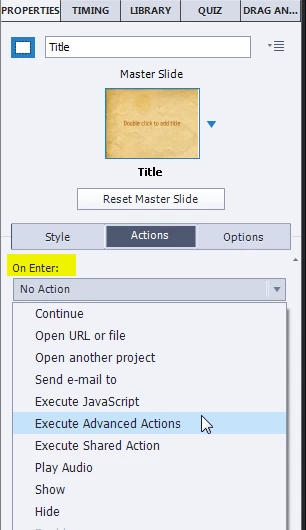
You showed me one action. Each action has to be triggered by an 'event'. That event can be a slide event (On Enter, On Exit) or an event from an interactive object (mostly Success event). You showed me just a conditional action with one decision: where did you attach that action ?

Events and (advanced) Actions - Captivate blog

Here is a summarized work flow, where I suppose that with the 5 buttons you are leaving that slide (go to another slide) and from that slide you are coming back with a 'Back to Menu' button:

  • Create 5 user variables v_one, v_two, v_three, v_four, v_five (it is dangerous to give a name with only one letter, because you can never use duplicate names). The default value of those variables should be 0 (not 1)
  • Use the simple action 'Jump to Slide x' for each of the buttons on your dashboard.
  • For the Back to Menu buttons on the later slides create this (shared) or advanced action:
        Assign v_one with 1                       the variable is different for each button
         Jump to slide Dashboard
  • Trigger the conditional action that you showed by the On Enter event of the dashboard slide.

6 replies

Known Participant
August 24, 2017

So awesome. haha 

1-4 all worked 5 was an "A" instead of a 1.  You've taught me a ton of stuff today. I greatly appreciate it. This has me psyched!  I've taught myself drag and drop, buttons, actions, adv. actions all in the last few months so this is awesome thank you. thank you!!  thank you thank you!!!

Lilybiri
Legend
August 24, 2017

Check my blog, lot of stuff about advanced actions.

Thread is still marked as Unanswered

Known Participant
August 24, 2017

I added the 0 to the value and I am still missing something.  My next button never appears.

Lilybiri
Legend
August 24, 2017

To debug, add a text caption to the dashboard slide. Insert the 5 variables in that text caption, using the X button in the Properties panel. That way you can see if the vars have been changed to 1.

Known Participant
August 24, 2017

Thanks for your help and your patience... I think I am still missing something. I am determined to figure this out.

Menu page: I have 5 image buttons. Each button links to a different slide, slide 12, 13, 14, 15, 16...  They are all linked by "jump to..." and the appropriate slide number.

Menu Page: I have the action ON ENTER executing the advanced actions: DisplayNext which looks like: (V1 is cut off from image as is the "ELSE" which shows "HIDE .. Next Button"

I have the Next button on the MENU page NOT visible

The next five pages are all advance to by clicking on the 5 buttons on the menu page.

I called my 5 Variables, V1 - V5 and did NOT put a value in the "value" field within the variables window.

The BACK button that links the 5 pages (slide 12, 13, 14, 15, 16) back to the MENU page I created the advance action as below, changing the V1 to V2 etc for each page but I left the jump to slide the same for each page. (example, Slide 12 is Assign - V1 with 1... Slide 13 is Assign V2 with 1.. etc... )

Am i getting closer?

Lilybiri
Legend
August 24, 2017

Yes, you could have kept the ELSE part in the conditional action, that way you didn't need to hide the Next button in output.

For Captivate 0 and empty are the same, but for the clarity I prefer giving a Boolean variable the value 0. Result would be the same.

Does it work?

Known Participant
August 24, 2017

Im not sure if I know what you mean, or if i actually did "trigger the conditional action on enter" for the dashboard slide.. 

Lilybiri
LilybiriCorrect answer
Legend
August 24, 2017

You showed me one action. Each action has to be triggered by an 'event'. That event can be a slide event (On Enter, On Exit) or an event from an interactive object (mostly Success event). You showed me just a conditional action with one decision: where did you attach that action ?

Events and (advanced) Actions - Captivate blog

Here is a summarized work flow, where I suppose that with the 5 buttons you are leaving that slide (go to another slide) and from that slide you are coming back with a 'Back to Menu' button:

  • Create 5 user variables v_one, v_two, v_three, v_four, v_five (it is dangerous to give a name with only one letter, because you can never use duplicate names). The default value of those variables should be 0 (not 1)
  • Use the simple action 'Jump to Slide x' for each of the buttons on your dashboard.
  • For the Back to Menu buttons on the later slides create this (shared) or advanced action:
        Assign v_one with 1                       the variable is different for each button
         Jump to slide Dashboard
  • Trigger the conditional action that you showed by the On Enter event of the dashboard slide.
Participant
April 23, 2018

Hi Lilybiri -

I am very new to Captivate and using version 2017. I need to create a menu using forced navigation and these steps sort of helped I just need a bit more step by step instructions. I have 8 buttons that need to be clicked before button 9 will activate. It can remain on screen but can only be activate at the end. Do you have anything with step by step instructions? Most of what I can find gives me step by step for older versions of Captivate which include steps that I don't need now that there is an option to add visited states.

Thank you,

Laura

Known Participant
August 24, 2017

I have the 5 buttons set up as:

(with the exception that each button is going to a different slide..)

And then I did set up variables as:

And finally I set up the Advance Action as:  (a is also equal to 1 I just didnt capture it in this screenshot)

Lilybiri
Legend
August 24, 2017

I suspect you could get some information about the dialog box here:

Advanced Actions Dialog box in Captivate 2017 - Captivate blog

Do you trigger the Conditional action On Enter for that dashboard slide?

I asked for the action triggered by the buttons. ????

The default value for the different user variables should be 0, will be toggle to 1 either when they click an image button or when they click the Back button to come back to the dashboard slide.

Lilybiri
Legend
August 24, 2017

Can you show the preview of one of the button actions? Did you create a user variable (Boolean) for each button?

I have been posting that solution even for CP9  several times.