

JayC_in_WV
Inspiring
August 3, 2020
Answered

How Do I Clear a Text-Entry-Box after the First Submission?

  • August 3, 2020
  • 2 replies
  • 563 views

I've put a text-entry-box into a course, giving the learner three attempts to answer correctly before I just give them the answer.  I'd like to be able to clear their answer out of the text entry area and I tried to do that with an advanced action that sets the variable (Answer) for the box with Assign =  " " when the learner selects the "Close" button on the popup that appears when the answer is wrong (see below).
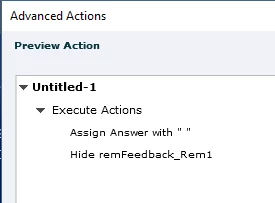
 

That however does not work.


Any ideas?

Thanks

Jay


P.S. I made my own "submit" button for the text-entry-box...I didn't use the one attached to it by Captivate.

    This topic has been closed for replies.
    Correct answer Stagprime2687219

    You might try this.

    You would need to set the  onSuccess action of the button to  Execute JavaScript


    document.getElementById("Text_Entry_Box_1_inputField").value = "";


    Then change the  Text_Entry_Box_1_  part to match the name of your text field.

    Do not remove the underscore inputField at the end.

    Be sure to remove the value of the variable associated with the TEB as well.


    Let me know if you have further questions about this.

    2 replies

    Stagprime2687219
    Stagprime2687219Correct answer
    Legend
    August 3, 2020

    You might try this.

    You would need to set the  onSuccess action of the button to  Execute JavaScript


    document.getElementById("Text_Entry_Box_1_inputField").value = "";


    Then change the  Text_Entry_Box_1_  part to match the name of your text field.

    Do not remove the underscore inputField at the end.

    Be sure to remove the value of the variable associated with the TEB as well.


    Let me know if you have further questions about this.

    JayC_in_WV
    Inspiring
    August 3, 2020

    That did it!  Thanks much for the help!  

    I've gotta put the effort into working with JS...it's clearly the answer for alot of problems.

    Thanks again.

    Jay

    Lilybiri
    Legend
    August 3, 2020

    The only solution is to re-emter the slide. I have explained this workflow when presenting about the Timeline in 2017-2018  (two conferences) and I mention it in a recent post:

    http://blog.lilybiri.com/replay-or-reset-slide

    Annoying, there are more problems with the TEB. Another solution would be to use the CpExtra widget by InfoSemantics.