Known Participant
October 14, 2011
Question

Marking Module as 'Completed' in LMS

  • October 14, 2011
  • 1 reply
  • 815 views

My apologies but I'm really stuck on this.  We recently have acquired an LMS and are migrating everything over to the platform.

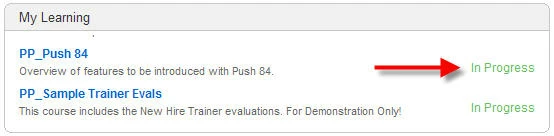
What I'm trying to do is this.  When a student completes the eLearning, I want the LMS record for that learner to switch from 'In Progress' to 'Completed'. 

But I can't get it to work.  Some have told me I could do this by creating a button and making sure 'reporting' is turned on.  Others have said I should create/insert a question slide.  Still others say that by adding a 'close' button to the progress bar, it will mark as completed.

I'm not even sure I have the right settings on the 'reporting' window of Captivate (version 5.0 by the way).  Attached to this post are two images.  One showing our LMS and the 'in progress' message and the other is the settings I currently have on the preferences.  I could really use some expertise on this one.

Thanks.  Chuck
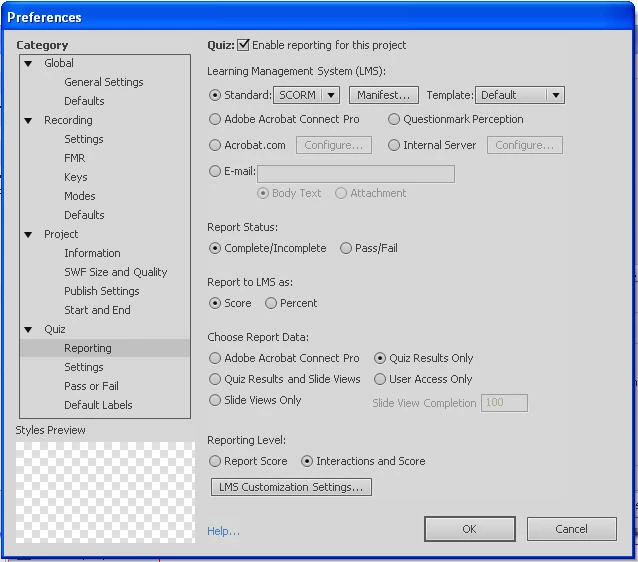
By the way, our LMS is 'Sum Total' and I'm checking some of the past posts to see if there is any answers I can try. Message was edited by: Chuck Grubb

Sorry, I want to add details.  I've looked at the other Adobe forum posts on this topic and can't really find something that fits.  We have Captivate 5.0 and our LMS is Sum Total GeoLearning.  The module does NOT have a quiz.  The only thing I want to happen is to have the course be marked as COMPLETED when the student clicks a button at the end of the course.  Thanks! Message was edited by: Chuck Grubb

This topic has been closed for replies.

1 reply

cegrubbAuthor
Known Participant
October 14, 2011

Found a recommendation by RodWard on 5/24/11 and it worked!!!     Thanks RodWard!  You da' man!

Here was his reply:

I would suggest you use a button instead of a quiz question since you need to configure the question properly so that it will only need a single click on the Submit button.  Otherwise two clicks will be required by the user. One to submit and another click to progress.  A normal button will always do the job with just a single click.

Just add a normal Captivate button to the second last slide and set that button to Report to Quiz with a score of 1.

Label this button something like Click Here to Complete This Module or similar, so that the learners all get the idea they REALLY NEED to click this button or else their course won't be over.  Just set as Continue or Go to Next Slide action for the On Success action of the button.

Make the final slide of the movie fairly short, maybe a second or two. Set the Preferences > Project End action to either Stop Project or Close Project, whichever seems to work best with your LMS.  If you're launching all course modules in a separate window to the SCORM player, you can often use Close Project.  But if you're launching the course content within the SCORM player you'll find some LMSs will not allow the Close Project command and Stop Project is a better option.

If it's any consolation, you SHOULDN'T need to do this just to get your course to complete, but yours is not the only LMS that does this with Captivate content.