Inspiring
November 4, 2016
Answered

Radio Buttons and Check Boxes

  • November 4, 2016
  • 2 replies
  • 1792 views

Hi, everyone,

Thank you for all your help so far.

I have spent the past 5 hours trying to get radio buttons and check boxes to work properly. I've attempted to read blog posts, but they are a bit over my head currently. There is obviously something I'm missing.

I have Cap 8, by the way.

I am trying to do this:

I have one question with 4 choices. Only 3 are correct.

I have a "submit" button.

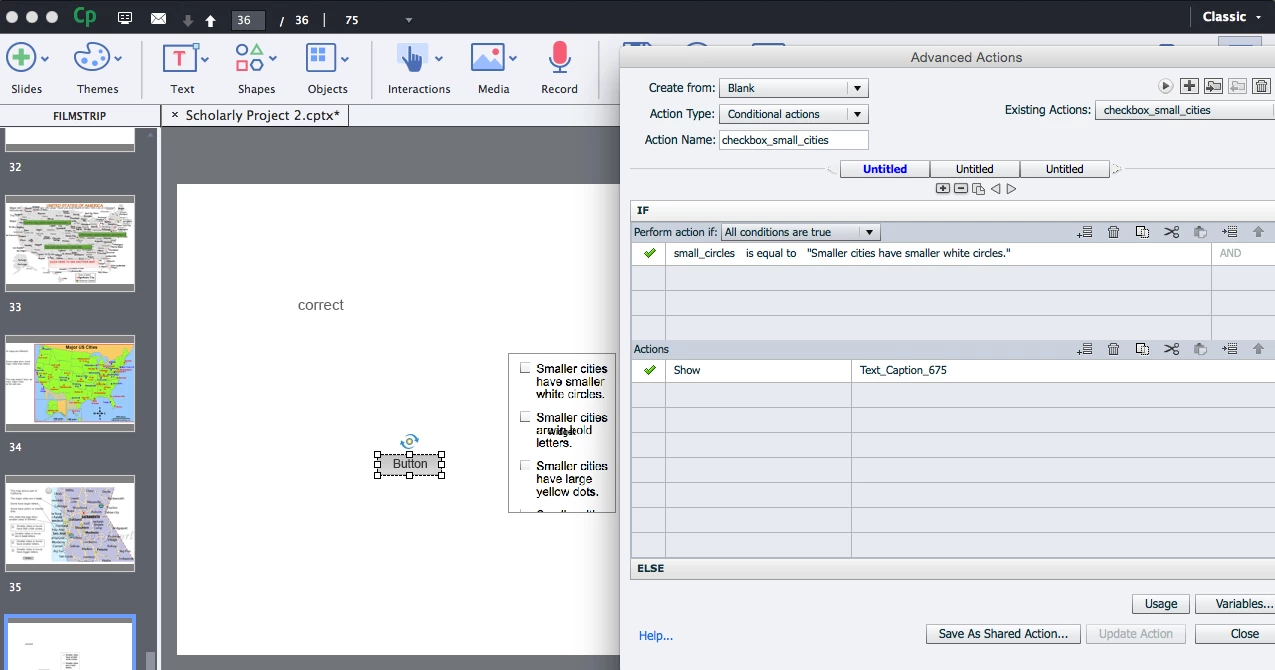
I assigned an advanced action to the button.

The correct radio button answers all have a variable, and I made a variable via project/variable, also.

I have the action set up: If (variable) is equal to (literal--and then the exact words) AND

if (the next variable) is equal to (literal--and then the exact words)

SHOW text caption 680 (which says "good job").

BUT It will show "good job" if there is only one radio button option. As soon as I put two of them (in separate widgets), it no longer displays the good job text caption.

So then I tried the long route of using a variable (correct_answer_1) and told the action to assign variable correct_answer _1 with correct (same for the other answers). Then a final decision checks for correctness. If all is correct, show the good job text caption.

Nothing works so far, and I'm sure it's me, of course.

I don't know if this makes sense as I write this since it's past midnight and I've been banging my head for a couple hours now, haha. Captivate is great; I'm just a newbie with limited computer skills.

Thanks for any insights.
    This topic has been closed for replies.
    Correct answer Lilybiri

    Here's what I've done so far.

    To be honest, I am unclear about step 1, step 2, etc. of how to do this. Here is my best guess.

    This works for one action. As soon as I add another action under it, (to show another text caption, etc.) it no longer shows anything.

    I'm thinking that an Intro to Captivate tutorial or video series somewhere is what I need...


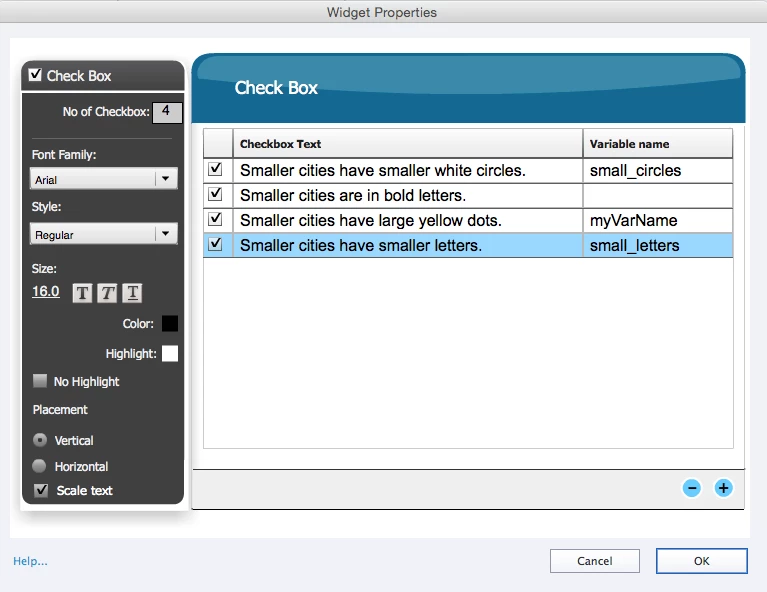
    You have to define a variable for each of the check boxes, will label them (same sequence as in your setup):

      v_circles

      v_bold

      v_yellow

      v_small

    You have to do that in the Project, Variables dialog box. You can leave the default value empty.

    Type in those variables in the second column, exactly same way (they are case sensitive).

    The submit button needs a pausing point, is that the case?

    The conditional action needs to test all variables, not just one. I asked you to post a complete Preview of the action (with the first button i the top right of the dialog box, looks like a play button, a right-pointed arrow). It should look like this

    First decision (first Untitled):

       IF v_circles is equal to 'Smaller cites have smaller white circles'

          Hide Gr_texts
          Show Tx_WhiteCircles

    Second decision

       IF v_bold is equal to 'Smaller cities are in bold letters'

          Hide Gr_texts
          Show Tx_BoldLetters

    Third decision

    IF v_yellow is equal to 'Smaller cities have large yellow dots'

          Hide Gr_texts
          Show Tx_YellowDots

    Fourth decision

    IF v_small is equal to 'Smaller cities have smaller letters'

          Hide Gr_texts
          Show Tx_SmallerLetters

    I grouped the text captions, and gave them a significant name. If you want to offer the possibility to show another text, you have to hide the former texts, that is why I use the gruoping

    However, I wonder why you use checkboxes or radiobuttons for this functionality? If you put the texts in a shape, and turn that shape into a shape button you can use a much less complicated shared (or advanced) action for each shape button:

         Hide Gr_texts      with Gr_texts being the first parameter

         Show Tx.....         with Tx... being the second parameter

    2 replies

    Lilybiri
    Legend
    November 4, 2016

    Are you perhaps referring to my blog? Which posts did you read? I have blogged several times about learning interactions or the former widgets where radiobuttons and check boxes were available as well.

    There is some confusion in your question:

    • Radiobuttons interaction has only one variable that can be associated. As for all interactions you have first to define that variable. The value it will have after interaction with the user is the user's choice, the content of that chosen item. Your answer seems to tell that you created several variables for the radiobuttons widget. If you tell what you want exactly to achieve, maybe could point directly to a blog post with an example or give a step-by-step explanation.
    • Checkboxes interaction has a variable associated with each item, since multiple items can be chosen. In that case you need indeed to check the content of the variables associated with the correct answers to validate that interaction.
    Inspiring
    November 4, 2016

    Hi!

    Yes, I read your blog post (or attempted to), and they are wonderful, except I'm not quite up to speed on much of the introductory concepts and terms. The instructor I have currently is unfamiliar with Captivate, and the one who was (who I took a class with last semester) is not in the program anymore. So I'm doing my best on my own--with your help, which I very much appreciate.

    Here's the entry I read, and I did look at some others: Widgets and Custom Questions - part 1 - Captivate blog

    I have 4 radio buttons. But I added them separately and gave each one its own variable; so I have four individual radio buttons, not one widget with four buttons. I also made matching ones from the project.

    So each radio button has its own variable both in the widget and in the project.

    From that point, I made one action with a submit button. I told the action that each variable (the radio button/project variable) must be equal to [literal] and then the words. After that, if variable=literal, show a caption. It works perfectly when I use one radio button only. As soon as I add 2 and add the exact process to the action, nothing happens.

    I tried check boxes, but I can't grasp those yet.

    I may end up doing standard actions that just show a text caption of "correct" or "try again" from this point on if I cannot catch on. It's not the best route for this project and not nearly as interactive or educational; but I think once I graduate, I need to take a year and figure out this program. There's so much potential with it, but it takes me so long to figure out tech stuff.

    But thanks for helping me bumble along!!

    Lilybiri
    Legend
    November 4, 2016

    I don't understand why you need several instances of the radiobuttons interaction because of the common accepted logic of radiobuttons: only one button can be chosen. That has been the rules for as long as I'm in the IT world (will not tell how many years). If you want to allow multiple choices you need to use check boxes. That is the reason why the checkboxes interaction has a variable associated with each item.

    Tips about using widgets (which apply also to learning interactions): Using Captivate Widgets? Some tips - Captivate blog

    Overview of the learning interactions + tips: Tips - Learning Interactions - Captivate blog

    Replace your multiple radiobuttons by one checkbox interaction. You can use the variables that you already defined for that checkhbox interaction. Post a screenshot of the setup of that interaction, and of the conditional advanced action which you created. Use the Preview Action button (first one on the control panel top right i the Advanced Actions dialog box, looks like a play button) to show the complete conditional action.

    RodWard
    Community Expert
    Community Expert
    November 4, 2016

    First you need to be able to see what the current value is of all these user variables at all points in the process. Only then will you have some idea why your interaction is not working as expected.

    So insert the variables into some temporary captions on your slides so that the current value will be visible as you run it.  Then see if anything jumps out at you.

    Inspiring
    November 4, 2016

    Hi, Rod,

    Thanks for responding!

    I have assigned each radio button a variable and also created a matching one from the project variable option. So the variable "smaller_cities" has a matching radio button that says something like "Smaller cities have smaller circles." So for the action, I have If [variable] smaller_cities is equal to [literal] "Smaller cities have smaller circles." and then some action, like show text caption 680. I do the same kind of thing for each radio button and its variable. When you mentioned giving it a current value, isn't that the "is equal to" and then the literal phrase? Maybe I'm misunderstanding what "current value" means.