
Participating Frequently
August 26, 2011
Answered

Remove lines from matching quiz?

  • August 26, 2011
  • 2 replies
  • 1148 views

(Sorry for the slight overlap discussion but http://forums.adobe.com/message/3560229 does not answer the question.)

Using Captivate 5. I have a matching question in a quiz where the drop-down letters will correspond with a list of 5 possible answers.  Each dropdown list item is corresponding to an area of an image (from master slide) and all 5 dropdowns need to be on one slide.  Here is a snapshot of a simplified version:
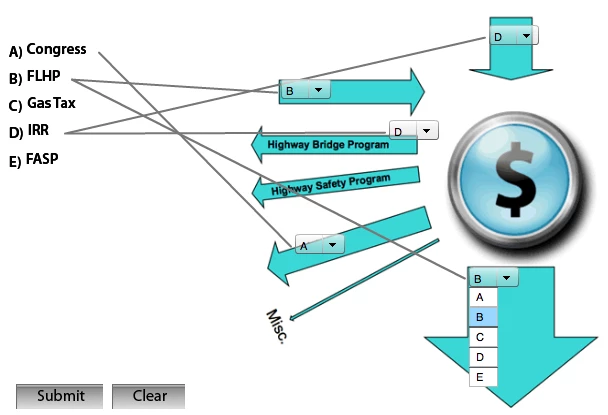
This would be perfect if I could make lines transparent or at least white?  Or is there another way to do this with dropdowns so that they would have to choose one of the items (congress, FLHP, etc) but not force them to choose one at a time as separate questions?

Thanks!!

This topic has been closed for replies.
Correct answer Lilybiri

Hello,

AFAIK you cannot change the lines in the Matching question slides. I have been looking in the object styles, but nowhere they are to be found. And since quizzing objects are always on top, you cannot mask them with a drawing object either.

Do you have to report the score? It is possible to create your own question slide with the dropdown or combobox widgets. I had planned to treat those widget in the third part of my serie Custom questions with widgets, but did not do it yet. The reason is that I got too many questions about the possibility to report scores of that kind of question slides, so I started with that. To report this kind of question slides with static widgets is explained here:

Report Custom Questions - part 2

You'll find on my blog examples with other static widgets (TextArea, Radiobuttons, Checkboxes) but not yet with the dropdown/combobox widgets.

Lilybiri

2 replies

RodWard
Community Expert
Community Expert
August 26, 2011

Perhaps you would be able to create this interaction as a drag and drop question using either the Drag and Drop Lite question widget or the Drag and Drop Interactive widget: http://www.infosemantics.com.au/dragdrop

Participating Frequently
August 26, 2011

Thanks RodWard for the helpful answer.  This solution might work for me too.

Lilybiri
LilybiriCorrect answer
Legend
August 26, 2011

Hello,

AFAIK you cannot change the lines in the Matching question slides. I have been looking in the object styles, but nowhere they are to be found. And since quizzing objects are always on top, you cannot mask them with a drawing object either.

Do you have to report the score? It is possible to create your own question slide with the dropdown or combobox widgets. I had planned to treat those widget in the third part of my serie Custom questions with widgets, but did not do it yet. The reason is that I got too many questions about the possibility to report scores of that kind of question slides, so I started with that. To report this kind of question slides with static widgets is explained here:

Report Custom Questions - part 2

You'll find on my blog examples with other static widgets (TextArea, Radiobuttons, Checkboxes) but not yet with the dropdown/combobox widgets.

Lilybiri

Participating Frequently
August 26, 2011

Thanks so much. I don't really need reporting on this one, just feedback, so I think your suggestion will be very helpful and I'll check it out.  Thanks for creating tutorials & showing examples!