
Known Participant
February 22, 2011
Question

Reporting Progress and Scores in LMS

  • February 22, 2011
  • 1 reply
  • 2597 views

Hi all,

I am having some trouble incorporating my Captivate presentations into an LMS and getting it to report both progress and assessments correctly.  This could be a lengthy post, so I apologize in advance.

Let me start by including my current setups:
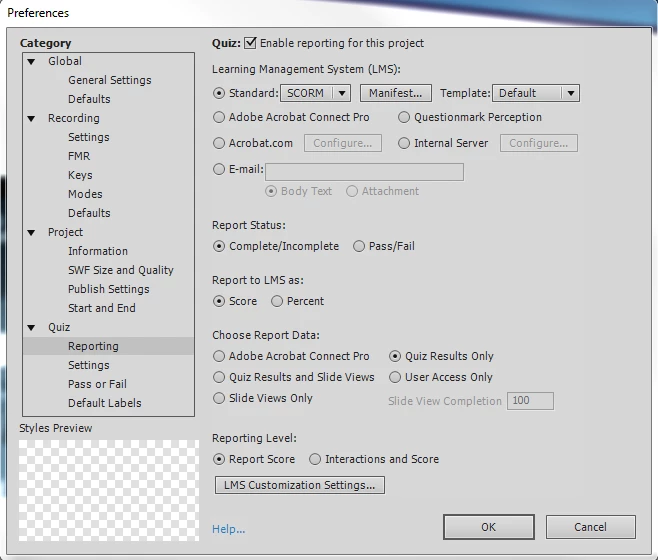
The desired outcome is as follows:

Progress

- I want to report progress up until the exam; for instance, if a user leaves midway through, on slide 15 of 30, Captivate should relaunch on slide 15 for that user

- Once I get to the exam, users should not be able to backtrack to previous slides.

- If the user starts the exam, but doesn't finish, it should report to the LMS whatever score was earned, counting unanswered questions as 0's.

- Once an exam is failed, and this is the tricky part, I want the course to completely restart.  Right now, it's loading mid-exam, and if I try to go back, it chain-pauses the presentation; possibly a conflict since I have it set to not allow users to go back once the exam is started.  Essentially, once a score is reported, I want to wipe the cookie saving the progress clean.

Is there a way I can achieve all of this through Captivate?

Any help would be MUCH appreciated.  Right now, the best compromise I can come up with to check "Never Send Resume Data" and not save a users progress - but when I turn this off, it also isn't communicating the exam scores to the LMS either.

Thanks in advance!

This topic has been closed for replies.

1 reply

RodWard
Community Expert
Community Expert
February 22, 2011

I can't promise that you can have everything you want, but perhaps some of your wishes are certainly doable in Captivate.

I note from your settings that you have the course Report Status set to track Complete/Incomplete rather than Pass/Fail, yet you talk about wanting the user to complete "exam" quiz questions and you also have Report Data set to Quiz Results Only.  There's something inherently contradictory about these settings. Complete/Incomplete is mostly for recording slide views. If recording quiz results is most important, I think you should really be using Pass/Fail.  It's an either/or decision. Most LMSs are far more likely to be reliable on the Pass/Fail setting and some just don't do Complete/Incomplete at all anyway.

I would also recommend you change your Report to LMS setting to Percent rather than Score.  In my experience, Percent is more LMS "friendly".

For starters, there are two mechanisms available for allowing the user to resume a course module at the same point they left off:

  • One option is to tick the option in TOC settings for Self-paced Learning.  This writes data to a Shared Object (Flash Cookie) on the user's PC that records the slide they finished on.  Captivate doesn't provide a means to erase this cookie out of the box.  You'd have to get some programming done in AS3 to achieve that extra functionality.
  • Option 2 is to untick the box in LMS Customisation Settings for Never Send Resume Data.  This then will mean the Captivate lesson DOES send resume data to the LMS.  With this option you are depending on the LMS to keep track of where your user got up to.  But be warned.  This setting is more reliable when it comes to tracking which scored object (e.g, a quiz question slide) the user got up to.  I'm not sure how reliable it is when it comes to tracking slide views because each LMS is slightly different as to it's abilities to track data. In my experience, using Self-Paced Learning is better for straight out slide view tracking, but it's also a pain when users that completed the course come back later to browse the content again because they get shunted straight to the last slide.  Quite annoying.  So I don't use it.

Now for some of your other wishes:

  • To prevent users backtracking to previous slides once they've reached the exam, simply disable Backward movement under Quiz Settings.  Remember that as far as Captivate is concerned, the quiz begins at the very first scored object, which might be a button or click box, not necessarily the first quiz question.
  • If a user only partially completes an exam, the LMS should still receive a score for each completed quiz question slide as long as you have Reporting Level set to Interactions and Score.  But be aware that this means the LMS will be getting pinged by the course after each and every user interaction, which can place quite a load on the LMS if there are lots of simultaneous users.
  • By default in Captivate, if a user gets a question wrong they get no score for that question.  So that one is easy.

Your final wish is to force the entire quiz to restart if the user flunks it.  I may be misunderstanding your drift but why not just allow the user multiple attempts at the quiz?  You can set this under Quiz > Settings > Pass/Fail.  Tick the box for Show Retake Quiz Button and place this button right over the top of the Review Quiz button on the Quiz Results slide.  The user will only see the Retake Quiz button if they fail the quiz and when they click it, their previous quiz answers are erased, effectively forcing them to redo the entire quiz.  Wouldn't that get you what you want?

One more thing.  Beware of the options in the drop down menu under Quiz > Settings > Required. I generally set this to Optional, as some of the other settings can cause unpredictable results with LMSs.

Hopefully this info will get you closer to your goals.

pdq6500Author
Known Participant
February 22, 2011

Hello, and thank you!

That was very helpful.

I just have a couple follow ups:

1)  What exactly is reporting "Interactions and Score" doing?  Reporting each quiz question interaction individually, and then the final score?

2)  I don't actually want to just restart the quiz, I also want to restart the entire course.  However, after I fail a quiz in a course and the score is sent to the LMS, it keeps bringing me back to the final quiz results screen - and from here, I don't allow backward movement so itsort of stalls out.

I've been investigating executing some javascript to clear relevant cookies upon project exit, but I'm worried this might conflict with a great number of things.  I've tried creating a screen that a student is directed to at the end with a "restart course" button, but really its just jumping back to slide 1 and not playing back properly (because again, there isn't supposed to be backward movement after we've started the quiz).

I'll be honest, my brain is pretty cluttered right now and I might be missing something obvious, but that's my current predicament.

3)  Although I've set the project to report Percent in my most recent tests, it's still reporting scores.  This might be something I need to work out with the LMS vendor, but have you heard of this happening before?

Thanks again!

megbertapelleid
Participating Frequently
April 8, 2011

I appreciate what help you've provided.  Normally, I'd be glad to discuss philosophies and why we are trying to do what we are trying to do, but it wouldn't be appropriate for me to do here.

That being said, I've discovered some workarounds for most of the technical issues I've had, though if anyone has further insight they wish to provide I'd always be glad to hear it.


what about doing a daisy-chain, where you bookmark the module, but then link to the quiz as a separate module?  then if you fail the quiz, you can try again, but you can control the quiz by not doing bookmarking, and not allowing backward movement - and in the module part, you can allow bookmarking & allow backward movement, then complete in the LMS based on slide views, so if you've seen them all, it might go back to the beginning? or even have a copy of the title slide as the last slide, that jumps back to the beginning...

workarounds I know, but might help. good luck!

Meg