


- Home
- Character Animator
- Discussions
- Re: Does anyone know why only one eye is blinking?
- Re: Does anyone know why only one eye is blinking?

Copy link to clipboard
Copied
Thanks in advance!!


 1 Correct answer
Ah, and that is why you have Blink/Left Blink and Blink 2/Right Blink above for some of the profiles. You had fixed it for everything except the frontal profile!

 12
Replies
12
12
Replies
12

Copy link to clipboard
Copied


Copy link to clipboard
Copied
Hi,
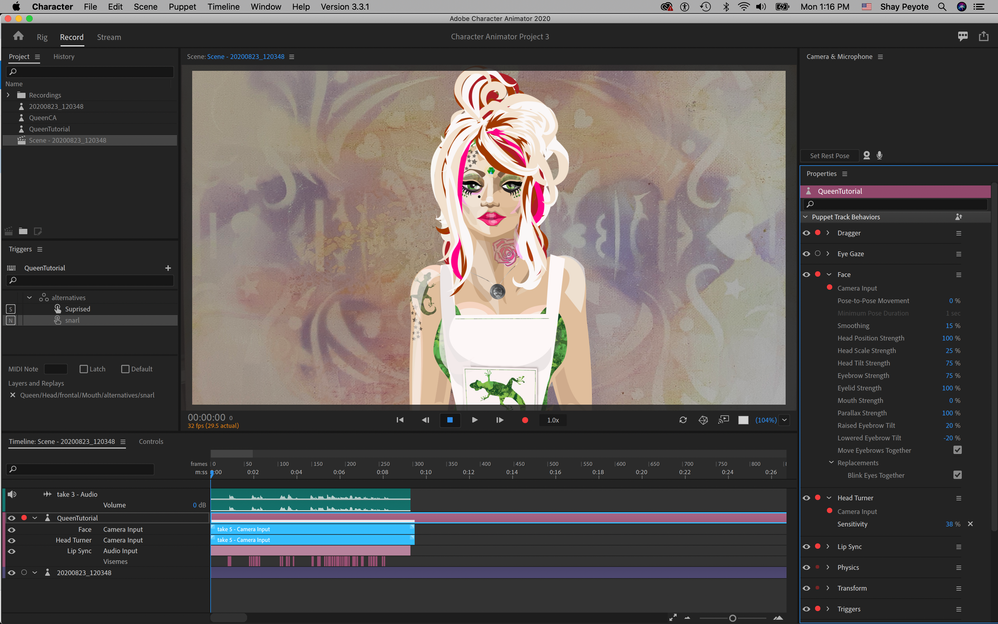
Can you check Face behavior -> Replacements -> Blink Eyes Together is checked?
Copy link to clipboard
Copied
Copy link to clipboard
Copied
Thank you for sharing your puppet.
I think you are using “Auto Blink” and see only her left eye is blinking. If so, I can repeat the problem with your puppet.
I’m still not sure why this happens (for me, it looks like a bug), but I could work around it by moving each “blink” group into the corresponding “eye” group. I will send the modified version of puppet via direct message.
Hope that help.
Copy link to clipboard
Copied
Thank you so much! I don't know why I'm having so much trouble, this has been solved and as you can see this set up worked perfectly for this puppet in this series of five https://youtu.be/V85e3m3-drw !
Copy link to clipboard
Copied
I seem not to send a direct message for some reasons. Can you send me a direct message? I will try to reply it. Thanks.
Copy link to clipboard
Copied
I sent it, but it's not turning up in my mailbox…
Copy link to clipboard
Copied
I was looking at the blink layers - initially I was wondering if some were missing...
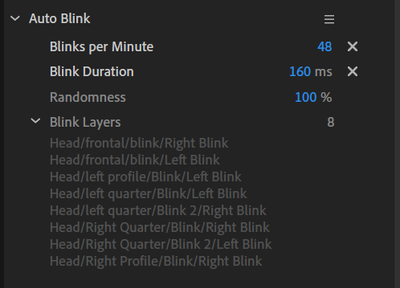
But I think the real problem is you have put the Left Blink and Right Blink layers under Blink. Normally they go under Left Eye and Right Eye. So I think what is happening is when the Right Blink turns on, the definition of a blink layer is it hides all the siblings under the same parent. So Right Blink hides the Left Blink layer. If you delete the Right Blink layer, Left Blink starts working.
So never put Left Blink and Right Blink under the same parent.
Copy link to clipboard
Copied
Ah, and that is why you have Blink/Left Blink and Blink 2/Right Blink above for some of the profiles. You had fixed it for everything except the frontal profile!
Copy link to clipboard
Copied
HAHA I guess at some point I fixed it, and I haven't made a new animation for so long I guess I forgot the solution! Thank you for that. 😉
Copy link to clipboard
Copied
FIXED!!! Great job!!!
Copy link to clipboard
Copied
Putting left blank and right blank under the same parent is a workaround that I learned from Dave Warner that's always worked up until now!


Find more inspiration, events, and resources on the new Adobe Community
Explore Now
 AdChoices