
mauriziov97876043
Participant
December 17, 2018
Answered

CF2018 treads TIMED_WAITING grow out of control

  • December 17, 2018
  • 5 replies
  • 8568 views

I've a big issue with my new server:

Windows Server 2016 , IIS 10 ,  CF 2018 standard, FusionReactor

All works with good performance and without errors, but after 2 or 3 hours CF become slow and unresponsive.

I've noted that the number of threads in TIMED_WAITING status grows up continuosly, from the initial 100 to 5000 in about 2 hour, then CF begin crashing.

When IIS is offline, threds sto to grow up.

Here is a sample from a thred dump:

name : pool-702-thread-1 priority : 5 state : TIMED_WAITING (PARKING) group : pool

at  "pool-702-thread-1" #1755 prio=5 os_prio=0 tid=0x000001742eac0000 nid=0xa3d0 waiting on condition  [0x000000541c8ff000]

   java.lang.Thread.State: TIMED_WAITING (parking)

at jdk.internal.misc.Unsafe.park(java.base@10.0.1/Native Method)

- parking to wait for  <0x000000074a15b238> (a java.util.concurrent.locks.AbstractQueuedSynchronizer$ConditionObject)

at java.util.concurrent.locks.LockSupport.parkNanos(java.base@10.0.1/LockSupport.java:234)

at java.util.concurrent.locks.AbstractQueuedSynchronizer$ConditionObject.awaitNanos(java.base@10.0.1/AbstractQueuedSynchronizer.java:2117)

at java.util.concurrent.ScheduledThreadPoolExecutor$DelayedWorkQueue.take(java.base@10.0.1/ScheduledThreadPoolExecutor.java:1182)

at java.util.concurrent.ScheduledThreadPoolExecutor$DelayedWorkQueue.take(java.base@10.0.1/ScheduledThreadPoolExecutor.java:899)

at java.util.concurrent.ThreadPoolExecutor.getTask(java.base@10.0.1/ThreadPoolExecutor.java:1061)

at java.util.concurrent.ThreadPoolExecutor.runWorker(java.base@10.0.1/ThreadPoolExecutor.java:1121)

at java.util.concurrent.ThreadPoolExecutor$Worker.run(java.base@10.0.1/ThreadPoolExecutor.java:635)

at java.lang.Thread.run(java.base@10.0.1/Thread.java:844)

name : pool-705-thread-1 priority : 5 state : TIMED_WAITING (PARKING) group : pool

at  "pool-705-thread-1" #1761 prio=5 os_prio=0 tid=0x000001742eac4000 nid=0xa7e4 waiting on condition  [0x000000541cbfe000]

   java.lang.Thread.State: TIMED_WAITING (parking)

at jdk.internal.misc.Unsafe.park(java.base@10.0.1/Native Method)

- parking to wait for  <0x000000074ad4b768> (a java.util.concurrent.locks.AbstractQueuedSynchronizer$ConditionObject)

at java.util.concurrent.locks.LockSupport.parkNanos(java.base@10.0.1/LockSupport.java:234)

at java.util.concurrent.locks.AbstractQueuedSynchronizer$ConditionObject.awaitNanos(java.base@10.0.1/AbstractQueuedSynchronizer.java:2117)

at java.util.concurrent.ScheduledThreadPoolExecutor$DelayedWorkQueue.take(java.base@10.0.1/ScheduledThreadPoolExecutor.java:1182)

at java.util.concurrent.ScheduledThreadPoolExecutor$DelayedWorkQueue.take(java.base@10.0.1/ScheduledThreadPoolExecutor.java:899)

at java.util.concurrent.ThreadPoolExecutor.getTask(java.base@10.0.1/ThreadPoolExecutor.java:1061)

at java.util.concurrent.ThreadPoolExecutor.runWorker(java.base@10.0.1/ThreadPoolExecutor.java:1121)

at java.util.concurrent.ThreadPoolExecutor$Worker.run(java.base@10.0.1/ThreadPoolExecutor.java:635)

at java.lang.Thread.run(java.base@10.0.1/Thread.java:844)

name : pool-706-thread-1 priority : 5 state : TIMED_WAITING (PARKING) group : pool

at  "pool-706-thread-1" #1763 prio=5 os_prio=0 tid=0x000001742eab9000 nid=0xf238 waiting on condition  [0x000000541ccfe000]

   java.lang.Thread.State: TIMED_WAITING (parking)

at jdk.internal.misc.Unsafe.park(java.base@10.0.1/Native Method)

- parking to wait for  <0x000000074ad4c0f8> (a java.util.concurrent.locks.AbstractQueuedSynchronizer$ConditionObject)

at java.util.concurrent.locks.LockSupport.parkNanos(java.base@10.0.1/LockSupport.java:234)

at java.util.concurrent.locks.AbstractQueuedSynchronizer$ConditionObject.awaitNanos(java.base@10.0.1/AbstractQueuedSynchronizer.java:2117)

at java.util.concurrent.ScheduledThreadPoolExecutor$DelayedWorkQueue.take(java.base@10.0.1/ScheduledThreadPoolExecutor.java:1182)

at java.util.concurrent.ScheduledThreadPoolExecutor$DelayedWorkQueue.take(java.base@10.0.1/ScheduledThreadPoolExecutor.java:899)

at java.util.concurrent.ThreadPoolExecutor.getTask(java.base@10.0.1/ThreadPoolExecutor.java:1061)

at java.util.concurrent.ThreadPoolExecutor.runWorker(java.base@10.0.1/ThreadPoolExecutor.java:1121)

at java.util.concurrent.ThreadPoolExecutor$Worker.run(java.base@10.0.1/ThreadPoolExecutor.java:635)

at java.lang.Thread.run(java.base@10.0.1/Thread.java:844)

IIS Connector , and server.xml are properly configured, here is JVM args:

-server --add-opens=java.rmi/sun.rmi.transport=ALL-UNNAMED --add-opens=java.base/java.nio=ALL-UNNAMED --add-modules=java.xml.ws --add-opens=java.base/java.lang=ALL-UNNAMED --add-opens=java.base/sun.util.cldr=ALL-UNNAMED --add-opens=java.base/sun.util.locale.provider=ALL-UNNAMED -XX:MaxMetaspaceSize=512m -XX:+UseParallelGC -Xbatch -Djdk.attach.allowAttachSelf=true -Dcoldfusion.home={application.home} -Duser.language=en -Dcoldfusion.rootDir={application.home} -Dcom.sun.xml.bind.v2.bytecode.ClassTailor.noOptimize=true -Dcoldfusion.libPath={application.home}/lib -Dorg.apache.coyote.USE_CUSTOM_STATUS_MSG_IN_HEADER=true -Dcoldfusion.jsafe.defaultalgo=FIPS186Random -Dorg.eclipse.jetty.util.log.class=org.eclipse.jetty.util.log.JavaUtilLog -Djava.util.logging.config.file={application.home}/lib/logging.properties -Djava.locale.providers=COMPAT,SPI -Dsun.font.layoutengine=icu -javaagent:C:/FusionReactor/instance/cfusion.cf2018/fusionreactor.jar=name=cfusion.cf2018,address=8088,external=false -agentpath:C:/FusionReactor/instance/cfusion.cf2018/frjvmti_x64.dll

Tried to restart CF, IIS, the whole server, change connector config from 'all sites' to 'individual sites', nothing change thi behaviour. Anyone can help me?
    This topic has been closed for replies.
    Correct answer Takumix007

    Thanks for the update, Dirk, and the encouraging news that the fix helped with the one issue of blossoming pool- threads, due to cflogin. That is indeed what it was said by Adobe to fix.


    As for the security.log, the real question is not so much whether it's empty since installing the fix. The point being raised above was a question of whether it was littered with them BEFORE applying the fix. We were trying to discern if there's a connection between that cflogin/threads issue and a correlating explosion of authcachemanager errors in that security.log. Can you check that and report back?


    Finally, as for this other issue now, well, it would indeed seem different. And of course sometimes when one problem is solved, we find that another was lurking behind it, perhaps totally unrelated. Indeed, while it's creating new threads, can you confirm what kind they are (what name pattern do they have)? They may well be pool- threads (like the previous issue), or they may not. For the sake of all this discusison above, it could be helpful to know.


    You mention that it's when you do an orm reload, which by the code shown indicates you have a URL to do that, and if true it sets that ormsettings.dbcreate to "update". I'll leave others with more ORM experience to chew on that. And are you saying that for every one call to such an app with such a reload, there's a single new thread? or some number? That may be a useful clue.


    And FWIW, ORM does have caching that leverages ehcache, so there may be SOME connection between the issues. Again, Adobe never clarified what the real issue was that was fixed in the hotfix--only that it addressed the symptom of blossoming pool- threads due to cflogin use. There may be some different or related problem.


    Or it may also be that these extra threads you see only lived on for some time. In addition to confirming their name, it would be interesting to hear if you confirm they never end or do end after some time.


    Again, thanks for jumping in to confirm that the fix has at least addressed the most significant thread-creating issue. Looking forward to hearing from others who have that issue and try this fix.


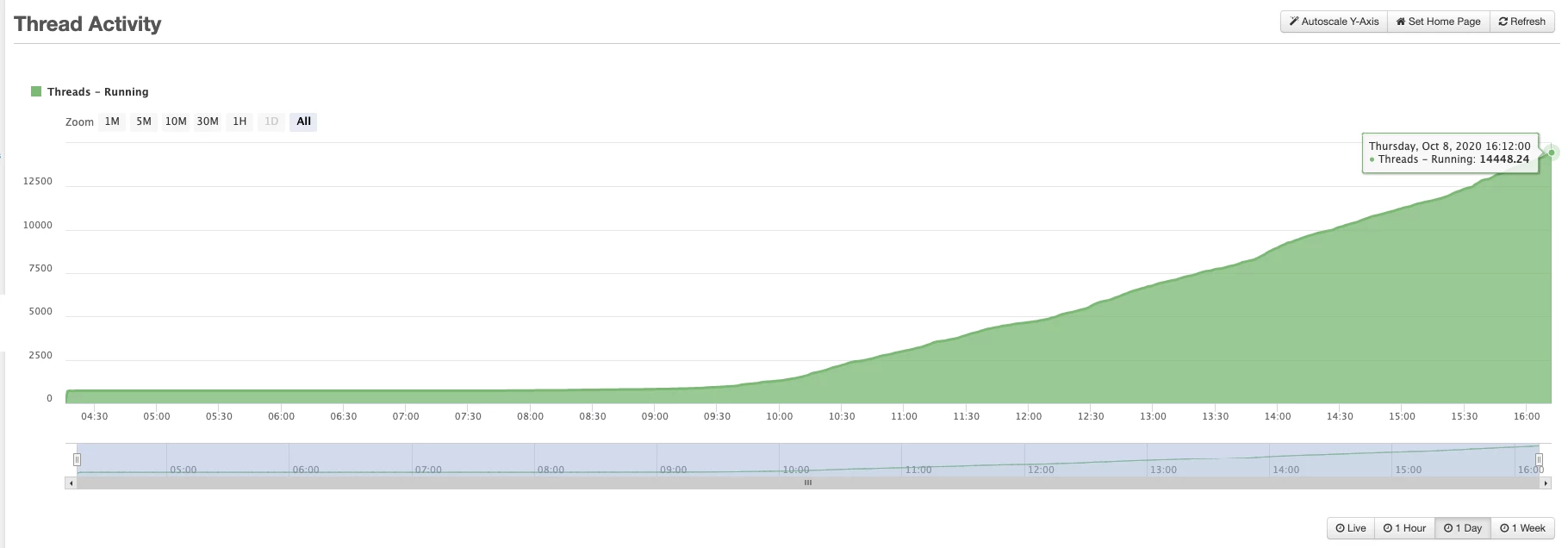
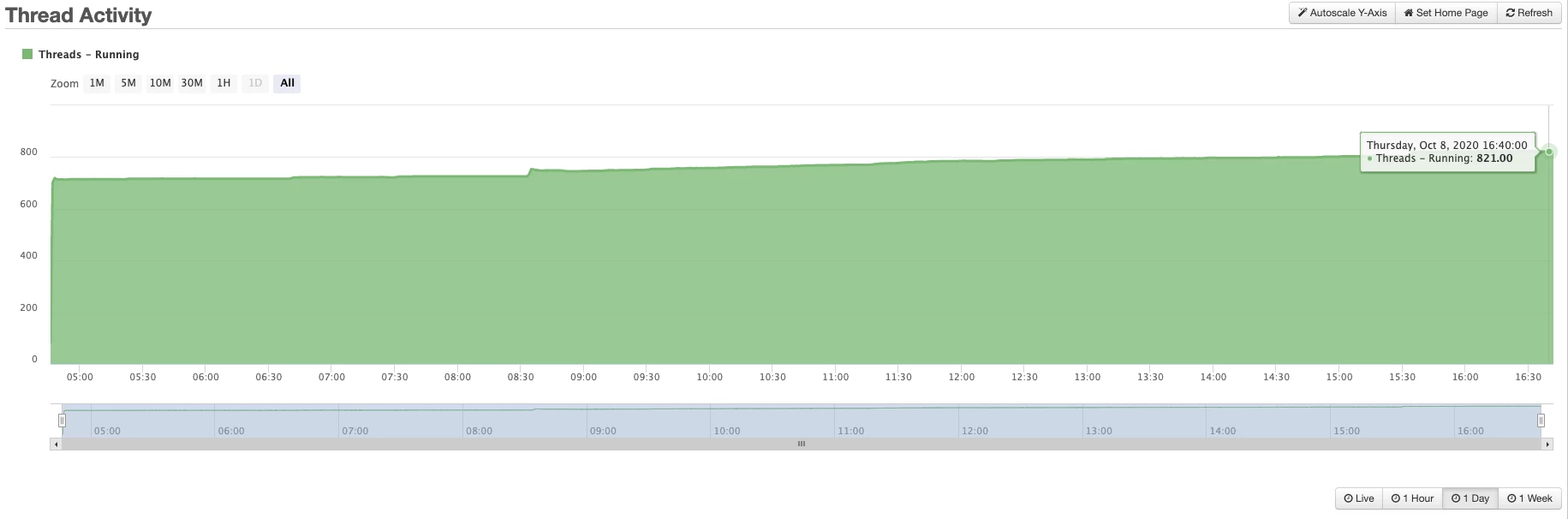
    We did have the same issue with pool threads count growing abnormally which cuased CPU spikes and server unresponisive eventually. We also got the same hot fix file from Adobe, hf201800-4207395.jar,  and after applying the fix, the issue went away. 

    Thanks for Charlie and other members who provided the solution in this thread and another one, https://community.adobe.com/t5/coldfusion/coldfusion-2018-timed-waiting-threads-stacking-up-endlessly/m-p/11475127?page=1#M186610.

    We never thought that cflogin was causing the issue and spent coutless days and nights tuning JVM, IIS tomcat connector, template cache settings and etc.. we even added more memory to the server.

    Below is the thread counts from FR with hot fix and without hot fix.


    Before hotfix


    After hotfix

    5 replies

    Charlie Arehart
    Community Expert
    Community Expert
    October 5, 2020

    The fix for this blossoming of pool threads seems to be in applying the hf201800-4207395.jar that I'd mentioned here recently. (At least until Adobe rolls that into a general update to CF, of course.)


    To be clear, when Dirk said here that the fix "did not work for him", it was that he had been sent the wrong hotfix (for hf201800-4207069). He explained this in the "other thread" where he had first raised this whole pool thread issue. He then clarified that the new fix DID work.


    So I raise this here as a new reply to help mauriziov97876043 or anyone else who may find this thread instead.


    And Dirk also noted in a later message in that other thread that it was down to use of cflogin (fixed by that hotfix). And I had just written there something there which I will repeat here:


    "Thanks for the update, Dirk. I can confirm (for the sake of readers) that I had another client in the past who had a similar "blossoming" of threads--in their case these very "pool" threads I mentioned in my first comment, and in their case too we narrowed things down to cflogin processing.


    They ended up just removing it, to solve the problem (didn't wait for any fix from Adobe, nor did they report it that I know of). But it's "good" to hear that this issue is now fixed by that hotfix. Glad to have shared it, and looking forward to Adobe incorporating it into a new general update soon."


    It's of course unfortunate when a conversation is cross-posted, but it's understandable when people are deseparate to find a solution. In their case, they did, but did not report back here, so I wanted to share this news. 


    Hope that's helpful. (If we don't hear from mauriziov97876043 in coming days or weeks, I may mark this mention of that Adobe hotfix as the "correct answer" to further help others, so they need not wade through so much conversation since the original post in 2018.)

    /Charlie (troubleshooter, carehart. org)
    BKBK
    Community Expert
    Community Expert
    October 6, 2020

    Charlie_Arehart: > (If we don't hear from mauriziov97876043 in coming days or weeks, I may mark this mention of that Adobe hotfix as the "correct answer" to further help others, so they need not wade through so much conversation since the original post in 2018.)


    I think we should wait till he responds. The reason will become apparent in a moment.


    Mauriziov97876043

    The following warnings and errors from your application are likely to be fatal.


    • Warnings suggesting faulty connector settings in Tomcat

    Dec 17, 2018 5:02:18 PM org.apache.catalina.startup.SetAllPropertiesRule begin

    WARNING: [SetAllPropertiesRule]{Server/Service/Connector} Setting property 'protocol' to 'HTTP/1.1' did not find a matching property.

    Dec 17, 2018 5:02:18 PM org.apache.catalina.startup.SetAllPropertiesRule begin

    WARNING: [SetAllPropertiesRule]{Server/Service/Connector} Setting property 'protocol' to 'AJP/1.3' did not find a matching property.


    • Error indicating that 2 identically-named cachemanagers are loading classes to the Java Virtual Machine

    Dec 17, 2018 17:03:15 PM Error [ajp-nio-8018-exec-21] - Another CacheManager with same name 'AuthCacheManager' already exists in the same VM. Please provide unique names for each CacheManager in the config or do one of following: 1. Use one of the CacheManager.create() static factory methods to reuse same CacheManager with same name or create one if necessary 2. Shutdown the earlier cacheManager before creating new one with same name. The source of the existing CacheManager is: FileNameSource [file=C:\ColdFusion2018\cfusion\lib\auth-ehcache.xml]


    Last, but not least, your post is approachng 2 years. There have been updates of ColdFusion 2018 since. Installing the latest update will certainly help.

    Charlie Arehart
    Community Expert
    Community Expert
    October 6, 2020

    BKBK, those are messages I find in many (many) people's setups, and they are not "fatal". Again, not trying to pick a fight ,but you are throwing the kitchen sink at this problem, when it seems very clearly from the original post by M that they had mounting threads, and they showed pool- ones in their thread dump. All of that ties right in with the hotfix from Adobe that I mentioned (which for now, people must request from them).


    So no, really, I don't think it's wise for us to wait for M to reply. As you note, they have not in two years. They may well have moved off of CF by now. I raised my observation about this available fix on Sep 28, now 8 days ago. If they were going to reply, it seems they would have.


    But as I said, I was willing to wait a bit. I just don't think we should wait until they reply. Again, the goal here is to help others who find this thread (and they have, as I have heard from people on this matter). If we mark the news of that Adobe bugfix (which HAS now helped multiple people I am working with), and somehow M comes back and clarifies that it's NOT the answer for them, we can certainly change the answer.

    /Charlie (troubleshooter, carehart. org)
    BKBK
    Community Expert
    Community Expert
    October 4, 2020

    Hi mauriziov97876043,


    About the setting:


        -XX:MaxMetaspaceSize=512m 


    Delete the MaxMetaspaceSize setting altogether from the jvm.config file. Let the Java Virtual Machine decide the value of MetaspaceSize to use. This might or might not help, but it is the best option in the circumstances.

    Charlie Arehart
    Community Expert
    Community Expert
    October 5, 2020

    BKBK, what led you to say that? I've not seen a reply from mauriziov97876043 since 2018. With the recent messages here from Dirk and me, and given what mauriziov had written before, it seems rather random to propose the maxmetaspacesize. I mean, sure, it's in their first note, but otherwise why propose that now, today? Sincere question, not a snark. 

    /Charlie (troubleshooter, carehart. org)
    BKBK
    Community Expert
    Community Expert
    October 5, 2020

    Charlie_Arehart : > With the recent messages here from Dirk and me, and given what mauriziov had written before, it seems rather random to propose the maxmetaspacesize. I mean, sure, it's in their first note, but otherwise why propose that now, today?

    I proposed removing the setting after having just seen that it had been used.


    > what led you to say that?

    It also occurred to me that Mauriziov97876043's Ehcache settings might involve millions of elements on disk. The cachemanager could prevent the application server from phasing out cache classes. A MaxMetaspaceSize of 512m would likely be insufficient. 


    You should implement MaxmetaspaceSize only if you have an indication of how much native memory your application will use for class metadata. If you have no indication, then you should leave it to the JVM. The JVM will dynamically resize the metaspace depending on the demands of your application.

    Charlie Arehart
    Community Expert
    Community Expert
    September 28, 2020

    Mauriziov97876043, did you ever solve this? I can report that since you raised it (and we had discussion here in Dec 2018), I have indeed heard of others experiencing the problem since then, and specifically about such mounting "pool" threads specifically. I had not heard of any resolution since then (and did not find it in working with folks directly).


    But just last week I heard of a bug fix that seems may POSSIBLY be related to this, at least to a blossoming of threads in CF2018. Unfortunately, the bug report is no public, but one CAN request the update from Adobe. I have asked them to clarify if it's about "pool" threads specifically, but have not heard back since last week.


    If you or others want to either give the fix a try, or ask Adobe for more info, the hotfix file name you'd request is hf201800-4207395.jar. (If they would want to share the file or a link to it here, I will leave that to them.)


    With hofixes like this, you would drop it into the lib/updates folder under cfusion (or whatever folder name represents any other CF instance you are running), and do NOT remove any other already there, then restart CF. It should pull that new fix in, adding it to any other update already there. And then, if a later update would incorporate this fix, that update will itself remove this hf jar from the folder for you.


    If anyone tries it, I hope you will report back on how things go. I have shared the same news with the clients who experiecned it, and I hope to remember to report back if I hear news from them.


    Or if you or anyone else may have since tried and found resolution some other way, please do let us know.

    /Charlie (troubleshooter, carehart. org)
    dirk.
    Participating Frequently
    September 29, 2020

    Hi Charlie, thanks for your post, we experienced the same issue a couple of days ago when we updated Coldfusion 2016 to 2018. We installed the hot fix yesterday and first of all everything looked promising (OK, during the night there is not much traffic, so it was pretty clear that the threads are not exploding). But since an hour or so the "pool-nnn-thread-1" threads are piling up again like before.

    I have contacted the support team. Will keep you updated.

    Dirk

    Charlie Arehart
    Community Expert
    Community Expert
    September 29, 2020

    dirk, thanks for the update. Bummer if it didn't help, but are you 100% sure you implemented it in the correct instance, if you may have more than one?


    If so, I will note that I have only heard of this problem hitting a few shops...out of several hundred I've helped runniing cf2018. There seems to be something unique, whether in your configuration (of cf or something else), or in your incoming traffic, etc. I realize that the folks hitting this may feel there's  nothing unique. 


    I will make an offer: I will offer my assistance for free to assess both these things, to rule them out, while we await Adobe coming up with some fix (if it's their problem) or we may identify some clear config correction, that we can share with others here and in another cf portal post here. For more on my remote assistance approach and more, see carehart.org/consulting. Looking forward to seeing this problem get resolved. There HAS to be an answer. 


    /Charlie (troubleshooter, carehart. org)
    Charlie Arehart
    Community Expert
    Community Expert
    December 19, 2018

    Mauriziov, how did things shake out? If still unresolved, please reconsider my last two comments.

    And BKBK, while you're right that his logs show cache manager errors, I would be surprised if they had anything to do with the hangups M is reporting. Again, I'm trying to get M to look at what was tracked (if anything) in the CF (and FR) logs BEFORE the crash. The answer may well be there.

    /Charlie (troubleshooter, carehart. org)
    BKBK
    Community Expert
    Community Expert
    December 20, 2018

    It is difficult to tell, one way or the other.  mauriziov97876043 , could you show us the logs, coldfusion-error and coldfusion-out, for the time period 13:30 - 13:40 on the day you took the screenshots? I expect them to contain information pointing to the cause of the problem.

    mauriziov97876043
    Participant
    December 20, 2018

    The jump in the chart from 13:30 to 13:40 is the turn on of the performance monitor logging, so don't take it into account.

    As you advised me I checked the cache functionality... switching the cache engine from EHCache to JCS this is what happen:

    timed_waiting thread stopped to grow up, instead waiting thread start to growing up.

    In coldfusion-out and security log I have many error regarding Cache Manager, but I don't know how to solve.
    I only use the default cold fusion cache manager.

    security.log

    "Error","ajp-nio-8018-exec-26","12/20/18","13:47:04","","Another CacheManager with same name 'AuthCacheManager' already exists in the same VM. Please provide unique names for each CacheManager in the config or do one of following: 1. Use one of the CacheManager.create() static factory methods to reuse same CacheManager with same name or create one if necessary 2. Shutdown the earlier cacheManager before creating new one with same name. The source of the existing CacheManager is: FileNameSource [file=C:\ColdFusion2018\cfusion\lib\auth-ehcache.xml]"

    "Error","ajp-nio-8018-exec-78","12/20/18","13:47:05","","Another CacheManager with same name 'AuthCacheManager' already exists in the same VM. Please provide unique names for each CacheManager in the config or do one of following: 1. Use one of the CacheManager.create() static factory methods to reuse same CacheManager with same name or create one if necessary 2. Shutdown the earlier cacheManager before creating new one with same name. The source of the existing CacheManager is: FileNameSource [file=C:\ColdFusion2018\cfusion\lib\auth-ehcache.xml]"

    "Error","ajp-nio-8018-exec-19","12/20/18","13:47:05","","Another CacheManager with same name 'AuthCacheManager' already exists in the same VM. Please provide unique names for each CacheManager in the config or do one of following: 1. Use one of the CacheManager.create() static factory methods to reuse same CacheManager with same name or create one if necessary 2. Shutdown the earlier cacheManager before creating new one with same name. The source of the existing CacheManager is: FileNameSource [file=C:\ColdFusion2018\cfusion\lib\auth-ehcache.xml]"

    "Error","ajp-nio-8018-exec-60","12/20/18","13:47:05","","Another CacheManager with same name 'AuthCacheManager' already exists in the same VM. Please provide unique names for each CacheManager in the config or do one of following: 1. Use one of the CacheManager.create() static factory methods to reuse same CacheManager with same name or create one if necessary 2. Shutdown the earlier cacheManager before creating new one with same name. The source of the existing CacheManager is: FileNameSource [file=C:\ColdFusion2018\cfusion\lib\auth-ehcache.xml]"

    "Error","ajp-nio-8018-exec-47","12/20/18","13:47:05","","Another CacheManager with same name 'AuthCacheManager' already exists in the same VM. Please provide unique names for each CacheManager in the config or do one of following: 1. Use one of the CacheManager.create() static factory methods to reuse same CacheManager with same name or create one if necessary 2. Shutdown the earlier cacheManager before creating new one with same name. The source of the existing CacheManager is: FileNameSource [file=C:\ColdFusion2018\cfusion\lib\auth-ehcache.xml]"

    "Error","ajp-nio-8018-exec-81","12/20/18","13:47:05","","Another CacheManager with same name 'AuthCacheManager' already exists in the same VM. Please provide unique names for each CacheManager in the config or do one of following: 1. Use one of the CacheManager.create() static factory methods to reuse same CacheManager with same name or create one if necessary 2. Shutdown the earlier cacheManager before creating new one with same name. The source of the existing CacheManager is: FileNameSource [file=C:\ColdFusion2018\cfusion\lib\auth-ehcache.xml]"

    "Error","ajp-nio-8018-exec-84","12/20/18","13:47:05","","Another CacheManager with same name 'AuthCacheManager' already exists in the same VM. Please provide unique names for each CacheManager in the config or do one of following: 1. Use one of the CacheManager.create() static factory methods to reuse same CacheManager with same name or create one if necessary 2. Shutdown the earlier cacheManager before creating new one with same name. The source of the existing CacheManager is: FileNameSource [file=C:\ColdFusion2018\cfusion\lib\auth-ehcache.xml]"

    "Error","ajp-nio-8018-exec-90","12/20/18","13:47:05","","Another CacheManager with same name 'AuthCacheManager' already exists in the same VM. Please provide unique names for each CacheManager in the config or do one of following: 1. Use one of the CacheManager.create() static factory methods to reuse same CacheManager with same name or create one if necessary 2. Shutdown the earlier cacheManager before creating new one with same name. The source of the existing CacheManager is: FileNameSource [file=C:\ColdFusion2018\cfusion\lib\auth-ehcache.xml]"

    "Error","ajp-nio-8018-exec-40","12/20/18","13:47:05","","Another CacheManager with same name 'AuthCacheManager' already exists in the same VM. Please provide unique names for each CacheManager in the config or do one of following: 1. Use one of the CacheManager.create() static factory methods to reuse same CacheManager with same name or create one if necessary 2. Shutdown the earlier cacheManager before creating new one with same name. The source of the existing CacheManager is: FileNameSource [file=C:\ColdFusion2018\cfusion\lib\auth-ehcache.xml]"

    "Error","ajp-nio-8018-exec-6","12/20/18","13:47:06","","Another CacheManager with same name 'AuthCacheManager' already exists in the same VM. Please provide unique names for each CacheManager in the config or do one of following: 1. Use one of the CacheManager.create() static factory methods to reuse same CacheManager with same name or create one if necessary 2. Shutdown the earlier cacheManager before creating new one with same name. The source of the existing CacheManager is: FileNameSource [file=C:\ColdFusion2018\cfusion\lib\auth-ehcache.xml]"

    "Error","ajp-nio-8018-exec-48","12/20/18","13:47:06","","Another CacheManager with same name 'AuthCacheManager' already exists in the same VM. Please provide unique names for each CacheManager in the config or do one of following: 1. Use one of the CacheManager.create() static factory methods to reuse same CacheManager with same name or create one if necessary 2. Shutdown the earlier cacheManager before creating new one with same name. The source of the existing CacheManager is: FileNameSource [file=C:\ColdFusion2018\cfusion\lib\auth-ehcache.xml]"

    "Error","ajp-nio-8018-exec-75","12/20/18","13:47:06","","Another CacheManager with same name 'AuthCacheManager' already exists in the same VM. Please provide unique names for each CacheManager in the config or do one of following: 1. Use one of the CacheManager.create() static factory methods to reuse same CacheManager with same name or create one if necessary 2. Shutdown the earlier cacheManager before creating new one with same name. The source of the existing CacheManager is: FileNameSource [file=C:\ColdFusion2018\cfusion\lib\auth-ehcache.xml]"

    "Error","ajp-nio-8018-exec-97","12/20/18","13:47:06","","Another CacheManager with same name 'AuthCacheManager' already exists in the same VM. Please provide unique names for each CacheManager in the config or do one of following: 1. Use one of the CacheManager.create() static factory methods to reuse same CacheManager with same name or create one if necessary 2. Shutdown the earlier cacheManager before creating new one with same name. The source of the existing CacheManager is: FileNameSource [file=C:\ColdFusion2018\cfusion\lib\auth-ehcache.xml]"

    "Error","ajp-nio-8018-exec-53","12/20/18","13:47:06","","Another CacheManager with same name 'AuthCacheManager' already exists in the same VM. Please provide unique names for each CacheManager in the config or do one of following: 1. Use one of the CacheManager.create() static factory methods to reuse same CacheManager with same name or create one if necessary 2. Shutdown the earlier cacheManager before creating new one with same name. The source of the existing CacheManager is: FileNameSource [file=C:\ColdFusion2018\cfusion\lib\auth-ehcache.xml]"

    "Error","ajp-nio-8018-exec-15","12/20/18","13:47:06","","Another CacheManager with same name 'AuthCacheManager' already exists in the same VM. Please provide unique names for each CacheManager in the config or do one of following: 1. Use one of the CacheManager.create() static factory methods to reuse same CacheManager with same name or create one if necessary 2. Shutdown the earlier cacheManager before creating new one with same name. The source of the existing CacheManager is: FileNameSource [file=C:\ColdFusion2018\cfusion\lib\auth-ehcache.xml]"

    "Error","ajp-nio-8018-exec-92","12/20/18","13:47:07","","Another CacheManager with same name 'AuthCacheManager' already exists in the same VM. Please provide unique names for each CacheManager in the config or do one of following: 1. Use one of the CacheManager.create() static factory methods to reuse same CacheManager with same name or create one if necessary 2. Shutdown the earlier cacheManager before creating new one with same name. The source of the existing CacheManager is: FileNameSource [file=C:\ColdFusion2018\cfusion\lib\auth-ehcache.xml]"

    "Error","ajp-nio-8018-exec-94","12/20/18","13:47:07","","Another CacheManager with same name 'AuthCacheManager' already exists in the same VM. Please provide unique names for each CacheManager in the config or do one of following: 1. Use one of the CacheManager.create() static factory methods to reuse same CacheManager with same name or create one if necessary 2. Shutdown the earlier cacheManager before creating new one with same name. The source of the existing CacheManager is: FileNameSource [file=C:\ColdFusion2018\cfusion\lib\auth-ehcache.xml]"

    "Error","ajp-nio-8018-exec-2","12/20/18","13:47:07","","Another CacheManager with same name 'AuthCacheManager' already exists in the same VM. Please provide unique names for each CacheManager in the config or do one of following: 1. Use one of the CacheManager.create() static factory methods to reuse same CacheManager with same name or create one if necessary 2. Shutdown the earlier cacheManager before creating new one with same name. The source of the existing CacheManager is: FileNameSource [file=C:\ColdFusion2018\cfusion\lib\auth-ehcache.xml]"

    "Error","ajp-nio-8018-exec-21","12/20/18","13:47:07","","Another CacheManager with same name 'AuthCacheManager' already exists in the same VM. Please provide unique names for each CacheManager in the config or do one of following: 1. Use one of the CacheManager.create() static factory methods to reuse same CacheManager with same name or create one if necessary 2. Shutdown the earlier cacheManager before creating new one with same name. The source of the existing CacheManager is: FileNameSource [file=C:\ColdFusion2018\cfusion\lib\auth-ehcache.xml]"

    "Error","ajp-nio-8018-exec-44","12/20/18","13:47:07","","Another CacheManager with same name 'AuthCacheManager' already exists in the same VM. Please provide unique names for each CacheManager in the config or do one of following: 1. Use one of the CacheManager.create() static factory methods to reuse same CacheManager with same name or create one if necessary 2. Shutdown the earlier cacheManager before creating new one with same name. The source of the existing CacheManager is: FileNameSource [file=C:\ColdFusion2018\cfusion\lib\auth-ehcache.xml]"

    "Error","ajp-nio-8018-exec-45","12/20/18","13:47:07","","Another CacheManager with same name 'AuthCacheManager' already exists in the same VM. Please provide unique names for each CacheManager in the config or do one of following: 1. Use one of the CacheManager.create() static factory methods to reuse same CacheManager with same name or create one if necessary 2. Shutdown the earlier cacheManager before creating new one with same name. The source of the existing CacheManager is: FileNameSource [file=C:\ColdFusion2018\cfusion\lib\auth-ehcache.xml]"

    "Error","ajp-nio-8018-exec-35","12/20/18","13:47:07","","Another CacheManager with same name 'AuthCacheManager' already exists in the same VM. Please provide unique names for each CacheManager in the config or do one of following: 1. Use one of the CacheManager.create() static factory methods to reuse same CacheManager with same name or create one if necessary 2. Shutdown the earlier cacheManager before creating new one with same name. The source of the existing CacheManager is: FileNameSource [file=C:\ColdFusion2018\cfusion\lib\auth-ehcache.xml]"

    auth-ehcache is the default from coldfusion installation

    auth-ehcache.xml

    <?xml version="1.0" encoding="UTF-8"?>


    <ehcache xmlns:xsi="http://www.w3.org/2001/XMLSchema-instance"

             xsi:noNamespaceSchemaLocation="ehcache.xsd" >

        <!--

        CacheManager Configuration

        ==========================

        An ehcache.xml corresponds to a single CacheManager.


        See instructions below or the ehcache schema (ehcache.xsd) on how to configure.

        System property tokens can be specified in this file which are replaced when the configuration

        is loaded. For example multicastGroupPort=${multicastGroupPort} can be replaced with the

        System property either from an environment variable or a system property specified with a

        command line switch such as -DmulticastGroupPort=4446.

        DiskStore configuration

        =======================

        The diskStore element is optional. To turn off disk store path creation, comment out the diskStore

        element below.

        Configure it if you have overflowToDisk or diskPersistent enabled for any cache.

        If it is not configured, and a cache is created which requires a disk store, a warning will be

         issued and java.io.tmpdir will automatically be used.

        diskStore has only one attribute - "path". It is the path to the directory where

        .data and .index files will be created.

        If the path is one of the following Java System Property it is replaced by its value in the

        running VM. For backward compatibility these are not specified without being enclosed in the ${token}

        replacement syntax.

        The following properties are translated:

        * user.home - User's home directory

        * user.dir - User's current working directory

        * java.io.tmpdir - Default temp file path

        * ehcache.disk.store.dir - A system property you would normally specify on the command line

          e.g. java -Dehcache.disk.store.dir=/u01/myapp/diskdir ...

        Subdirectories can be specified below the property e.g. java.io.tmpdir/one

        -->

        <diskStore path="java.io.tmpdir"/>

        <!--

        CacheManagerEventListener

        =========================

        Specifies a CacheManagerEventListenerFactory which is notified when Caches are added

        or removed from the CacheManager.

        The attributes of CacheManagerEventListenerFactory are:

        * class - a fully qualified factory class name

        * properties - comma separated properties having meaning only to the factory.

        Sets the fully qualified class name to be registered as the CacheManager event listener.

        The events include:

        * adding a Cache

        * removing a Cache

        Callbacks to listener methods are synchronous and unsynchronized. It is the responsibility

        of the implementer to safely handle the potential performance and thread safety issues

        depending on what their listener is doing.

        If no class is specified, no listener is created. There is no default.

        -->

        <cacheManagerEventListenerFactory class="" properties=""/>

        <!--

        CacheManagerPeerProvider

        ========================

        (For distributed operation)

        Specifies a CacheManagerPeerProviderFactory which will be used to create a

        CacheManagerPeerProvider, which discovers other CacheManagers in the cluster.

        One or more providers can be configured. The first one in the ehcache.xml is the default, which is used

        for replication and bootstrapping.

        The attributes of cacheManagerPeerProviderFactory are:

        * class - a fully qualified factory class name

        * properties - comma separated properties having meaning only to the factory.

        Providers are available for RMI, JGroups and JMS as shown following.

        RMICacheManagerPeerProvider

        +++++++++++++++++++++++++++

        Ehcache comes with a built-in RMI-based distribution system with two means of discovery of

        CacheManager peers participating in the cluster:

        * automatic, using a multicast group. This one automatically discovers peers and detects

          changes such as peers entering and leaving the group

        * manual, using manual rmiURL configuration. A hardcoded list of peers is provided at

          configuration time.

        Configuring Automatic Discovery:

        Automatic discovery is configured as per the following example:

        <cacheManagerPeerProviderFactory

                            class="net.sf.ehcache.distribution.RMICacheManagerPeerProviderFactory"

                            properties="peerDiscovery=automatic, multicastGroupAddress=230.0.0.1,

                                        multicastGroupPort=4446, timeToLive=32"/>

        Valid properties are:

        * peerDiscovery (mandatory) - specify "automatic"

        * multicastGroupAddress (mandatory) - specify a valid multicast group address

        * multicastGroupPort (mandatory) - specify a dedicated port for the multicast heartbeat

          traffic

        * timeToLive - specify a value between 0 and 255 which determines how far the packets will

          propagate.

          By convention, the restrictions are:

          0   - the same host

          1   - the same subnet

          32  - the same site

          64  - the same region

          128 - the same continent

          255 - unrestricted

        Configuring Manual Discovery:

        Manual discovery is configured as per the following example:

        <cacheManagerPeerProviderFactory class=

                              "net.sf.ehcache.distribution.RMICacheManagerPeerProviderFactory"

                              properties="peerDiscovery=manual,

                              rmiUrls=//server1:40000/sampleCache1|//server2:40000/sampleCache1

                              | //server1:40000/sampleCache2|//server2:40000/sampleCache2"

                              propertySeparator="," />

        Valid properties are:

        * peerDiscovery (mandatory) - specify "manual"

        * rmiUrls (mandatory) - specify a pipe separated list of rmiUrls, in the form

                                //hostname:port

        The hostname is the hostname of the remote CacheManager peer. The port is the listening

        port of the RMICacheManagerPeerListener of the remote CacheManager peer.


        JGroupsCacheManagerPeerProvider

        +++++++++++++++++++++++++++++++

        <cacheManagerPeerProviderFactory class="net.sf.ehcache.distribution.jgroups.JGroupsCacheManagerPeerProviderFactory"

                                         properties="connect=UDP(mcast_addr=231.12.21.132;mcast_port=45566;ip_ttl=32;

                                         mcast_send_buf_size=150000;mcast_recv_buf_size=80000):

                                         PING(timeout=2000;num_initial_members=6):

                                         MERGE2(min_interval=5000;max_interval=10000):

                                         FD_SOCK:VERIFY_SUSPECT(timeout=1500):

                                         pbcast.NAKACK(gc_lag=10;retransmit_timeout=3000):

                                         UNICAST(timeout=5000):

                                         pbcast.STABLE(desired_avg_gossip=20000):

                                         FRAG:

                                         pbcast.GMS(join_timeout=5000;join_retry_timeout=2000;shun=false;print_local_addr=false)"

                                         propertySeparator="::"

                />

         The only property necessary is the connect String used by jgroups to configure itself. Refer to the Jgroups documentation for explanation

         of all the protocols. The example above uses UDP multicast. If the connect property is not specified the default JGroups connection will be

         used.      

        JMSCacheManagerPeerProviderFactory

        ++++++++++++++++++++++++++++++++++

        <cacheManagerPeerProviderFactory

                class="net.sf.ehcache.distribution.jms.JMSCacheManagerPeerProviderFactory"

                properties="..."

                propertySeparator=","

                />

        The JMS PeerProviderFactory uses JNDI to maintain message queue independence. Refer to the manual for full configuration

        examples using ActiveMQ and Open Message Queue.

        Valid properties are:

        * initialContextFactoryName (mandatory) - the name of the factory used to create the message queue initial context.

        * providerURL (mandatory) - the JNDI configuration information for the service provider to use.

        * topicConnectionFactoryBindingName (mandatory) - the JNDI binding name for the TopicConnectionFactory

        * topicBindingName (mandatory) - the JNDI binding name for the topic name

        * getQueueBindingName (mandatory only if using jmsCacheLoader) - the JNDI binding name for the queue name

        * securityPrincipalName - the JNDI java.naming.security.principal

        * securityCredentials - the JNDI java.naming.security.credentials

        * urlPkgPrefixes - the JNDI java.naming.factory.url.pkgs

        * userName - the user name to use when creating the TopicConnection to the Message Queue

        * password - the password to use when creating the TopicConnection to the Message Queue

        * acknowledgementMode - the JMS Acknowledgement mode for both publisher and subscriber. The available choices are

                                AUTO_ACKNOWLEDGE, DUPS_OK_ACKNOWLEDGE and SESSION_TRANSACTED. The default is AUTO_ACKNOWLEDGE.

        -->

    <!--

        <cacheManagerPeerProviderFactory

                class="net.sf.ehcache.distribution.RMICacheManagerPeerProviderFactory"

                properties="peerDiscovery=automatic,

                            multicastGroupAddress=230.0.0.1,

                            multicastGroupPort=4446, timeToLive=1"

                propertySeparator=","

                />

    -->

        <!--

        CacheManagerPeerListener

        ========================

        (Enable for distributed operation)

        Specifies a CacheManagerPeerListenerFactory which will be used to create a

        CacheManagerPeerListener, which

        listens for messages from cache replicators participating in the cluster.

        The attributes of cacheManagerPeerListenerFactory are:

        class - a fully qualified factory class name

        properties - comma separated properties having meaning only to the factory.

        Ehcache comes with a built-in RMI-based distribution system. The listener component is

        RMICacheManagerPeerListener which is configured using

        RMICacheManagerPeerListenerFactory. It is configured as per the following example:

        <cacheManagerPeerListenerFactory

            class="net.sf.ehcache.distribution.RMICacheManagerPeerListenerFactory"

            properties="hostName=fully_qualified_hostname_or_ip,

                        port=40001,

                        remoteObjectPort=40002,

                        socketTimeoutMillis=120000"

                        propertySeparator="," />

        All properties are optional. They are:

        * hostName - the hostName of the host the listener is running on. Specify

          where the host is multihomed and you want to control the interface over which cluster

          messages are received. Defaults to the host name of the default interface if not

          specified.

        * port - the port the RMI Registry listener listens on. This defaults to a free port if not specified.

        * remoteObjectPort - the port number on which the remote objects bound in the registry receive calls.

                             This defaults to a free port if not specified.

        * socketTimeoutMillis - the number of ms client sockets will stay open when sending

          messages to the listener. This should be long enough for the slowest message.

          If not specified it defaults to 120000ms.

        -->

    <!--

        <cacheManagerPeerListenerFactory

                class="net.sf.ehcache.distribution.RMICacheManagerPeerListenerFactory"/>

    -->

        <!--

        Cache configuration

        ===================

        The following attributes are required.

        name:

        Sets the name of the cache. This is used to identify the cache. It must be unique.

        maxElementsInMemory:

        Sets the maximum number of objects that will be created in memory

    maxElementsOnDisk:

        Sets the maximum number of objects that will be maintained in the DiskStore

    The default value is zero, meaning unlimited.

        eternal:

        Sets whether elements are eternal. If eternal,  timeouts are ignored and the

        element is never expired.

        overflowToDisk:

        Sets whether elements can overflow to disk when the memory store

        has reached the maxInMemory limit.

        The following attributes and elements are optional.

        timeToIdleSeconds:

        Sets the time to idle for an element before it expires.

        i.e. The maximum amount of time between accesses before an element expires

        Is only used if the element is not eternal.

        Optional attribute. A value of 0 means that an Element can idle for infinity.

        The default value is 0.

        timeToLiveSeconds:

        Sets the time to live for an element before it expires.

        i.e. The maximum time between creation time and when an element expires.

        Is only used if the element is not eternal.

        Optional attribute. A value of 0 means that and Element can live for infinity.

        The default value is 0.

        diskPersistent:

        Whether the disk store persists between restarts of the Virtual Machine.

        The default value is false.

        diskExpiryThreadIntervalSeconds:

        The number of seconds between runs of the disk expiry thread. The default value

        is 120 seconds.

        diskSpoolBufferSizeMB:

        This is the size to allocate the DiskStore for a spool buffer. Writes are made

        to this area and then asynchronously written to disk. The default size is 30MB.

        Each spool buffer is used only by its cache. If you get OutOfMemory errors consider

        lowering this value. To improve DiskStore performance consider increasing it. Trace level

        logging in the DiskStore will show if put back ups are occurring.

        clearOnFlush:

        whether the MemoryStore should be cleared when flush() is called on the cache.

        By default, this is true i.e. the MemoryStore is cleared.

        memoryStoreEvictionPolicy:

        Policy would be enforced upon reaching the maxElementsInMemory limit. Default

        policy is Least Recently Used (specified as LRU). Other policies available -

        First In First Out (specified as FIFO) and Less Frequently Used

        (specified as LFU)

        Cache elements can also contain sub elements which take the same format of a factory class

        and properties. Defined sub-elements are:

        * cacheEventListenerFactory - Enables registration of listeners for cache events, such as

          put, remove, update, and expire.

        * bootstrapCacheLoaderFactory - Specifies a BootstrapCacheLoader, which is called by a

          cache on initialisation to prepopulate itself.

        * cacheExtensionFactory - Specifies a CacheExtension, a generic mechansim to tie a class

          which holds a reference to a cache to the cache lifecycle.

        * cacheExceptionHandlerFactory - Specifies a CacheExceptionHandler, which is called when

          cache exceptions occur.

        * cacheLoaderFactory - Specifies a CacheLoader, which can be used both asynchronously and

          synchronously to load objects into a cache. More than one cacheLoaderFactory element

          can be added, in which case the loaders form a chain which are executed in order. If a

          loader returns null, the next in chain is called.

        RMI Cache Replication

        +++++++++++++++++++++

        Each cache that will be distributed needs to set a cache event listener which replicates

        messages to the other CacheManager peers. For the built-in RMI implementation this is done

        by adding a cacheEventListenerFactory element of type RMICacheReplicatorFactory to each

        distributed cache's configuration as per the following example:

        <cacheEventListenerFactory class="net.sf.ehcache.distribution.RMICacheReplicatorFactory"

             properties="replicateAsynchronously=true,

             replicatePuts=true,

             replicatePutsViaCopy=false,

             replicateUpdates=true,

             replicateUpdatesViaCopy=true,

             replicateRemovals=true

             asynchronousReplicationIntervalMillis=<number of milliseconds"

             propertySeparator="," />

        The RMICacheReplicatorFactory recognises the following properties:

        * replicatePuts=true|false - whether new elements placed in a cache are

          replicated to others. Defaults to true.

        * replicatePutsViaCopy=true|false - whether the new elements are

          copied to other caches (true), or whether a remove message is sent. Defaults to true. 

        * replicateUpdates=true|false - whether new elements which override an

          element already existing with the same key are replicated. Defaults to true.

        * replicateRemovals=true - whether element removals are replicated. Defaults to true.

        * replicateAsynchronously=true | false - whether replications are

          asynchronous (true) or synchronous (false). Defaults to true.

        * replicateUpdatesViaCopy=true | false - whether the new elements are

          copied to other caches (true), or whether a remove message is sent. Defaults to true.

        * asynchronousReplicationIntervalMillis=<number of milliseconds> - The asynchronous

          replicator runs at a set interval of milliseconds. The default is 1000. The minimum

          is 10. This property is only applicable if replicateAsynchronously=true

        JGroups Replication

        +++++++++++++++++++

    For the Jgroups replication this is done with:

    <cacheEventListenerFactory class="net.sf.ehcache.distribution.jgroups.JGroupsCacheReplicatorFactory"

                                properties="replicateAsynchronously=true, replicatePuts=true,

      replicateUpdates=true, replicateUpdatesViaCopy=false,

      replicateRemovals=true,asynchronousReplicationIntervalMillis=1000"/>

        This listener supports the same properties as the RMICacheReplicationFactory.

        JMS Replication

        +++++++++++++++

    For JMS-based replication this is done with:

    <cacheEventListenerFactory

              class="net.sf.ehcache.distribution.jms.JMSCacheReplicatorFactory"

              properties="replicateAsynchronously=true,

                           replicatePuts=true,

                           replicateUpdates=true,

                           replicateUpdatesViaCopy=true,

                           replicateRemovals=true,

                           asynchronousReplicationIntervalMillis=1000"

               propertySeparator=","/>

        This listener supports the same properties as the RMICacheReplicationFactory.


        Cluster Bootstrapping

        +++++++++++++++++++++

        (RMI clusters only)

        The RMIBootstrapCacheLoader bootstraps caches in clusters where RMICacheReplicators are

        used. It is configured as per the following example:

        <bootstrapCacheLoaderFactory

            class="net.sf.ehcache.distribution.RMIBootstrapCacheLoaderFactory"

            properties="bootstrapAsynchronously=true, maximumChunkSizeBytes=5000000"

            propertySeparator="," />

        The RMIBootstrapCacheLoaderFactory recognises the following optional properties:

        * bootstrapAsynchronously=true|false - whether the bootstrap happens in the background

          after the cache has started. If false, bootstrapping must complete before the cache is

          made available. The default value is true.

        * maximumChunkSizeBytes=<integer> - Caches can potentially be very large, larger than the

          memory limits of the VM. This property allows the bootstraper to fetched elements in

          chunks. The default chunk size is 5000000 (5MB).

        Cache Exception Handling

        By default, most cache operations will propagate a runtime CacheException on failure. An

        interceptor, using a dynamic proxy, may be configured so that a CacheExceptionHandler can

        be configured to intercept Exceptions. Errors are not intercepted.

        It is configured as per the following example:

          <cacheExceptionHandlerFactory class="com.example.ExampleExceptionHandlerFactory"

                                          properties="logLevel=FINE"/>

        Caches with ExceptionHandling configured are not of type Cache, but are of type Ehcache only,

        and are not available using CacheManager.getCache(), but using CacheManager.getEhcache().

        Cache Loader

        A default CacheLoader may be set which loads objects into the cache through asynchronous and

        synchronous methods on Cache. This is different to the bootstrap cache loader, which is used

        only in distributed caching.

        It is configured as per the following example:

            <cacheLoaderFactory class="com.example.ExampleCacheLoaderFactory"

                                          properties="type=int,startCounter=10"/>

        Cache Extension

        CacheExtensions are a general purpose mechanism to allow generic extensions to a Cache.

        CacheExtensions are tied into the Cache lifecycle.

        CacheExtensions are created using the CacheExtensionFactory which has a

        <code>createCacheCacheExtension()</code> method which takes as a parameter a

        Cache and properties. It can thus call back into any public method on Cache, including, of

        course, the load methods.

        Extensions are added as per the following example:

             <cacheExtensionFactory class="com.example.FileWatchingCacheRefresherExtensionFactory"

                                 properties="refreshIntervalMillis=18000, loaderTimeout=3000,

                                             flushPeriod=whatever, someOtherProperty=someValue ..."/>

        -->

    <!-- uncomment this to enable RMI replicated caching for auth-cache.

    <cacheManagerPeerProviderFactory

                            class="net.sf.ehcache.distribution.RMICacheManagerPeerProviderFactory"

                            properties="peerDiscovery=automatic, multicastGroupAddress=230.0.0.1,

                                        multicastGroupPort=4446, timeToLive=32"/>

    <cacheManagerPeerListenerFactory class="net.sf.ehcache.distribution.RMICacheManagerPeerListenerFactory" properties="hostName=localhost, port=40001, socketTimeoutMillis=2000"/>

    -->

        <!--

        Mandatory Default Cache configuration. These settings will be applied to caches

        created programmtically using CacheManager.add(String cacheName).

        The defaultCache has an implicit name "default" which is a reserved cache name.

        -->

        <defaultCache

            maxElementsInMemory="10000"

            eternal="false"

            timeToIdleSeconds="86400"

            timeToLiveSeconds="86400"

            overflowToDisk="false"

            diskSpoolBufferSizeMB="30"

            maxElementsOnDisk="10000000"

            diskPersistent="false"

            diskExpiryThreadIntervalSeconds="3600"

            memoryStoreEvictionPolicy="LRU"

    clearOnFlush="true"

    statistics="true"

                />

    <!-- Cache for Authentication. This is by default set for non disk persistence.

    Don't change cachename of this.

    If disk Persistence is required for Remember Me kind of functionality then make necessary arrangements

    If cluster set up is done and sticky sessions not used, add distributed properties and cache replication to this cache.

    -->

    <!-- timeToIdleSeconds is being set dynamically in code using SessionTimeout from Application or at server level From administrator. If the same is specified here in cache configuration it will have no meaning.

    -->

    <cache name="authcache"

    maxElementsInMemory="10000"

    eternal="false"

    overflowToDisk="false"

    diskSpoolBufferSizeMB="30"

    maxElementsOnDisk="10000000"

    diskPersistent="false"

        diskExpiryThreadIntervalSeconds="3600"

        memoryStoreEvictionPolicy="LRU"

    clearOnFlush="true"

    timeToLiveSeconds="86400"

    >

    <!-- uncomment this to enable RMI replicated caching for auth-cache.

    <cacheEventListenerFactory class="net.sf.ehcache.distribution.RMICacheReplicatorFactory" properties="replicateAsynchronously=true, replicatePuts=true, replicatePutsViaCopy=true, replicateUpdates=true, replicateUpdatesViaCopy=true, replicateRemovals=true" propertySeparator="," /> -->

    </cache>

    <!-- Cache used for intenal purpose. This is by default set for non disk persistence.

    Don't change cachename of this.

    If cluster set up is done and sticky sessions not used, add distributed properties and cache replication to this cache.

    -->

    <cache name="authtokenmappingcache"

    maxElementsInMemory="10000"

    eternal="false"

    overflowToDisk="false"

    diskSpoolBufferSizeMB="30"

    maxElementsOnDisk="10000000"

    diskPersistent="false"

        diskExpiryThreadIntervalSeconds="3600"

        memoryStoreEvictionPolicy="LRU"

    clearOnFlush="true"

    timeToLiveSeconds="60">

    <!-- uncomment this to enable RMI replicated caching for auth-token-mapping-cache.

    <cacheEventListenerFactory class="net.sf.ehcache.distribution.RMICacheReplicatorFactory" properties="replicateAsynchronously=true, replicatePuts=true, replicatePutsViaCopy=true, replicateRemovals=true" propertySeparator="," /> -->

    </cache>

    </ehcache>

    Charlie Arehart
    Community Expert
    Community Expert
    December 17, 2018

    Looking at threads is not the best place to start. Is there any info in the coldfusion-error.log, in the minute or two before things hangup and you restart CF? That's the first place to look. Then the coldfusion-out.log.

    If those tell you nothing, then since you have FusionReactor, what does its resource.log show about if/when requests start piling up?  And at that time, what do its other logs show? And had you setup FR's CP email alerts for request quantity? If so, did you get them and what did they say?

    You may feel like you're stuck, but the answer is in there among these. If your stumped as to what to make of all the info, I can help, remotely and perhaps in less than 15 minutes (today even), with satisfaction guaranteed  More at carehart.org/consulting.

    Or you can share here, and I and others will help as we have time and as we notice replies. Some problems will be more obvious than others. Also, some solutions will be better long-term than others.

    Let us know how it goes.

    /Charlie (troubleshooter, carehart. org)
    mauriziov97876043
    Participant
    December 17, 2018

    waiting_time threads starts piling up as soon as the server start and IIS pass the requests via connector. CF becoming unresponsive because the waiting threads are too much (after 2 hour more than 6000), occuping memory.

    I cannot see any events that trigger the issue, it exists from the start of CF.

    Here some logs:

    coldfusion-error.log

    Dec 17, 2018 5:02:18 PM org.apache.catalina.startup.SetAllPropertiesRule begin

    WARNING: [SetAllPropertiesRule]{Server/Service/Connector} Setting property 'protocol' to 'HTTP/1.1' did not find a matching property.

    Dec 17, 2018 5:02:18 PM org.apache.catalina.startup.SetAllPropertiesRule begin

    WARNING: [SetAllPropertiesRule]{Server/Service/Connector} Setting property 'packetSize' to '65535' did not find a matching property.

    Dec 17, 2018 5:02:18 PM org.apache.catalina.startup.SetAllPropertiesRule begin

    WARNING: [SetAllPropertiesRule]{Server/Service/Connector} Setting property 'protocol' to 'AJP/1.3' did not find a matching property.

    Dec 17, 2018 5:02:19 PM org.apache.catalina.core.AprLifecycleListener lifecycleEvent

    INFO: The APR based Apache Tomcat Native library which allows optimal performance in production environments was not found on the java.library.path:

    Dec 17, 2018 5:02:19 PM org.apache.coyote.AbstractProtocol init

    INFO: Initializing ProtocolHandler ["http-nio-8500"]

    Dec 17, 2018 5:02:19 PM org.apache.tomcat.util.net.NioSelectorPool getSharedSelector

    INFO: Using a shared selector for servlet write/read

    Dec 17, 2018 5:02:19 PM org.apache.coyote.AbstractProtocol init

    INFO: Initializing ProtocolHandler ["ajp-nio-8018"]

    Dec 17, 2018 5:02:19 PM org.apache.tomcat.util.net.NioSelectorPool getSharedSelector

    INFO: Using a shared selector for servlet write/read

    Dec 17, 2018 5:02:19 PM org.apache.catalina.core.StandardService startInternal

    INFO: Starting service [Catalina]

    Dec 17, 2018 5:02:19 PM org.apache.catalina.core.StandardEngine startInternal

    INFO: Starting Servlet Engine: Apache Tomcat/9.0.10

    Dec 17, 2018 5:02:25 PM java.io.ObjectInputFilter$Config lambda$static$0

    INFO: Creating serialization filter from !org.mozilla.**;!com.sun.syndication.**;!org.apache.commons.beanutils.**

    Dec 17, 2018 5:02:26 PM org.apache.jasper.servlet.TldScanner scanJars

    INFO: At least one JAR was scanned for TLDs yet contained no TLDs. Enable debug logging for this logger for a complete list of JARs that were scanned but no TLDs were found in them. Skipping unneeded JARs during scanning can improve startup time and JSP compilation time.

    Dec 17, 2018 5:02:28 PM org.apache.catalina.core.ApplicationContext log

    INFO: ColdFusionStartUpServlet: ColdFusion: Starting application services

    Dec 17, 2018 5:02:28 PM org.apache.catalina.core.ApplicationContext log

    INFO: ColdFusionStartUpServlet: ColdFusion: VM version = 10.0.1+10

    Dec 17, 2018 5:02:35 PM org.eclipse.jetty.util.log.JavaUtilLog info

    INFO: jetty-7.x.y-SNAPSHOT

    Dec 17, 2018 5:02:35 PM org.eclipse.jetty.util.log.JavaUtilLog info

    INFO: started o.e.j.s.ServletContextHandler{/,null}

    Dec 17, 2018 5:02:35 PM org.eclipse.jetty.util.log.JavaUtilLog info

    INFO: Started SelectChannelConnector@0.0.0.0:8088

    Dec 17, 2018 5:02:48 PM org.eclipse.jetty.util.log.Log initialized

    INFO: Logging initialized @37733ms

    Dec 17, 2018 5:02:50 PM org.eclipse.jetty.server.Server doStart

    INFO: jetty-9.3.6.v20151106

    Dec 17, 2018 5:02:50 PM org.eclipse.jetty.server.handler.ContextHandler doStart

    INFO: Started o.e.j.s.ServletContextHandler@3dbf3bc{/,null,AVAILABLE}

    Dec 17, 2018 5:02:50 PM org.eclipse.jetty.server.AbstractConnector doStart

    INFO: Started ServerConnector@1f602930{HTTP/1.1,[http/1.1]}{0.0.0.0:5500}

    Dec 17, 2018 5:02:50 PM org.eclipse.jetty.server.Server doStart

    INFO: Started @40098ms

    Dec 17, 2018 5:02:54 PM org.apache.catalina.core.ApplicationContext log

    INFO: CFMxmlServlet: Macromedia Flex Build: 87315.134646

    Dec 17, 2018 5:02:57 PM com.sun.xml.bind.v2.runtime.reflect.opt.AccessorInjector <clinit>

    INFO: The optimized code generation is disabled

    Dec 17, 2018 5:02:59 PM org.apache.coyote.AbstractProtocol start

    INFO: Starting ProtocolHandler ["http-nio-8500"]

    Dec 17, 2018 5:02:59 PM org.apache.coyote.AbstractProtocol start

    INFO: Starting ProtocolHandler ["ajp-nio-8018"]

    Dec 17, 2018 5:02:59 PM com.adobe.coldfusion.launcher.Launcher run

    INFO: Server startup in 44706 ms

    Dec 17, 2018 5:03:00 PM org.apache.tomcat.util.http.LegacyCookieProcessor processCookieHeader

    INFO: Cookies: Invalid cookie. Value not a token or quoted value

    Note: further occurrences of Cookie errors will be logged at DEBUG level.

    Loading class `com.mysql.jdbc.Driver'. This is deprecated. The new driver class is `com.mysql.cj.jdbc.Driver'. The driver is automatically registered via the SPI and manual loading of the driver class is generally unnecessary.

    coldfusion-out.log

    INFO Fusionreactor: --------------------------------------------------------------------------------------

    INFO Fusionreactor: FusionReactor - Copyright (C) Intergral GmbH. All Rights Reserved

    INFO Fusionreactor: Revision:  7.4.3 fusionreactor.69.82499.branches/FR-7.4.x-MAINT

    INFO Fusionreactor: Date    :  Tue, 9 Oct 2018 13:39:00 GMT

    INFO Fusionreactor: Java    :  10.0.1 [10.0.1+10] "Oracle Corporation" (64 bit)

    INFO Fusionreactor: OS      :  Windows Server 2016 [10.0] amd64

    INFO Fusionreactor: --------------------------------------------------------------------------------------

    [DEBUG] Ignoring Servlet Service [javax.servlet.Servlet], alias is missing or empty

    [INFO] Http service whiteboard started

    Dec 17, 2018 17:02:30 PM Information [main] - C:\ColdFusion2018\cfusion\logs\server.log initialized

    Dec 17, 2018 17:02:30 PM Information [main] - Starting logging...

    Dec 17, 2018 17:02:30 PM Information [main] - Starting license...

    Dec 17, 2018 17:02:30 PM Information [main] - Standard Edition enabled

    Dec 17, 2018 17:02:30 PM Information [main] - Starting crypto...

    Dec 17, 2018 17:02:30 PM Information [main] - Starting security...

    Dec 17, 2018 17:02:32 PM Information [main] - Starting scheduler...

    Dec 17, 2018 17:02:32 PM Information [main] - Starting WatchService...

    Dec 17, 2018 17:02:32 PM Information [main] - Starting debugging...

    Dec 17, 2018 17:02:32 PM Information [main] - Starting sql...

    Dec 17, 2018 17:02:36 PM Information [main] - Starting runtime...

    Dec 17, 2018 17:02:40 PM Information [main] - CORBA Configuration not enabled

    Dec 17, 2018 17:02:40 PM Information [main] - Starting mail...

    Dec 17, 2018 17:02:40 PM Information [main] - Starting cron...

    Dec 17, 2018 17:02:41 PM Information [main] - C:\ColdFusion2018\cfusion\logs\scheduler.log initialized

    Dec 17, 2018 17:02:41 PM Information [main] - Created scheduler DefaultQuartzScheduler with thread pool size as 10

    Dec 17, 2018 17:02:41 PM Information [DefaultQuartzScheduler_QuartzSchedulerThread] - Task DEFAULT.cat2_larioseta_outlet_scheduler misfired.

    Dec 17, 2018 17:02:41 PM Information [DefaultQuartzScheduler_QuartzSchedulerThread] - Task DEFAULT.cat2_milanooutlet_scheduler misfired.

    Dec 17, 2018 17:02:41 PM Information [DefaultQuartzScheduler_QuartzSchedulerThread] - Task DEFAULT.cat2_firenzebags_scheduler misfired.

    Dec 17, 2018 17:02:41 PM Information [DefaultQuartzScheduler_QuartzSchedulerThread] - Task DEFAULT.cat2_bluejoint_scheduler misfired.

    Dec 17, 2018 17:02:41 PM Information [DefaultQuartzScheduler_QuartzSchedulerThread] - Task DEFAULT.cat2_larioseta_scheduler misfired.

    Dec 17, 2018 17:02:41 PM Information [DefaultQuartzScheduler_QuartzSchedulerThread] - Task DEFAULT.cat2_dmties_scheduler misfired.

    Dec 17, 2018 17:02:41 PM Information [DefaultQuartzScheduler_QuartzSchedulerThread] - Task DEFAULT.cat2_libriufo_scheduler misfired.

    Dec 17, 2018 17:02:41 PM Information [DefaultQuartzScheduler_QuartzSchedulerThread] - Task DEFAULT.cat2_scstrend_scheduler misfired.

    Dec 17, 2018 17:02:41 PM Information [DefaultQuartzScheduler_QuartzSchedulerThread] - Task DEFAULT.cat2_fattorseta_scheduler misfired.

    Dec 17, 2018 17:02:41 PM Information [DefaultQuartzScheduler_QuartzSchedulerThread] - Task DEFAULT._Scheduler orario di italianmoda 2 misfired.

    Dec 17, 2018 17:02:41 PM Information [DefaultQuartzScheduler_QuartzSchedulerThread] - Task DEFAULT.cat2_catalogo_vuoto_scheduler misfired.

    Dec 17, 2018 17:02:41 PM Information [DefaultQuartzScheduler_QuartzSchedulerThread] - Task DEFAULT.cat2_florenceleather_scheduler misfired.

    Dec 17, 2018 17:02:41 PM Information [DefaultQuartzScheduler_QuartzSchedulerThread] - Task DEFAULT.cat2_albert_scheduler misfired.

    Dec 17, 2018 17:02:41 PM Information [DefaultQuartzScheduler_QuartzSchedulerThread] - Task DEFAULT.cat2_zimo_scheduler misfired.

    Dec 17, 2018 17:02:41 PM Information [DefaultQuartzScheduler_QuartzSchedulerThread] - Task DEFAULT.cat2_bellesi_scheduler misfired.

    Dec 17, 2018 17:02:41 PM Information [DefaultQuartzScheduler_QuartzSchedulerThread] - Task DEFAULT.cat_upiar_alert_prodotti misfired.

    Dec 17, 2018 17:02:41 PM Information [DefaultQuartzScheduler_QuartzSchedulerThread] - Task DEFAULT.cat2_maxicollection_scheduler misfired.

    Dec 17, 2018 17:02:41 PM Information [DefaultQuartzScheduler_QuartzSchedulerThread] - Task DEFAULT.cat2_gysual_scheduler misfired.

    Dec 17, 2018 17:02:41 PM Information [DefaultQuartzScheduler_QuartzSchedulerThread] - Task DEFAULT.cat2_belisama_scheduler misfired.

    Dec 17, 2018 17:02:41 PM Information [DefaultQuartzScheduler_QuartzSchedulerThread] - Task DEFAULT.cat2_impronte_scheduler misfired.

    Dec 17, 2018 17:02:41 PM Information [DefaultQuartzScheduler_QuartzSchedulerThread] - Task DEFAULT.cat2_queenxbags_scheduler misfired.

    Dec 17, 2018 17:02:41 PM Information [DefaultQuartzScheduler_QuartzSchedulerThread] - Task DEFAULT.cat2_baccaro_scheduler misfired.

    Dec 17, 2018 17:02:41 PM Information [DefaultQuartzScheduler_QuartzSchedulerThread] - Task DEFAULT.cat2_principimilano_scheduler misfired.

    Dec 17, 2018 17:02:41 PM Information [DefaultQuartzScheduler_QuartzSchedulerThread] - Task DEFAULT.cat2_catalogo_demo_scheduler misfired.

    Dec 17, 2018 17:02:41 PM Information [DefaultQuartzScheduler_QuartzSchedulerThread] - Task DEFAULT.cat2_catalogo_livedemo_scheduler misfired.

    Dec 17, 2018 17:02:41 PM Information [DefaultQuartzScheduler_QuartzSchedulerThread] - Task DEFAULT.Ripristino catalogo Live Demo misfired.

    Dec 17, 2018 17:02:41 PM Information [DefaultQuartzScheduler_QuartzSchedulerThread] - Task DEFAULT.cat2_absolutus_scheduler misfired.

    Dec 17, 2018 17:02:41 PM Information [DefaultQuartzScheduler_QuartzSchedulerThread] - Task DEFAULT.cat2_gussaci_scheduler misfired.

    Dec 17, 2018 17:02:41 PM Information [DefaultQuartzScheduler_QuartzSchedulerThread] - Task DEFAULT.cat2_anthony_scheduler misfired.

    Dec 17, 2018 17:02:41 PM Information [DefaultQuartzScheduler_QuartzSchedulerThread] - Task DEFAULT.cat_upiar_cambio misfired.

    Dec 17, 2018 17:02:41 PM Information [DefaultQuartzScheduler_QuartzSchedulerThread] - Task DEFAULT.cat2_aspell_scheduler misfired.

    Dec 17, 2018 17:02:41 PM Information [DefaultQuartzScheduler_QuartzSchedulerThread] - Task DEFAULT.cat2_antartide_scheduler misfired.

    Dec 17, 2018 17:02:41 PM Information [DefaultQuartzScheduler_QuartzSchedulerThread] - Task DEFAULT.cat2_cavas_scheduler misfired.

    Dec 17, 2018 17:02:41 PM Information [DefaultQuartzScheduler_QuartzSchedulerThread] - Task DEFAULT.cat2_kristyx_scheduler misfired.

    Dec 17, 2018 17:02:41 PM Information [DefaultQuartzScheduler_QuartzSchedulerThread] - Task DEFAULT.cat2_maglificioviola_scheduler misfired.

    Dec 17, 2018 17:02:41 PM Information [DefaultQuartzScheduler_QuartzSchedulerThread] - Task DEFAULT.cat2_michelamiib2b_scheduler misfired.

    Dec 17, 2018 17:02:41 PM Information [DefaultQuartzScheduler_QuartzSchedulerThread] - Task DEFAULT.cat2_kallamilano_scheduler misfired.

    Dec 17, 2018 17:02:41 PM Information [DefaultQuartzScheduler_QuartzSchedulerThread] - Task DEFAULT.cat2_carbottibags_scheduler misfired.

    Dec 17, 2018 17:02:41 PM Information [DefaultQuartzScheduler_QuartzSchedulerThread] - Task DEFAULT.cat2_missmiss_scheduler misfired.

    Dec 17, 2018 17:02:41 PM Information [DefaultQuartzScheduler_QuartzSchedulerThread] - Task DEFAULT.cat2_seanfirenze_scheduler misfired.

    Dec 17, 2018 17:02:41 PM Information [DefaultQuartzScheduler_QuartzSchedulerThread] - Task DEFAULT.cat2_muchmoney_scheduler misfired.

    Dec 17, 2018 17:02:41 PM Information [DefaultQuartzScheduler_QuartzSchedulerThread] - Task DEFAULT.cat2_keysha_scheduler misfired.

    Dec 17, 2018 17:02:41 PM Information [DefaultQuartzScheduler_QuartzSchedulerThread] - Task DEFAULT.cat2_lucybags_scheduler misfired.

    Dec 17, 2018 17:02:41 PM Information [DefaultQuartzScheduler_QuartzSchedulerThread] - Task DEFAULT.cat2_tuscanybags_scheduler misfired.

    Dec 17, 2018 17:02:41 PM Information [DefaultQuartzScheduler_QuartzSchedulerThread] - Task DEFAULT.cat2_firstladyfirenze_scheduler misfired.

    Dec 17, 2018 17:02:41 PM Information [DefaultQuartzScheduler_QuartzSchedulerThread] - Task DEFAULT.cat2_texbnb_scheduler misfired.

    Dec 17, 2018 17:02:41 PM Information [DefaultQuartzScheduler_QuartzSchedulerThread] - Task DEFAULT.cat2_lisalivi_scheduler misfired.

    Dec 17, 2018 17:02:41 PM Information [DefaultQuartzScheduler_QuartzSchedulerThread] - Task DEFAULT._italianmodamall_scheduler misfired.

    Dec 17, 2018 17:02:41 PM Information [main] - Starting registry...

    Dec 17, 2018 17:02:41 PM Information [DefaultQuartzScheduler_QuartzSchedulerThread] - Task DEFAULT.cat2_ruggierobignardi_scheduler misfired.

    Dec 17, 2018 17:02:41 PM Information [DefaultQuartzScheduler_QuartzSchedulerThread] - Task DEFAULT.cat2_gesys_scheduler misfired.

    Dec 17, 2018 17:02:41 PM Information [DefaultQuartzScheduler_QuartzSchedulerThread] - Task DEFAULT.cat2_leadermoda_scheduler misfired.

    Dec 17, 2018 17:02:41 PM Information [DefaultQuartzScheduler_QuartzSchedulerThread] - Task DEFAULT._dev_catalogo_scheduler misfired.

    Dec 17, 2018 17:02:41 PM Information [main] - Starting client...

    Dec 17, 2018 17:02:41 PM Information [main] - Starting xmlrpc...

    Dec 17, 2018 17:02:44 PM Information [main] - Starting jaxrs...

    Dec 17, 2018 17:02:44 PM Information [main] - Starting graphing...

    Dec 17, 2018 17:02:44 PM Information [main] - Starting solr...

    Dec 17, 2018 17:02:44 PM Information [main] - Starting archive...

    Dec 17, 2018 17:02:44 PM Information [main] - Starting document...

    Dec 17, 2018 17:02:44 PM Information [main] - Starting eventgateway...

    Dec 17, 2018 17:02:45 PM Information [main] - C:\ColdFusion2018\cfusion\logs\eventgateway.log initialized

    Dec 17, 2018 17:02:45 PM Information [main] - Event Gateway Disabled.

    Dec 17, 2018 17:02:45 PM Information [main] - Starting FlexAssembler...

    Dec 17, 2018 17:02:45 PM Information [main] - Starting .NET...

    Dec 17, 2018 17:02:45 PM Information [main] - Starting Monitoring...

    Dec 17, 2018 17:02:47 PM Warning [main] - ElasticSearch with host: WIN-MHLK5VCCINS and port: 9250 is not running. Exception: Connection refused: no further information

    Dec 17, 2018 17:02:47 PM Information [main] - C:\ColdFusion2018\cfusion\logs\monitor.log initialized

    Dec 17, 2018 17:02:47 PM Warning [main] - ElasticSearch instance host:port WIN-MHLK5VCCINS:9250 is not running, hence Monitoring Service is not initialized

    Dec 17, 2018 17:02:48 PM Information [main] - Starting PDFG...

    Dec 17, 2018 17:02:50 PM Information [main] - Starting PDFG Server on port 5500.

    Dec 17, 2018 17:02:50 PM Information [main] - Starting WebSocket...

    Dec 17, 2018 17:02:52 PM Information [main] - WebSocket server listens on port: 8581

    Dec 17, 2018 17:02:53 PM Information [main] - ColdFusion started

    Dec 17, 2018 17:02:53 PM Information [main] - ColdFusion: application services are now available

    12/17 17:02:54 INFO License Service: Flex 1.5 CF Edition enabled

    12/17 17:02:54 INFO Starting Flex 1.5 CF Edition

    12/17 17:02:54 INFO Macromedia Flex Build: 87315.134646

    Dec 17, 2018 17:03:10 PM Information [Thread-68] - PDFg service manager http://127.0.0.1:8991/PDFgServlet/ registered.

    Dec 17, 2018 17:03:15 PM Information [ajp-nio-8018-exec-21] - C:\ColdFusion2018\cfusion\logs\security.log initialized

    Dec 17, 2018 17:03:15 PM Error [ajp-nio-8018-exec-21] - Another CacheManager with same name 'AuthCacheManager' already exists in the same VM. Please provide unique names for each CacheManager in the config or do one of following: 1. Use one of the CacheManager.create() static factory methods to reuse same CacheManager with same name or create one if necessary 2. Shutdown the earlier cacheManager before creating new one with same name. The source of the existing CacheManager is: FileNameSource [file=C:\ColdFusion2018\cfusion\lib\auth-ehcache.xml]

    FusionReactor JDBC: Driver loaded.

    Charlie Arehart
    Community Expert
    Community Expert
    December 17, 2018

    Please reread what I wrote. I said the answer may be in the logs BEFORE CF hang up. You're showing the logs after it CAME up.

    Or are you confirming there really is nothing more in them before you bring it down? 100% sure? And please do assess that before deciding whether to just dump them here for us to dig through. :-)

    Finally if there is indeed nothing, then again what does the fr resource log tell you? And the fr cp alerts? If you are going to ask for help here only, then please help us help you.

    /Charlie (troubleshooter, carehart. org)