What is the purpose of having a hw calibrated monitor with easy buttons to change from native to sRGB if then I have to create (how?) corresponding ICC profiles to be swapped manually in Windows every time I move from one calibration to another on the monitor?
When I was using my old monitor, I was using the a calibration SW that was always running in background: I would calibrate for native and sRGB, it would create two ICC profiles and the SW running in background would allow me to choose which ICC profile to use.
A hw calibrated monitor works differently: there are no more as many ICC profiles created for Windows as the calibrations stored in the monitor, and the calibration SW is not running in background. You can create one or max three calibrations in the monitor but on Windows the SW creates only one ICC profile named benqsw270c.icc loaded into Windows. Full stop. You cannot even change it as it's the only option. And since I change calibration modes from the monitor, and the calibration SW is not running in background, there is no way for the monitor to tell windows to change to another ICC profile, also because (let me repeat) there is one and only one ICC profile created by the calibration SW.
I don't know the BenQ software, but this sounds strange. It has to be able to switch calibration target and load the corresponding profile in Windows. That's a core function.
In Eizo Colornavigator you can do it in the main software interface - but there is also a separate component that loads in the Windows system tray, where you do that.
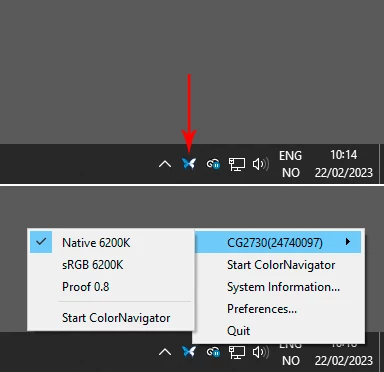
Look for something similar in the BenQ software. I've also used NEC Spectraview II, where (IIRC) there was a standalone utility packaged with the software, that did the same thing and worked the same way.
Note that you still have to relaunch color managed applications to load the new profile. This is how all color managed software works, that's nothing special for Adobe applications.



 AdChoices