
Inspiring
August 24, 2016
Answered

Adobe Connect cannot play meeting audio through Bluetooth headset

  • August 24, 2016
  • 3 replies
  • 33551 views

I am troubleshooting an audio issue for my son who takes online classes hosted through Adobe Connect. The operating system is OS X 10.11.6 (to date the latest), Flash Player is at Version 22.0.0.209, and I installed Version 11.9.977.321 of the Adobe Connect Add-In earlier today.

The other participants in the meeting can hear sound from my mic. The Audio Setup Wizard completes with Success. And, yet, audio from the other participants is either played through the internal speakers of my MacBook Pro or not at all. This is in spite of the fact that in the Sound preference pane of System Preferences the Bluetooth headset is selected both on the Input and Output tabs. Audio from the iTunes application does play in the headset.

Evidently, Adobe Connect is unable to correctly route audio based on the setting of the preferences.

Should I just chalk this up to a bug that Adobe won’t address, or can something be done? I currently cannot spend money on a different headset for my son, plus something wired will get destroyed in short order. I really do need to get this to work.
This topic has been closed for replies.
Correct answer Dominik Hoffmann

I came up with a viable, though not ideal, solution.

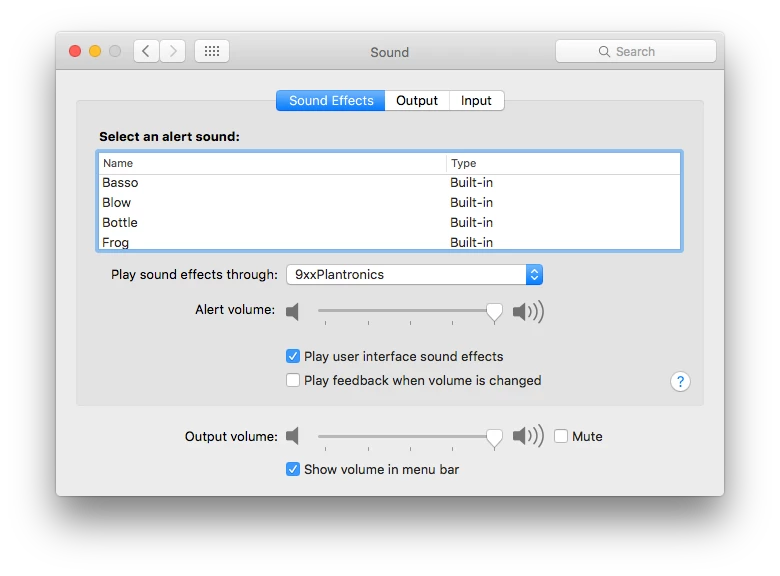
Evidently, Adobe Connect considers sound output to be a "sound effect." Consequently, when I set up the Sound preference pane like this

i.e., select my Bluetooth headset on the pull-down menu and check “Play user interface sound effects,” I can hear meeting audio in my headset.

I am not an Apple developer, but I suspect the API for interacting with the computer’s sound infrastructure must have separate calls for playing audio, such as music and voice, and producing alert sounds of various kinds. Adobe Connect is not using these calls correctly.

3 replies

Dominik HoffmannAuthorCorrect answer
Inspiring
August 31, 2016

I came up with a viable, though not ideal, solution.

Evidently, Adobe Connect considers sound output to be a "sound effect." Consequently, when I set up the Sound preference pane like this

i.e., select my Bluetooth headset on the pull-down menu and check “Play user interface sound effects,” I can hear meeting audio in my headset.

I am not an Apple developer, but I suspect the API for interacting with the computer’s sound infrastructure must have separate calls for playing audio, such as music and voice, and producing alert sounds of various kinds. Adobe Connect is not using these calls correctly.

Participant
September 18, 2018

Good advice and good discovery work! I was hopeful when I saw this but find the Sound Effects volume and output device has no bearing for me on the audio coming from Adobe Connect. Very frustrating!

To be clear, I am using a Bluetooth headset which is properly routing all other audio on the Mac (I hear ding and bloop and other system sounds).  Meanwhile, the Adobe Connect audio is loud and clear on the built-in speakers. Interesting too that none of the system audio sliders affect the output—only the volume slide within Adobe Connect changes to volume level. I suppose that is also a sign that audio integration is outside the typical OS control.

Participant
September 25, 2018

I have the same problem! No solution here yet either

Participant
August 31, 2016

I have recently seen this happen with USB headsets on several machines. Try downloading the addin rather than using flash through the browser. This was the fix for the people who were experiencing this issue.

When the addin is installed the browser will handoff the connect session when a meeting begins. I would recommend not using a bluetooth headset for connect.

Inspiring
August 31, 2016

The problem is that I don’t currently have a viable alternative. The Bluetooth headset is paid for, and I wouldn’t trust my 11-year-old who needs Adobe Connect for online classes he takes with a wired headset. It would be ripped apart in no time at all.

It is interesting that you report similar behavior of USB headsets. The would mean that the Logitech H820e Wireless Headset, which uses a USB-to-wireless dongle, would potentially also not work.

Inspiring
August 24, 2016

Just to demonstrate that my Sound settings are configured properly:

Also, here is the output of the Audio Setup Wizard, and I can report, that everything works as expected: