Mute all participants only
Hi there - We moved to Adobe Connect Pro from Citrix GoToTraining about six weeks ago and having numerous teething issues. While Adobe Connect gives participants an amazing experience, the experience for Presenters isn't quite as slick as Webex or Citrix it seems.
One example is the ability to mute all participants but not mute hosts and presenters. This works seamlessly in GoToTraining - just hit Mute All and all the participants go quiet. If I use the Mute All option in the Attendee pod in Adobe Connect it mutes everyone including all hosts and presenters. The ability to mute all participants only is so useful when participants are joining randomly at various times and not muting themselves - while we can mute individual participants at our, its painful to keep going through the participant list hunting for the one participant who is not on mute.
I saw in another post something about enabling a Lecture Mode in the Audio menu, but we don't seem to have this option in our Adobe Connect. Our Audio menu looks like...
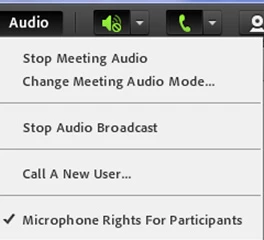
I can't find anything about this in the Preferences area either. I feel like I am missing something obvious because this should be a pretty straightforward feature to control large audiences.
Can someone please point me in the right direction?
Many thanks,
David
 AdChoices