
Participant
May 24, 2018
Question

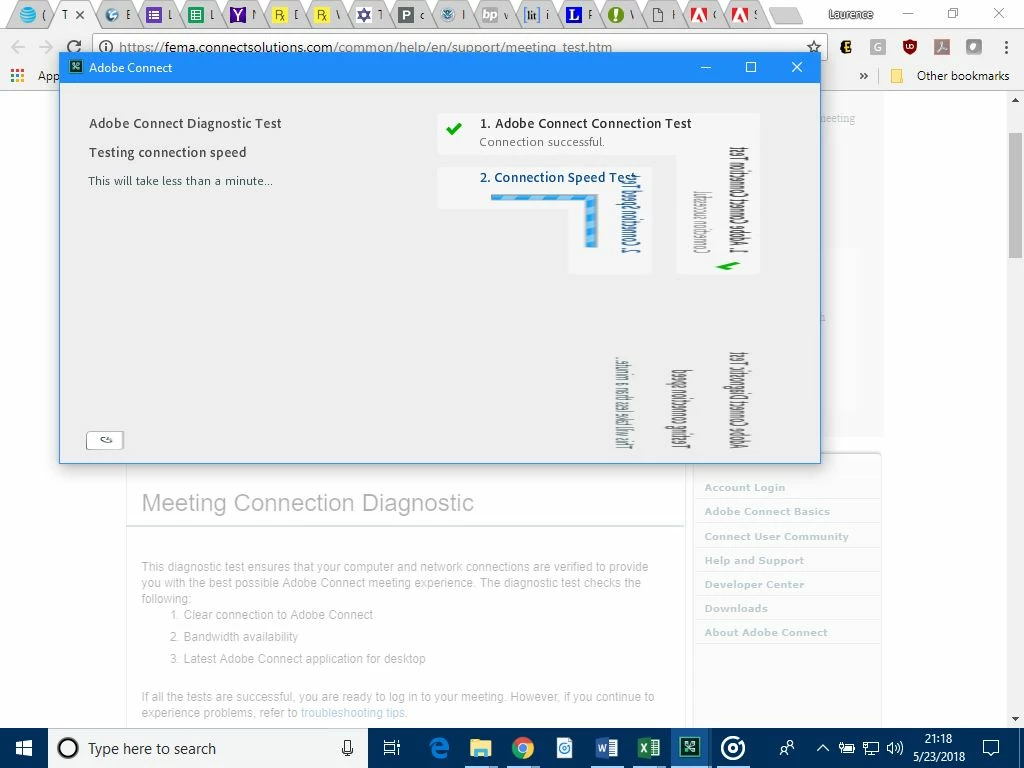
Connect: Faulty image rendering since Windows 10 update

  • May 24, 2018
  • 2 replies
  • 914 views

Since the Windows 10 update May 11, 2018, Adobe Connect renders images incorrectly. Consider a rectangular image. The upper-left part is rendered correctly. The part below a diagonal line from top-right to bottom-left is rendered as a mirror image of the top part.

What is the best way to resolve this?
This topic has been closed for replies.

2 replies

Participant
June 11, 2018

See if you are able to fix it by turning off hardware acceleration: Right-click -> settings -> uncheck "Enable Hardware acceleration" -> close. The close button is hidden by the mirrored graphics because it's in the bottom left corner of the dialog box, but it's still functional

Jorma_at_Knox
Legend
May 24, 2018

I'm not able to replicate this issue.

I would uninstall the Connect App and then download the latest version and install that. See if that helps.

You can get the latest version of the App here: Adobe Connect Downloads and Updates