Answered
I am trying to use adobe connect. When I try to use my camera it doesn't allow me. FaceTime and Skype work fine. I have a Mac Book Pro OS X 10.9.4
Any help would be greatly appreciated.

Any help would be greatly appreciated.
When you go to hit the camera button it comes up with 2 windows and when I try and click on the allow button it won't take it. It freezes those two windows. The second window is the preview window. Also I've noticed the camera light on above the screen is not coming on. But it comes on when I use facetime.
Odd. To select the camera before activating it you can do one of two things:
1. Use the drop down button to the right of the camer button and select a different camera input.
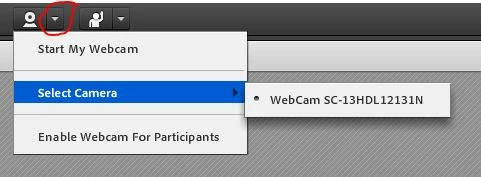
2. Right click anywhere in the room and select Settings... and then go to the camera tab to select which camera you want Flash to look to (you can also predefine permissions for Flash to acces your camera here but selecting Allow on the first tab seen in the Settings dialog):

Are you using the Connect add-in or just the Flash Player in your browser?
Already have an account? Login
Enter your E-mail address. We'll send you an e-mail with instructions to reset your password.
 AdChoices