
John_Meidl
Inspiring
July 16, 2012
Question

Why can't I "Share My Screen"?

  • July 16, 2012
  • 1 reply
  • 17280 views

Friday I was in a trouble-shooting session via Adobe's "chat" trying to get my Captivate app reactivated on a new PC (Windows 7). The Adobe tech support person wanted to see the window I was looking at, so the support person gave me to the link in the chat window to "share screen, " which opened Adobe Connect. After Adobe Connect opened, I clicked "Share My Screen," but it didn't work.

Why would it not work? Might it relate to my company's standard Internet security settings?

Here are my Internet security settings:
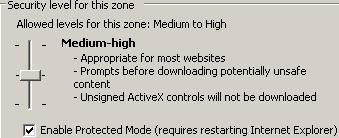
Any other ideas?

Thank you!

Jan

This topic has been closed for replies.

1 reply

Participant
July 17, 2012

Out of curiosity, did you also get kicked out of the room once you tried to share your screen? I'm trying to troubleshoot a similar problem we're having with folks outside of Adobe (I'm internal) connecting to our Connect rooms and getting kicked out when they try to share their screens. Thanks -Matt

John_Meidl
Inspiring
July 17, 2012

No, Matt, I didn't get kicked out; rather, the Adobe Connect window continued to be displayed -- but it did not share my screen.

-Jan

Participant
July 18, 2012

Hi,

We were able to fix this with the folks who were having issues outside of our team, per my note above. It turns out they needed to go and manually download the add-on. Although they thought it had added on automatically when they were logged in to the Connect session (as it had in the past), it may not have. So outside of a session, they went to this page and downloaded the add-in: http://www.adobe.com/support/connect/downloads-updates.html . In a follow-on session, the screen sharing now works.

Not sure if this will help, but maybe will...

Thanks,

Matt