Exit
  • Global community
    • Language:
      • Deutsch
      • English
      • Español
      • Français
      • Português
  • 日本語コミュニティ
  • 한국 커뮤니티
0

CC Library - Adding Description in the app

New Here ,
Jul 29, 2021 Jul 29, 2021

So I know you can add an edit a description for a CC library asset when in a program such as Bridge or InDesign. That functionality doesn't seem to be in the "Your Libraries" section in the CC app.


Am I missing something? Is this something that will get added? It would be super useful for some asset management/adding version information when using the "replace graphic" option.


Thanks!

TOPICS
Cloud storage web assets , Collaboration , File sync , Libraries
374
Translate
Report
Community guidelines
Be kind and respectful, give credit to the original source of content, and search for duplicates before posting. Learn more
community guidelines

correct answers 1 Correct answer

Adobe Employee , Aug 02, 2021 Aug 02, 2021

Hi,

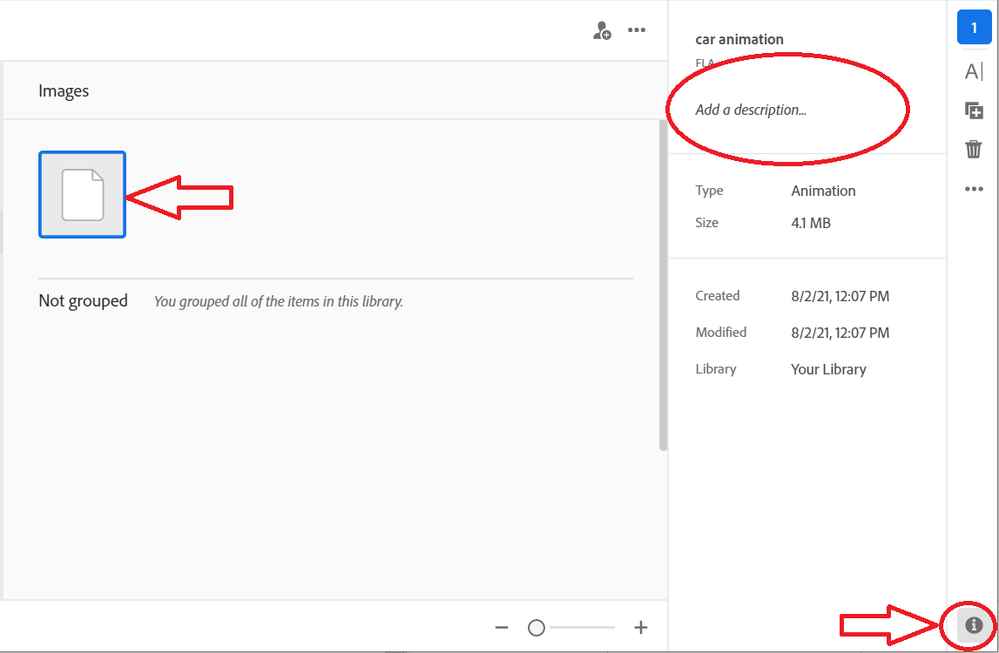
To Add / View / Edit / Delete Descripton in Creative Cloud Application, do following:
1. Select an element
2. Click "i" Info Button on the bottom of the right side bar
3. Add / Edit a description
ccd.PNG


Please, let us know if that is something you were looking for.

Thank you,
Mariia

Translate
Adobe Employee ,
Aug 02, 2021 Aug 02, 2021

Hi,

To Add / View / Edit / Delete Descripton in Creative Cloud Application, do following:
1. Select an element
2. Click "i" Info Button on the bottom of the right side bar
3. Add / Edit a description

ccd.PNG


Please, let us know if that is something you were looking for.

Thank you,
Mariia

Translate
Report
Community guidelines
Be kind and respectful, give credit to the original source of content, and search for duplicates before posting. Learn more
community guidelines
New Here ,
Aug 02, 2021 Aug 02, 2021
LATEST

Thank you Mariia!

That is exactly what I was looking for.

Translate
Report
Community guidelines
Be kind and respectful, give credit to the original source of content, and search for duplicates before posting. Learn more
community guidelines