


- Home
- Digital Editions
- Discussions
- Re: Activation Server error code E_ADEPT_SIGNIN_CO...
- Re: Activation Server error code E_ADEPT_SIGNIN_CO...
Activation Server error code E_ADEPT_SIGNIN_CONNECTION_EXCEPTION [2014]

Copy link to clipboard
Copied
I'm trying to set up Adobe Digital Editions for my grandmother but when i try to activated an Overdrive id with the program, i keep the Activation Server error code: E_ADEPT_SIGNIN_CONNECTION_EXCEPTION. i've searched for fixes, nothing i can find about the error code. If you have had to deal with this error please let me know how to fix it.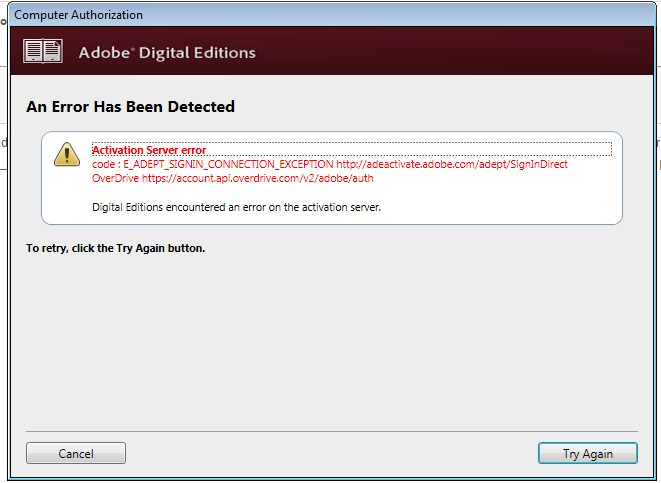


 4
Replies
4
4
Replies
4


Copy link to clipboard
Copied
Can you please check, whether this KB article, Error "Adobe DRM Error" | Activate access eBook | Digital Editions helps to solve your problem?

Copy link to clipboard
Copied
You can help for me? This article is not solve my problem. Plx

Copy link to clipboard
Copied
Hi, have same problem. From Russia. Time is correct. Antivirus is disabled. =( Don't authorize computer.
But..when I set synchro time with time.windows.com in settings clocks - it will work!!
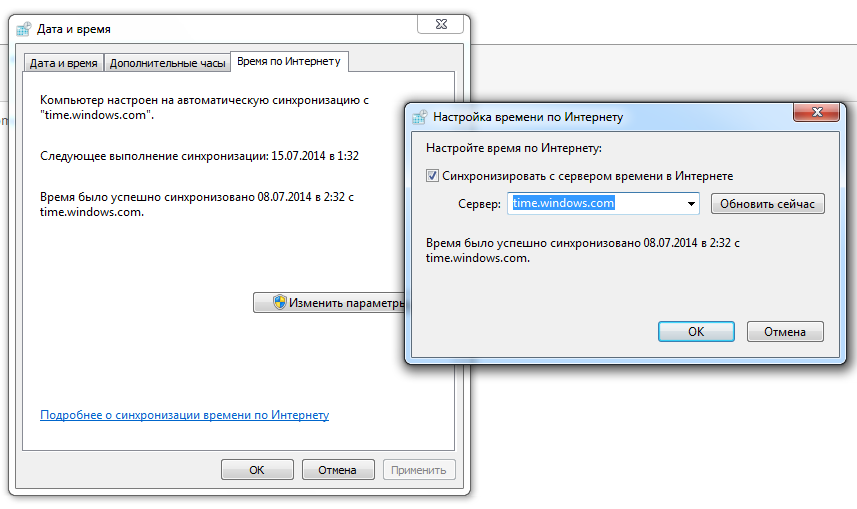
Thanks! 😃

Copy link to clipboard
Copied
Did not work for me

Get ready! An upgraded Adobe Community experience is coming in January.
Learn more
 AdChoices