Exit
  • Global community
    • Language:
      • Deutsch
      • English
      • Español
      • Français
      • Português
  • 日本語コミュニティ
  • 한국 커뮤니티
0

Adobe Dimensions won't open

New Here ,
May 16, 2024 May 16, 2024


Hi, I keep on getting the attached error when opening Adobe Dimensions, and I believe I do have the correct system requirements. Any ideas why I am getting this error, or what I can do to resolve?
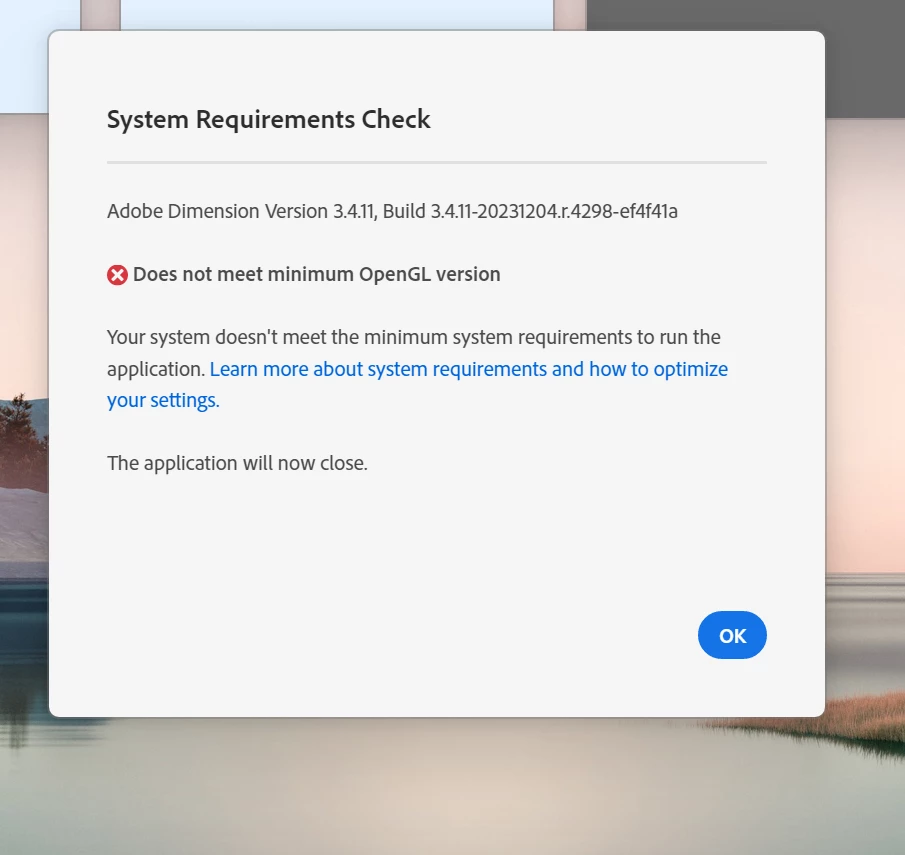

 

Screenshot 2024-05-08 180852.png

TOPICS
Problem or error
727
Translate
Report
Community guidelines
Be kind and respectful, give credit to the original source of content, and search for duplicates before posting. Learn more
community guidelines
Community Expert ,
May 20, 2024 May 20, 2024

Try to update your GPU. Is it AMD or Nvidia?

Translate
Report
Community guidelines
Be kind and respectful, give credit to the original source of content, and search for duplicates before posting. Learn more
community guidelines
New Here ,
May 20, 2024 May 20, 2024

What is that?

Where do I find it?

Translate
Report
Community guidelines
Be kind and respectful, give credit to the original source of content, and search for duplicates before posting. Learn more
community guidelines
Community Expert ,
May 21, 2024 May 21, 2024

Open your Graphic Card Settings and update driver if it not up to day. Drivers and Support for Processors and Graphics (amd.com)

Official Drivers | NVIDIA

Translate
Report
Community guidelines
Be kind and respectful, give credit to the original source of content, and search for duplicates before posting. Learn more
community guidelines
New Here ,
May 21, 2024 May 21, 2024

I have 2 Intel graphics driver, and one their model 31.0.101.5522. I believe theyre up to date. as I think i recentely updated them. Why else would I be getting that error?

Translate
Report
Community guidelines
Be kind and respectful, give credit to the original source of content, and search for duplicates before posting. Learn more
community guidelines
Community Expert ,
May 22, 2024 May 22, 2024
Translate
Report
Community guidelines
Be kind and respectful, give credit to the original source of content, and search for duplicates before posting. Learn more
community guidelines
New Here ,
May 22, 2024 May 22, 2024

Screenshot 2024-05-22 225529.png

Thank you for you response!

Can you please give me a little more information as  I am not so familiar with these concepts. I got the attached error when trying to install the nvidia. 

what does this mean?

Is it incompatible with my laptop?

where do I find what kind of graphics card I have?

When I bought this laptop, they told me I have all the required requirements. so I am not sure why I am getting these errors.

Thank you!

Translate
Report
Community guidelines
Be kind and respectful, give credit to the original source of content, and search for duplicates before posting. Learn more
community guidelines
Community Expert ,
May 24, 2024 May 24, 2024

You can find out what graphics card you have from the Windows Device Manager. In your PC's Start menu, type "Device Manager, " and press Enter to launch the Control Panel. Click the drop-down arrow next to. Display adapters, and it should list your GPU right there. If you aren't sure which company designed that chip, you can right-click on it and choose. Properties to see the manufacturer—in my case, Advanced Micro Devices, or AMD.

Translate
Report
Community guidelines
Be kind and respectful, give credit to the original source of content, and search for duplicates before posting. Learn more
community guidelines
New Here ,
May 25, 2024 May 25, 2024

I have 2 intel graphics cards. Is that why its not working?

Do I needto have a nVidia one?

Am I able to install a nVidia one one this device?

how would I know if its compatible?

I got the error I attached on 5/22 when I tried to install it.

So my 2 questions are:

1. Do I needto have a nVidia one?

2. Am I able to install a nVidia one one this device?

Thank you!

Translate
Report
Community guidelines
Be kind and respectful, give credit to the original source of content, and search for duplicates before posting. Learn more
community guidelines
Community Expert ,
May 26, 2024 May 26, 2024
LATEST

Your laptop intel GPU do not meet requirements Dimension system requirements (adobe.com). I use AMD Radeon RX580. Anyway any recent GPU are welcome for graphic work. GPU driver installation need GPU hardware on device, so you need to add any nvidia GPU on your device before any driver installation

Translate
Report
Community guidelines
Be kind and respectful, give credit to the original source of content, and search for duplicates before posting. Learn more
community guidelines