
New Participant
November 1, 2017
Question

Dimension Screen Issues - UI is Blurry

  • November 1, 2017
  • 8 replies
  • 9590 views

Just installed Dimension on my Win10 64-bit (i5-3570, 16GB RAM Nvidia 750Ti)

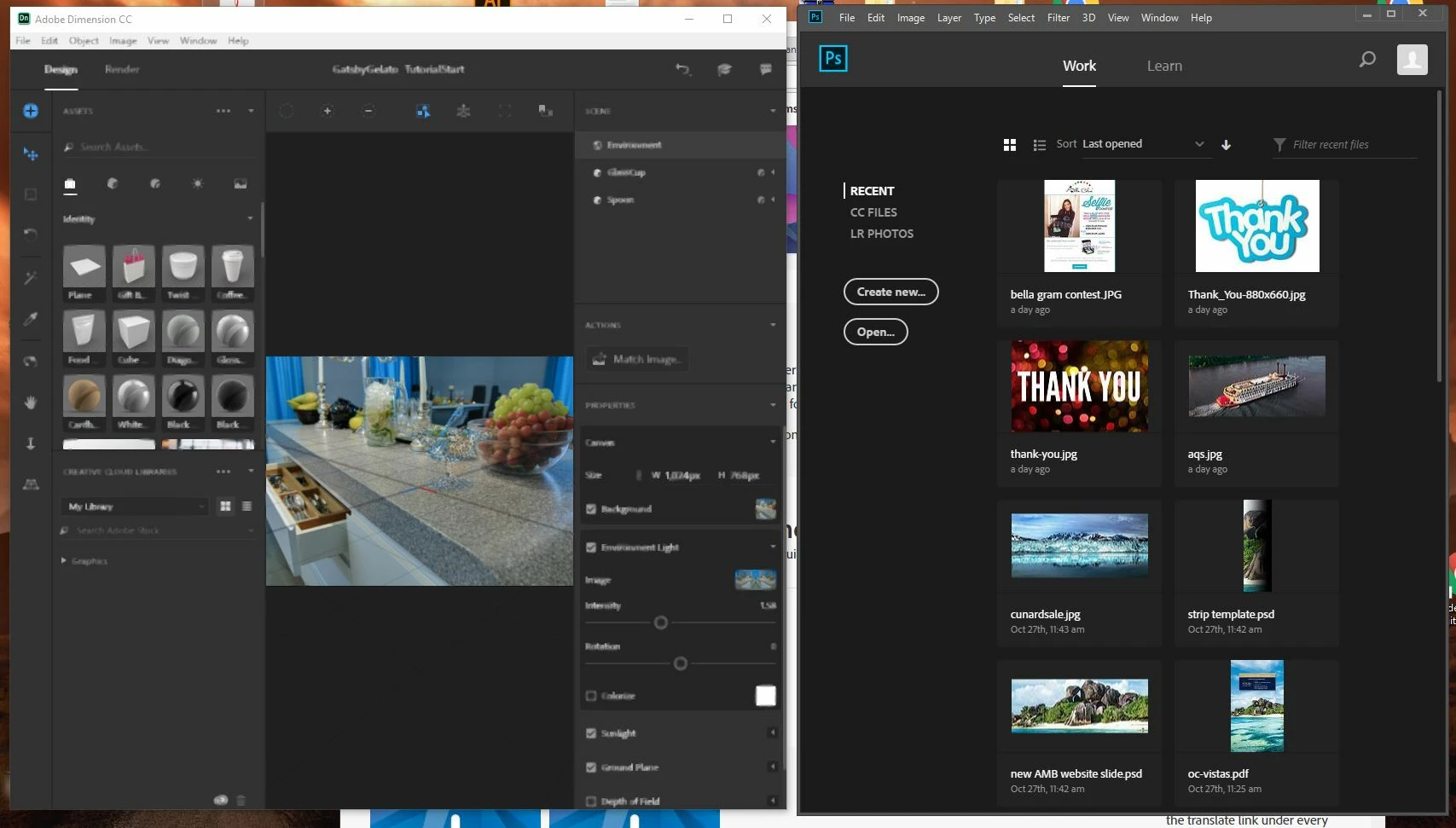
The user interface is extremely blurry (Like low res video) When I hover my mouse, some area get sharper, but no consistently. I attached screenshot

Any help would be appreciated to get this straightened out. Only happens in Dimension CC, all other apps are fine

Thanks

Alex Trevigne
This topic has been closed for replies.

8 replies

New Participant
May 1, 2022

I have a similar issue but mines not blurry, rather just a ton of white outlines.. makes it impossible to use the application.

Ussnorway7605025
Braniac
May 1, 2022

you don't have the same, your problem is sharpening... if you want to tack 'me too' posts on the forum at least add it to some that have the same problem


https://community.adobe.com/t5/dimension-discussions/why-do-these-bugs-occur-please-give-me-a-solution/m-p/12604603#M6630

New Participant
April 21, 2019

Facing same issue on HP 650G3 Ci7 7600u

New Participant
February 10, 2018

I had the same problem, Nvidia GTX 1050. Ive just turned off all the antialiasing for just Dimension in the Nvidia Control Panel. Seems to have sorted it.

sumedhj31696318
New Participant
February 21, 2018

solved it for me. Thanks

New Participant
January 8, 2018

I'm having the exact same issue

Overall the interface is blurry, some things will sharpen up if selected.

I have the integrated Graphics disabled in the BIOS.

OS Name Microsoft Windows 10 Enterprise

Version 10.0.15063 Build 15063

OS Manufacturer Microsoft Corporation

System Manufacturer Dell Inc.

System Model Precision 7510

Processor Intel(R) Core(TM) i7-6820HQ CPU @ 2.70GHz, 2701 Mhz, 4 Core(s), 8 Logical Processor(s)

Hardware Abstraction Layer Version = "10.0.15063.502"

Installed Physical Memory (RAM) 24.0 GB

Total Physical Memory 23.8 GB

Available Physical Memory 17.9 GB

Total Virtual Memory 24.8 GB

Available Virtual Memory 19.0 GB

Page File Space 1.00 GB

Adapter Type Quadro M1000M, NVIDIA compatible

Driver Version 23.21.13.8816

Adapter RAM (2,147,483,648) bytes

Color Table Entries 4294967296

Resolution 1920 x 1080 x 60 hertz

Bits/Pixel 32

Ussnorway7605025
Braniac
January 8, 2018

Edwin-Bar  wrote

OS Name Microsoft Windows 10 Enterprise

Version 10.0.15063 Build 15063

you don't have the min system to run Dimension

Dimension CC system requirements

New Participant
November 28, 2017

Same issue but just more intense at some points the screen kinda blends the colours together.

I am using win10 x64 bit, 8 gm ram, AMD R7 8gb ram dedicated I have checked everything possible in compatibility settings also and no fix.

New Participant
December 11, 2017

Any answer for this?  I'm running dimension on a laptop  1.9 GHz Quad-core 8 gm ram AMD  r7  2 Gb vram dedicated graphics card

Participating Frequently
December 30, 2017

I got the same problem here but I'm working on Nvidia GeForce GT 540M

jesperl58838115
New Participant
November 22, 2017

I have the same issue, but i have 32gb ram and a nvidia gtx 970 windows 10 64bit.

Ussnorway7605025
Braniac
November 15, 2017

alext41804601  wrote

Nvidia 750Ti

the g-card is very old and never got any windows 10 drivers... lastest I know of is Drivers | GeForce

so you are prob running on integrated graphics

New Participant
November 16, 2017

Actually running Win drivers from Nvidia for this video card. problem was solved by adding more RAM. from 16 to 24 problem solved

JeanetteMathews
Adobe Employee
Adobe Employee
November 17, 2017

Whaaat.  That's bizzare.  Thank you for the clue though, we'll check it out.

JeanetteMathews
Adobe Employee
Adobe Employee
November 2, 2017

Hello!  Thanks for reporting.  Can you let me know a few things:

- What resolution monitor are you using?

- In the Windows display settings for UI Zoom do you have any options turned on there?

New Participant
November 2, 2017

Im using dual monitors 1920 x 1080 (native resolution)

No UI scaling at all (100%). Attached a few more screen shots. When app first opens. Everything is good. Once you select "NEW" or "OPEN" project and the 2nd screen opens, thats when the problem starts

Alex

JeanetteMathews
Adobe Employee
Adobe Employee
November 3, 2017

Iiiiinteresting.  I have to say this has our team a bit boggled, hehe.  We have about half our users on Win 10 and first time I'm hearing of the issue.  Can you try locating the app and right-clicking on the icon and select "Properties". 

In the properties panel, try then going to the Compatibility tab and turning the "Disable display scaling on high DPI settings" on.  Here's an example of what it looks like: