


- Home
- Dimension
- Discussions
- I have a problem saving a file in Adobe Dimension
- I have a problem saving a file in Adobe Dimension

Copy link to clipboard
Copied
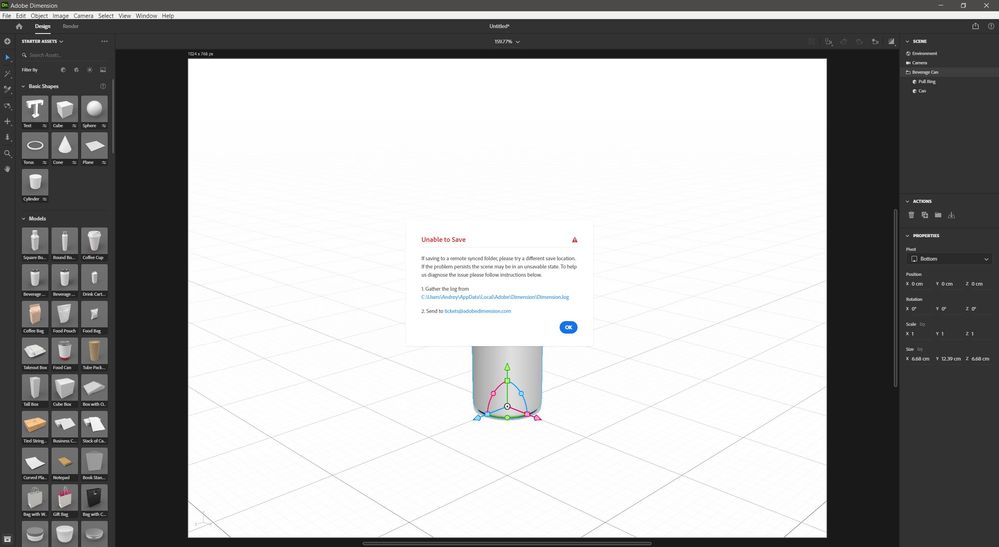
Good afternoon I have a problem saving a file in Adobe Dimension. According to my feelings, it cannot work with Windows 10 folders. I reinstalled the program with resetting all settings - this action did not help. I made the program to run as administrator - it also did not solve the problem. Changed different folders and drives - the file is still not saved. Those. the saving process is in percentage when the program makes a temporary file. But as soon as she tries to save the desired file, she gives an error. Import Export works. Rendering works - render results are saved.
https://docs.google.com/document/d/1K2EsN-F5jYg4GL-ZGNnReCb2qQyYC05uegVEuEEDhr8/edit?usp=sharing


 1 Correct answer
I solved the problem by installing a new user in Windows 10. Everything works well in it. But what is the real reason, I can not understand ...

 5
Replies
5
5
Replies
5



Copy link to clipboard
Copied
I can't remember in Windows 10 (I'm on windows 11 now) but I have never had any issues saving to my local drives (even an external drive)
Saving to -say-dropbox synced folder (even if it's physically on a Hard Drive) was always a bit of a hit and miss. But you did test that. I know other people have had trouble with synced folders with other software (bridge being one mighty culprit)
Seeing the log, I can see that there are some errors not all of them saving errors. However I am not knowledgeable enough to understand where the errors come from.
I think it's one for an Adobe employee to chime in so hang in there...Good luck!

Copy link to clipboard
Copied
I haven't get such an error till now on Win 10 and 11. Are you able to save from another apps without any problem?
Copy link to clipboard
Copied
Yes! Other Adobe applications save without problems! This is only!
Correct answer by
Dialmen
AUTHOR
Copy link to clipboard
Copied
I solved the problem by installing a new user in Windows 10. Everything works well in it. But what is the real reason, I can not understand ...

Copy link to clipboard
Copied
I'll take a guess and assume it's because Microsoft moved all your documents into OneDrive

Get ready! An upgraded Adobe Community experience is coming in January.
Learn more
 AdChoices