 Adobe Community

- Home
- Dimension
- Discussions
- Re: My render preview comes out very grainy. How d...
- Re: My render preview comes out very grainy. How d...
My render preview comes out very grainy. How do I fix this?
Copy link to clipboard
Copied
Whenever I click render preview, the image is very grainy, like old TV static. I don't think it's the DoF, but I'm not sure what else to try. The resolution is full, and I'm working from a Surface Book 2, so the specs shouldn't be the issue. Any help is appreciated!


 5
Replies
5
5
Replies
5


Copy link to clipboard
Copied
Did you use
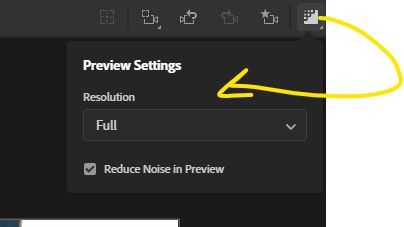
Improved Reduce Noise in render: This option reduces render times by using image denoising. This setting can be found in the application preferences and is on by default. The denoising technology has been updated in Dimension 2.3 with significant visual improvements, made possible with Adobe Sensei, our artificial intelligence and machine learning technology.

Copy link to clipboard
Copied
I have the same problem. Super grainy, even with no DoF and Reduced Noise turned on. 😕


Copy link to clipboard
Copied
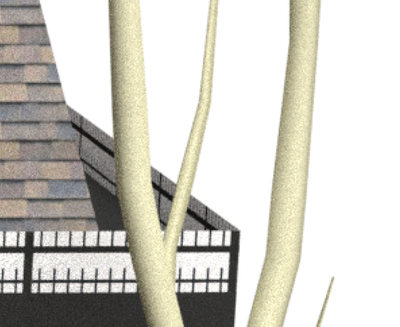
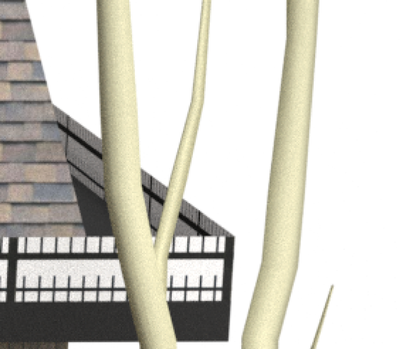
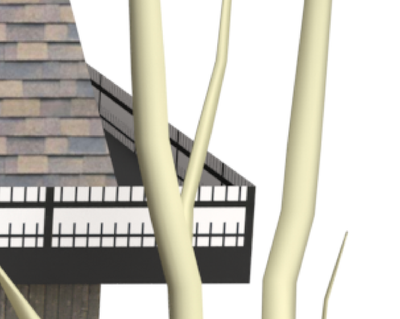
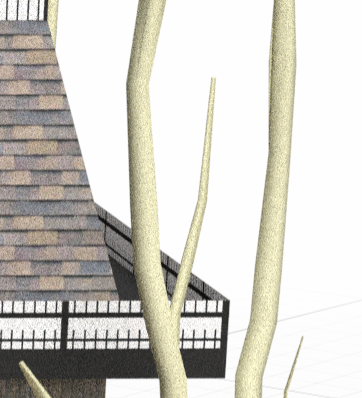
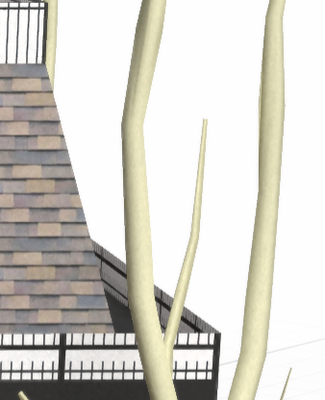
How grainy things are is usually down to the time you gave it to render. Here are some closeups of a render I did, one image after a few seconds, then a minte later, two minutes later, and 10 minutes later. The improvement even between the 9 minute and 10 minute stages was still noticeable. Would you be willing to post your DN file, so we can see if there is a setting that you're using that leads to more graininess?

Copy link to clipboard
Copied
I reread the subject, and now know you just meant the preview render, not the final render. My preview seems good enough. Here's the same area as normal, then with the reduce noise option selected.
Copy link to clipboard
Copied
Also please note that under Render Preview have content menu where you can choose render quality and noise reduction function.


 AdChoices