


- Home
- Dimension
- Discussions
- Re: Can't place object in Dimension, stuck on load...
- Re: Can't place object in Dimension, stuck on load...
Can't place object in Dimension, stuck on loading screen

Copy link to clipboard
Copied
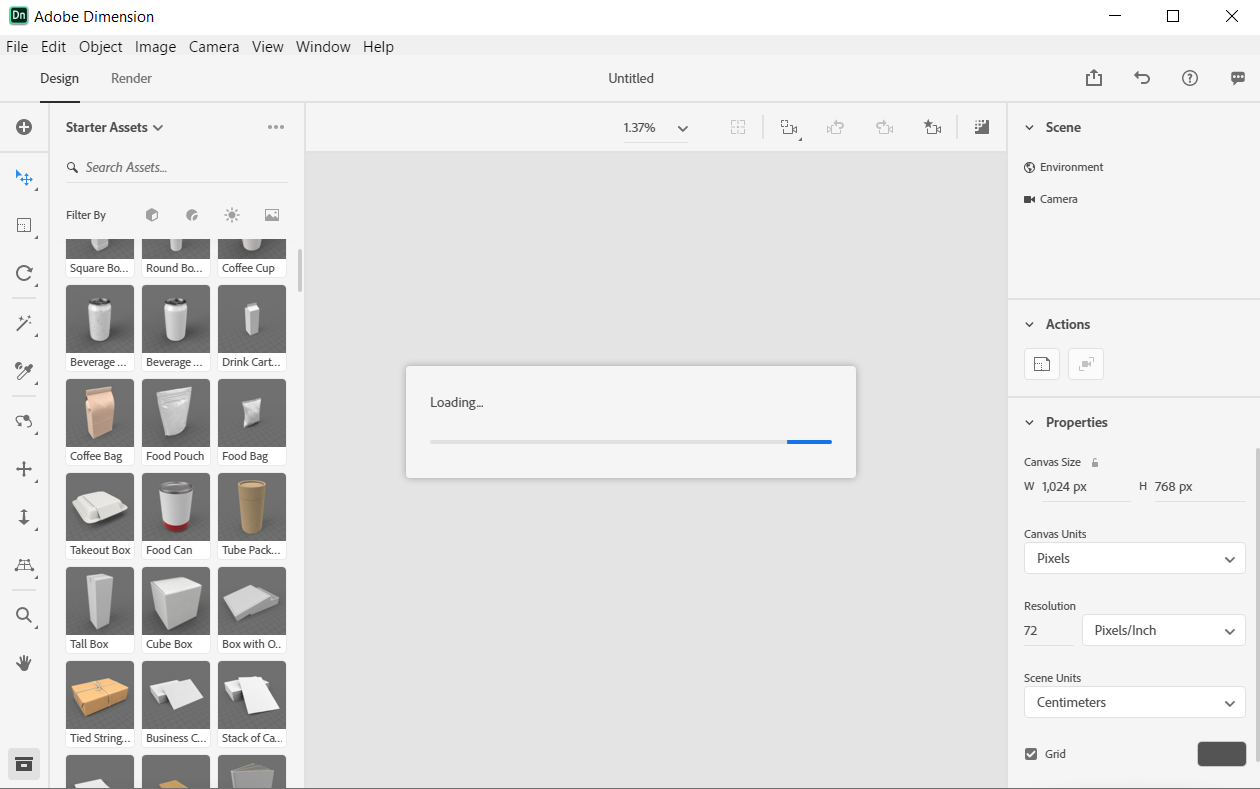
Dimension opens up just fine. Whenever I either create a new document or attempt to take a tour, I'm unable to drag in an object from the sidebar into the scene without getting stuck on a never-ending "Loading..." dialog box. The object never appears, and the only way to restart Dimension is to force close it from the Task Manager. This happens with any type of object that I attempt to drag in. This is my first time using Adobe Dimension, and I'm running the latest version on Windows 10. I've included a screenshot of the screen I get stuck on. My laptop has 8 GB of RAM and an AMD Ryzen 5 processor. I don't think my computer is too slow; after all, it's brand new and runs everything faster than my old computer, but I could be wrong. What causes this?


 48
Replies
48
48
Replies
48




Copy link to clipboard
Copied
Looks like the canvas loading is stopping at default IBL generation, we're exploring 

Copy link to clipboard
Copied
thank you for looking into this. It would mean the world to me if you could come up with the solution. Thanks

Copy link to clipboard
Copied
My GL view is also not initializing-- It would run fine in the past and then recently it just doesn't load anything, and then I have to force quit from Task Manager. Can you post what the solution was for this issue? Or should I send in my information? I don't seem to have a storage problem.
Copy link to clipboard
Copied
Okay nevermind! I just switched the graphics card it ran with. Don't know why it switched in the first place, but thank you all anyways!
Copy link to clipboard
Copied
Good morning guys. Have you found out a solution? I have installed the new Dimension update but the issue is still there. Many thanks

Copy link to clipboard
Copied
No fix has been reported yet
Copy link to clipboard
Copied
This is my log file:
gbl Info 490ms> Pepper PID: 10424
gbl Info 490ms> Build Info: git_commit_hash: 0f6e5499e799b587980bc7fffec23aa1b46a8f6f
gbl Info 490ms> Build Info: compilation_timestamp: 2019-08-08 00:19:27.303000
gbl Info 490ms> System Info: CPU Brand: Intel(R) Core(TM) i7-7500U CPU @ 2.70GHz
gbl Info 491ms> System Info: CPU Speed: 2904 MHz
gbl Info 491ms> System Info: CPU Physical Core Count: 2
gbl Info 491ms> System Info: CPU Logical Core Count: 4
gbl Info 491ms> System Info: CPU SSE4.2/AVX/AVX2 Capability: 1/1/1
gbl Info 491ms> System Info: RAM: 15 GB, (16,292 MB, 17,083,633,664 bytes)
gbl Info 491ms> System Info: OS: Windows 0.0.0
gbl Info 494ms> [embree] creating scene: old_hash=AAAAAAAAAAA=
pie_api Info 1508ms> Setting PIE Plugins Path to C:\Program Files\Adobe\Adobe Dimension CC\Plug-ins
pie_api Info 1508ms> Setting PIE CSF File to C:\Program Files\Adobe\Adobe Dimension CC\Resources\common\color_profiles\dimension_default_color_profiles.csf
pie_api Info 1508ms> Initializing PIE, Searching for Plugins at C:\Program Files\Adobe\Adobe Dimension CC\Plug-ins
gbl Info 2005ms> PIE Initialized with serial_executor thread of ID:11280
gbl Info 2005ms> PIE Serial Executor is running in a SEPARATE thread
pie_api Info 2006ms> Initializing the Default Color Spaces from a CSF File...
pie_api Info 2028ms> Initialized Default Color Spaces from file `C:/Program Files\Adobe\Adobe Dimension CC\Resources\common\color_profiles\dimension_default_color_profiles.csf`
pie_api Info 2029ms> PIE Initialized
pie_api Info 2081ms> STUB: Setting PIE Temp Path to C:\Users\bubun\AppData\Local\Temp (doesn't actually set anything right now)
gbl Info 2092ms> EUTaskManager:Hooking up element's TaskManager
gbl Info 2152ms> ****** POEKHALI: Creating a Surface GL Context!
gpu-brdg Info 2152ms> GlSurfaceWin::InitWindow
gpu-brdg Info 2155ms> GetDC(baseOpenGlContextWindow_)
gpu-brdg Info 2155ms> SetupPixelFormat(baseDeviceContext_)
gpu-brdg Info 2162ms> wglCreateContext(baseDeviceContext_)
gpu-brdg Info 2176ms> wglMakeCurrent(baseDeviceContext_, baseRenderingContext_);
gpu-brdg Info 2177ms> GLAD Loading GL Extensions
gpu-brdg Info 2178ms> GLAD Loading WGL Extensions
gpu-brdg Info 2178ms> Printing GL Version
gpu-brdg Info 2178ms> GL_VERSION 4.4.0 - Build 21.20.16.4565
gpu-brdg Info 2178ms> GL_RENDERER Intel(R) HD Graphics 620
gpu-brdg Info 2178ms> openGlContextWindow_ = GlSurfaceWin::InitWindow()
gpu-brdg Info 2179ms> GetDC(openGlContextWindow_)
gpu-brdg Info 2180ms> SetupPixelFormat(deviceContext_)
gpu-brdg Info 2182ms> Calling wglCreateContextAttribsARB
gpu-brdg Info 2189ms> GlContextWin::GlContextWin Done!
gbl Info 2189ms> ****** Creating a Surface GL Context done.
gbl Info 2189ms> INIT_AERO::init_context
gbl Info 2203ms> GPUResourceManager::initialize(): Valid GPU context detected, initializing GPU resource caches...
gbl Info 2204ms> GPUResourceManager::initialize(): Valid GPU context detected, GPU resource caches initialized.
gpu-brdg Info 2204ms> GlSurfaceWin::Init()
gpu-brdg Info 2207ms> InitWindow()
gpu-brdg Info 2208ms> D3D11CreateDevice()
gpu-brdg Info 2208ms> D3D11CreateDevice Manually Forced to Not Happen()
gpu-brdg Info 2208ms> wglDXOpenDeviceNV call failed with DX11. Fallback to DX9 instead.
gpu-brdg Info 2208ms> Direct3DCreate9Ex()
gpu-brdg Info 2212ms> DX9_->CreateDeviceEx()
gpu-brdg Info 2242ms> wglDXOpenDeviceNV(deviceDX9_)
gpu-brdg Info 2243ms> Checking Surface Components...
gpu-brdg Info 2243ms> windowDirectX_ is initialized
gpu-brdg Info 2244ms> deviceDX9_ is initialized
gpu-brdg Info 2244ms> deviceDX11_ is NOT initialized
gpu-brdg Info 2244ms> interopHandle_ is initialized
gpu-brdg Info 2244ms> GlSurfaceWin_IsInitialized is initialized
gbl Info 2244ms> EUSurface::init_context: OK
gbl Info 2244ms> EUSurface initialized with result 1
gpu-brdg Info 2244ms> >>>>>>>>> GlSurfaceWin::CreateBacking(1073744706)
gpu-brdg Info 2244ms> DxGlBacking::InitDxTexture()
gpu-brdg Info 2245ms> BindRenderBuffer()
gpu-brdg Info 2245ms> DX9: CreateTexture
gpu-brdg Info 2246ms> DX9: GetSurfaceLevel
gpu-brdg Info 2246ms> DX9: wglDXSetResourceShareHandleNV
gpu-brdg Info 2246ms> DX9: wglDXRegisterObjectNV
gpu-brdg Info 2246ms> DX9: CreateDepthBuffer
gpu-brdg Info 2246ms> LockDxTexture()...
gpu-brdg Info 2251ms> Creating FrameBuffer()...
gpu-brdg Info 2252ms> UnlockDxTexture()...
gpu-brdg Info 2252ms> DxGlBacking::InitDxTexture() Done OK!
gpu-brdg Info 2252ms> >>>>>>>>> GlSurfaceWin::CreateBacking() OK!
gpu-brdg Info 2253ms> >>
gpu-brdg Info 2253ms> >>>>>>>>> GlSurfaceWin::CreateBacking(1073744834)
gpu-brdg Info 2253ms> DxGlBacking::InitDxTexture()
gpu-brdg Info 2253ms> BindRenderBuffer()
gpu-brdg Info 2253ms> DX9: CreateTexture
gpu-brdg Info 2253ms> DX9: GetSurfaceLevel
gpu-brdg Info 2253ms> DX9: wglDXSetResourceShareHandleNV
gpu-brdg Info 2253ms> DX9: wglDXRegisterObjectNV
gpu-brdg Info 2253ms> DX9: CreateDepthBuffer
gpu-brdg Info 2254ms> LockDxTexture()...
gpu-brdg Info 2254ms> Creating FrameBuffer()...
gpu-brdg Info 2255ms> UnlockDxTexture()...
gpu-brdg Info 2255ms> DxGlBacking::InitDxTexture() Done OK!
gpu-brdg Info 2255ms> >>>>>>>>> GlSurfaceWin::CreateBacking() OK!
gpu-brdg Info 2255ms> >>
gpu-brdg Info 2255ms> >>>>>>>>> GlSurfaceWin::CreateBacking(1073744962)
gpu-brdg Info 2255ms> DxGlBacking::InitDxTexture()
gpu-brdg Info 2255ms> BindRenderBuffer()
gpu-brdg Info 2255ms> DX9: CreateTexture
gpu-brdg Info 2256ms> DX9: GetSurfaceLevel
gpu-brdg Info 2256ms> DX9: wglDXSetResourceShareHandleNV
gpu-brdg Info 2256ms> DX9: wglDXRegisterObjectNV
gpu-brdg Info 2256ms> DX9: CreateDepthBuffer
gpu-brdg Info 2256ms> LockDxTexture()...
gpu-brdg Info 2257ms> Creating FrameBuffer()...
gpu-brdg Info 2257ms> UnlockDxTexture()...
gpu-brdg Info 2257ms> DxGlBacking::InitDxTexture() Done OK!
gpu-brdg Info 2257ms> >>>>>>>>> GlSurfaceWin::CreateBacking() OK!
gpu-brdg Info 2257ms> >>
gbl Info 2309ms> Locale from frontend reported: 'en-US'
pie_api Info 2357ms> Known ICC Profiles JSON file: C:\Users\bubun\AppData\Roaming\Dimension CC\known_icc_profiles.json
gpu-brdg Info 2385ms> GlSurfaceWin::Init()
gpu-brdg Info 2385ms> InitWindow()
gpu-brdg Info 2386ms> D3D11CreateDevice()
gpu-brdg Info 2386ms> D3D11CreateDevice Manually Forced to Not Happen()
gpu-brdg Info 2386ms> wglDXOpenDeviceNV call failed with DX11. Fallback to DX9 instead.
gpu-brdg Info 2386ms> Direct3DCreate9Ex()
gpu-brdg Info 2388ms> DX9_->CreateDeviceEx()
gpu-brdg Info 2398ms> wglDXOpenDeviceNV(deviceDX9_)
gpu-brdg Info 2398ms> Checking Surface Components...
gpu-brdg Info 2398ms> windowDirectX_ is initialized
gpu-brdg Info 2398ms> deviceDX9_ is initialized
gpu-brdg Info 2398ms> deviceDX11_ is NOT initialized
gpu-brdg Info 2399ms> interopHandle_ is initialized
gpu-brdg Info 2399ms> GlSurfaceWin_IsInitialized is initialized
gbl Info 2399ms> EUSurface::init_context: OK
gbl Info 2399ms> EUSurface initialized with result 1
gpu-brdg Info 2399ms> >>>>>>>>> GlSurfaceWin::CreateBacking(1073745602)
gpu-brdg Info 2399ms> DxGlBacking::InitDxTexture()
gpu-brdg Info 2399ms> BindRenderBuffer()
gpu-brdg Info 2399ms> DX9: CreateTexture
gpu-brdg Info 2400ms> DX9: GetSurfaceLevel
gpu-brdg Info 2401ms> DX9: wglDXSetResourceShareHandleNV
gpu-brdg Info 2401ms> DX9: wglDXRegisterObjectNV
gpu-brdg Info 2401ms> DX9: CreateDepthBuffer
gpu-brdg Info 2401ms> LockDxTexture()...
gpu-brdg Info 2402ms> Creating FrameBuffer()...
gpu-brdg Info 2402ms> UnlockDxTexture()...
gpu-brdg Info 2403ms> DxGlBacking::InitDxTexture() Done OK!
gpu-brdg Info 2403ms> >>>>>>>>> GlSurfaceWin::CreateBacking() OK!
gpu-brdg Info 2403ms> >>
gpu-brdg Info 2403ms> >>>>>>>>> GlSurfaceWin::CreateBacking(1073745730)
gpu-brdg Info 2403ms> DxGlBacking::InitDxTexture()
gpu-brdg Info 2403ms> BindRenderBuffer()
gpu-brdg Info 2403ms> DX9: CreateTexture
gpu-brdg Info 2403ms> DX9: GetSurfaceLevel
gpu-brdg Info 2404ms> DX9: wglDXSetResourceShareHandleNV
gpu-brdg Info 2404ms> DX9: wglDXRegisterObjectNV
gpu-brdg Info 2404ms> DX9: CreateDepthBuffer
gpu-brdg Info 2404ms> LockDxTexture()...
gpu-brdg Info 2405ms> Creating FrameBuffer()...
gpu-brdg Info 2405ms> UnlockDxTexture()...
gpu-brdg Info 2405ms> DxGlBacking::InitDxTexture() Done OK!
gpu-brdg Info 2405ms> >>>>>>>>> GlSurfaceWin::CreateBacking() OK!
gpu-brdg Info 2405ms> >>
gpu-brdg Info 2405ms> >>>>>>>>> GlSurfaceWin::CreateBacking(1073745858)
gpu-brdg Info 2406ms> DxGlBacking::InitDxTexture()
gpu-brdg Info 2406ms> BindRenderBuffer()
gpu-brdg Info 2406ms> DX9: CreateTexture
gpu-brdg Info 2406ms> DX9: GetSurfaceLevel
gpu-brdg Info 2406ms> DX9: wglDXSetResourceShareHandleNV
gpu-brdg Info 2406ms> DX9: wglDXRegisterObjectNV
gpu-brdg Info 2406ms> DX9: CreateDepthBuffer
gpu-brdg Info 2406ms> LockDxTexture()...
gpu-brdg Info 2407ms> Creating FrameBuffer()...
gpu-brdg Info 2407ms> UnlockDxTexture()...
gpu-brdg Info 2407ms> DxGlBacking::InitDxTexture() Done OK!
gpu-brdg Info 2407ms> >>>>>>>>> GlSurfaceWin::CreateBacking() OK!
gpu-brdg Info 2408ms> >>
gpu-brdg Info 2437ms> GlSurfaceWin::Init()
gpu-brdg Info 2437ms> InitWindow()
gpu-brdg Info 2438ms> D3D11CreateDevice()
gpu-brdg Info 2438ms> D3D11CreateDevice Manually Forced to Not Happen()
gpu-brdg Info 2439ms> wglDXOpenDeviceNV call failed with DX11. Fallback to DX9 instead.
gpu-brdg Info 2439ms> Direct3DCreate9Ex()
gpu-brdg Info 2440ms> DX9_->CreateDeviceEx()
gpu-brdg Info 2451ms> wglDXOpenDeviceNV(deviceDX9_)
gpu-brdg Info 2451ms> Checking Surface Components...
gpu-brdg Info 2452ms> windowDirectX_ is initialized
gpu-brdg Info 2452ms> deviceDX9_ is initialized
gpu-brdg Info 2452ms> deviceDX11_ is NOT initialized
gpu-brdg Info 2452ms> interopHandle_ is initialized
gpu-brdg Info 2452ms> GlSurfaceWin_IsInitialized is initialized
gbl Info 2452ms> EUSurface::init_context: OK
gbl Info 2452ms> EUSurface initialized with result 1
gpu-brdg Info 2452ms> >>>>>>>>> GlSurfaceWin::CreateBacking(1073745986)
gpu-brdg Info 2452ms> DxGlBacking::InitDxTexture()
gpu-brdg Info 2452ms> BindRenderBuffer()
gpu-brdg Info 2453ms> DX9: CreateTexture
gpu-brdg Info 2453ms> DX9: GetSurfaceLevel
gpu-brdg Info 2453ms> DX9: wglDXSetResourceShareHandleNV
gpu-brdg Info 2453ms> DX9: wglDXRegisterObjectNV
gpu-brdg Info 2453ms> DX9: CreateDepthBuffer
gpu-brdg Info 2453ms> LockDxTexture()...
gpu-brdg Info 2454ms> Creating FrameBuffer()...
gpu-brdg Info 2454ms> UnlockDxTexture()...
gpu-brdg Info 2455ms> DxGlBacking::InitDxTexture() Done OK!
gpu-brdg Info 2455ms> >>>>>>>>> GlSurfaceWin::CreateBacking() OK!
gpu-brdg Info 2455ms> >>
gpu-brdg Info 2455ms> >>>>>>>>> GlSurfaceWin::CreateBacking(1073746114)
gpu-brdg Info 2455ms> DxGlBacking::InitDxTexture()
gpu-brdg Info 2455ms> BindRenderBuffer()
gpu-brdg Info 2455ms> DX9: CreateTexture
gpu-brdg Info 2456ms> DX9: GetSurfaceLevel
gpu-brdg Info 2456ms> DX9: wglDXSetResourceShareHandleNV
gpu-brdg Info 2456ms> DX9: wglDXRegisterObjectNV
gpu-brdg Info 2456ms> DX9: CreateDepthBuffer
gpu-brdg Info 2456ms> LockDxTexture()...
gpu-brdg Info 2457ms> Creating FrameBuffer()...
gpu-brdg Info 2457ms> UnlockDxTexture()...
gpu-brdg Info 2457ms> DxGlBacking::InitDxTexture() Done OK!
gpu-brdg Info 2457ms> >>>>>>>>> GlSurfaceWin::CreateBacking() OK!
gpu-brdg Info 2457ms> >>
gpu-brdg Info 2457ms> >>>>>>>>> GlSurfaceWin::CreateBacking(1073746242)
gpu-brdg Info 2458ms> DxGlBacking::InitDxTexture()
gpu-brdg Info 2458ms> BindRenderBuffer()
gpu-brdg Info 2458ms> DX9: CreateTexture
gpu-brdg Info 2458ms> DX9: GetSurfaceLevel
gpu-brdg Info 2458ms> DX9: wglDXSetResourceShareHandleNV
gpu-brdg Info 2458ms> DX9: wglDXRegisterObjectNV
gpu-brdg Info 2458ms> DX9: CreateDepthBuffer
gpu-brdg Info 2458ms> LockDxTexture()...
gpu-brdg Info 2459ms> Creating FrameBuffer()...
gpu-brdg Info 2459ms> UnlockDxTexture()...
gpu-brdg Info 2459ms> DxGlBacking::InitDxTexture() Done OK!
gpu-brdg Info 2460ms> >>>>>>>>> GlSurfaceWin::CreateBacking() OK!
gpu-brdg Info 2460ms> >>
gbl Info 2896ms> EUApplication::create_document Untitled
gbl Info 2896ms> EUDocument::createDocument
gbl Info 3183ms> EUApplication::createDocument ok
gbl Warn 4466ms> Found a bad IBL in this document. Replacing it with a default IBL setup.
lantern Info 4471ms> Lantern CPU Check: CPU is AVX-capable.
lantern Info 4471ms> Lantern CPU Check: CPU is AVX2-capable.
lantern Info 4472ms> Lantern CPU Check: CPU is FP16-capable.
gbl Info 4880ms> set viewable node
gbl Info 4880ms> nid: UdG4yFRTvF8=
gbl Info 4884ms> set viewable node
gbl Info 4884ms> nid: JrIy8qKIaCI=
gbl Info 4885ms> set viewable node
gbl Info 4885ms> nid: 7aFfOUIDHrk=
pie_api Info 5084ms> Saving tmp_image_pie_0dd4_f2db_87ca.png: .PNG, 460 x 230, 8 bpc, RGBA, Color Profile: sRGB IEC61966-2.1
gbl Perf 5115ms> method "CommonImageValue::encode" took 69.999500 msec
CamHist Info 5127ms> push "Camera position set at document creation"
CamHist Info 5127ms> pushing history of "C6uNov7D1zg=local_transform" path=/scenes/scene/render_camera_n3d/local_transform"
CamHist Info 5127ms> pushing history of "Sm0Vai/WE9U=focal_length" path=/cameras/render_camera/focal_length"
CamHist Info 5127ms> pushing history of "Sm0Vai/WE9U=horizontal_field_of_view" path=/cameras/render_camera/horizontal_field_of_view"
CamHist Info 5127ms> pushing history of "Sm0Vai/WE9U=depth_of_field_focus_point" path=/cameras/render_camera/depth_of_field_focus_point"
CamHist Info 5127ms> pushing history of "Sm0Vai/WE9U=depth_of_field_enabled" path=/cameras/render_camera/depth_of_field_enabled"
CamHist Info 5127ms> pushing history of "Sm0Vai/WE9U=aperture" path=/cameras/render_camera/aperture"
CamHist Info 5128ms> History now points to 0 "Camera position set at document creation"
History Info 5128ms> push "history.newDocument"
History Info 5128ms> pushing history of "ZPrdqPU8dc8=" path=/"
gbl Perf 5130ms> method "HistoryPush" took 2.070200 msec
History Info 5130ms> History now points to 0 "history.newDocument"
licensing Info 5421ms> cp received notification for profile ready: 2
gbl Info 5589ms> Loading OpenGL Extensions...
gbl Info 5590ms> DONE Loading OpenGL Extensions
erc Info 5590ms> ERC Logging Initialized.
erc Info 5591ms> Max GPU Texture Size detected in Rendercore: 16384
erc Info 5591ms> Creating New Render Target...
erc Info 5591ms> Creating New Render Target Color Texture 14 x 11 x RGBA8
erc Info 5591ms> Attaching New Render Target Color Texture...
erc Info 5592ms> Creating New Render Target Depth Renderbuffer 14 x 11
erc Info 5592ms> ALL GOOD: Render Target Update Complete
gbl Info 5601ms> TextureManager: Creating Texture. Total Texture Count: 0
gbl Info 5601ms> Loading IBL Image: 1024x512: BGRA channels, 32bpp
gbl Info 5601ms> TextureManager: Creating Texture. Total Texture Count: 1
gbl Info 5618ms> IBL Image Loaded
ibl-prep Info 5630ms> ******** IBL Integrator BEGIN
ibl-prep Info 5630ms> Preparing IBL Integrator Render Targets
ibl-prep Info 5630ms> (Desired Dimensions): 1024x1024 32-bit float
ibl-prep Info 5630ms> (Actual Dimensions): 1024x1024 32-bit float
erc Info 5630ms> Creating New Render Target...
erc Info 5630ms> Creating New Render Target Color Texture 1024 x 1024 x RGBA32F
erc Info 5631ms> Attaching New Render Target Color Texture...
erc Info 5632ms> ALL GOOD: Render Target Update Complete
ibl-prep Info 5632ms> IBL Integrator Render Targets Updated:, Blur levels10, Total Levels 11
ibl-prep Info 5632ms> Resetting Texture States...
ibl-prep Info 5632ms> Computing IBL Levels...
ibl-prep Info 5632ms> Starting IBL Integrator Compute: Level 0, Dimensions 1024x1024
ibl-prep Info 5632ms> IBL Integrator Compute: GPU Rendering
gbl Info 5754ms> TextureManager: Creating Texture. Total Texture Count: 2
ibl-prep Info 5764ms> IBL Integrator Compute: Readback and pixel upload
gbl Info 5764ms> ****READBACK: Creating Pixel Texture from current render target:
gbl Info 5764ms> READBACK: glFinish()
gbl Info 6791ms> READBACK: Reading FBO State()
gbl Info 6791ms> READBACK: Checking FBO State Preconditions...
gbl Info 6791ms> READBACK: Of 1024 x 1024, x32 buffer
gbl Info 6791ms> READBACK: Pixel Pack State Setting...
gbl Info 6792ms> READBACK: Setting the readback buffer (glReadBuffer) to GL_COLOR_ATTACHMENT0..
gbl Info 6792ms> READBACK: Reading pixels...
gbl Info 6823ms> **** READBACK: All done!
gbl Info 6823ms> ****
ibl-prep Info 6823ms> Finished IBL Integrator Compute: Level 0
ibl-prep Info 6823ms> Starting IBL Integrator Compute: Level 1, Dimensions 512x512
ibl-prep Info 6824ms> IBL Integrator Compute: GPU Rendering
ibl-prep Info 6828ms> IBL Integrator Compute: Readback and pixel upload
gbl Info 6828ms> ****READBACK: Creating Pixel Texture from current render target:
gbl Info 6829ms> READBACK: glFinish()
gbl Info 7120ms> READBACK: Reading FBO State()
gbl Info 7121ms> READBACK: Checking FBO State Preconditions...
gbl Info 7121ms> READBACK: Of 512 x 512, x32 buffer
gbl Info 7121ms> READBACK: Pixel Pack State Setting...
gbl Info 7121ms> READBACK: Setting the readback buffer (glReadBuffer) to GL_COLOR_ATTACHMENT0..
gbl Info 7122ms> READBACK: Reading pixels...
gbl Info 7193ms> **** READBACK: All done!
gbl Info 7193ms> ****
ibl-prep Info 7193ms> Finished IBL Integrator Compute: Level 1
ibl-prep Info 7193ms> Starting IBL Integrator Compute: Level 2, Dimensions 256x256
ibl-prep Info 7194ms> IBL Integrator Compute: GPU Rendering
ibl-prep Info 7204ms> IBL Integrator Compute: Readback and pixel upload
gbl Info 7204ms> ****READBACK: Creating Pixel Texture from current render target:
gbl Info 7204ms> READBACK: glFinish()
gbl Info 7399ms> READBACK: Reading FBO State()
gbl Info 7399ms> READBACK: Checking FBO State Preconditions...
gbl Info 7399ms> READBACK: Of 256 x 256, x32 buffer
gbl Info 7400ms> READBACK: Pixel Pack State Setting...
gbl Info 7400ms> READBACK: Setting the readback buffer (glReadBuffer) to GL_COLOR_ATTACHMENT0..
gbl Info 7400ms> READBACK: Reading pixels...
gbl Info 7437ms> **** READBACK: All done!
gbl Info 7437ms> ****
ibl-prep Info 7438ms> Finished IBL Integrator Compute: Level 2
ibl-prep Info 7438ms> Starting IBL Integrator Compute: Level 3, Dimensions 128x128
ibl-prep Info 7438ms> IBL Integrator Compute: GPU Rendering
ibl-prep Info 7438ms> IBL Integrator Compute: Readback and pixel upload
gbl Info 7438ms> ****READBACK: Creating Pixel Texture from current render target:
gbl Info 7438ms> READBACK: glFinish()
gbl Info 7542ms> READBACK: Reading FBO State()
gbl Info 7542ms> READBACK: Checking FBO State Preconditions...
gbl Info 7542ms> READBACK: Of 128 x 128, x32 buffer
gbl Info 7543ms> READBACK: Pixel Pack State Setting...
gbl Info 7543ms> READBACK: Setting the readback buffer (glReadBuffer) to GL_COLOR_ATTACHMENT0..
gbl Info 7543ms> READBACK: Reading pixels...
gbl Info 7569ms> **** READBACK: All done!
gbl Info 7570ms> ****
ibl-prep Info 7570ms> Finished IBL Integrator Compute: Level 3
ibl-prep Info 7570ms> Starting IBL Integrator Compute: Level 4, Dimensions 64x64
ibl-prep Info 7570ms> IBL Integrator Compute: GPU Rendering
ibl-prep Info 7570ms> IBL Integrator Compute: Readback and pixel upload
gbl Info 7570ms> ****READBACK: Creating Pixel Texture from current render target:
gbl Info 7570ms> READBACK: glFinish()
gbl Info 7634ms> READBACK: Reading FBO State()
gbl Info 7635ms> READBACK: Checking FBO State Preconditions...
gbl Info 7635ms> READBACK: Of 64 x 64, x32 buffer
gbl Info 7635ms> READBACK: Pixel Pack State Setting...
gbl Info 7635ms> READBACK: Setting the readback buffer (glReadBuffer) to GL_COLOR_ATTACHMENT0..
gbl Info 7635ms> READBACK: Reading pixels...
gbl Info 7645ms> **** READBACK: All done!
gbl Info 7655ms> ****
ibl-prep Info 7655ms> Finished IBL Integrator Compute: Level 4
ibl-prep Info 7655ms> Starting IBL Integrator Compute: Level 5, Dimensions 32x32
ibl-prep Info 7655ms> IBL Integrator Compute: GPU Rendering
ibl-prep Info 7655ms> IBL Integrator Compute: Readback and pixel upload
gbl Info 7655ms> ****READBACK: Creating Pixel Texture from current render target:
gbl Info 7655ms> READBACK: glFinish()
gbl Info 7690ms> READBACK: Reading FBO State()
gbl Info 7691ms> READBACK: Checking FBO State Preconditions...
gbl Info 7691ms> READBACK: Of 32 x 32, x32 buffer
gbl Info 7692ms> READBACK: Pixel Pack State Setting...
gbl Info 7694ms> READBACK: Setting the readback buffer (glReadBuffer) to GL_COLOR_ATTACHMENT0..
gbl Info 7695ms> READBACK: Reading pixels...
gbl Info 7701ms> **** READBACK: All done!
gbl Info 7705ms> ****
ibl-prep Info 7705ms> Finished IBL Integrator Compute: Level 5
ibl-prep Info 7706ms> Starting IBL Integrator Compute: Level 6, Dimensions 16x16
ibl-prep Info 7706ms> IBL Integrator Compute: GPU Rendering
ibl-prep Info 7706ms> IBL Integrator Compute: Readback and pixel upload
gbl Info 7706ms> ****READBACK: Creating Pixel Texture from current render target:
gbl Info 7706ms> READBACK: glFinish()
gbl Info 7720ms> READBACK: Reading FBO State()
gbl Info 7720ms> READBACK: Checking FBO State Preconditions...
gbl Info 7721ms> READBACK: Of 16 x 16, x32 buffer
gbl Info 7721ms> READBACK: Pixel Pack State Setting...
gbl Info 7721ms> READBACK: Setting the readback buffer (glReadBuffer) to GL_COLOR_ATTACHMENT0..
gbl Info 7721ms> READBACK: Reading pixels...
gbl Info 7731ms> **** READBACK: All done!
gbl Info 7731ms> ****
ibl-prep Info 7731ms> Finished IBL Integrator Compute: Level 6
ibl-prep Info 7731ms> Starting IBL Integrator Compute: Level 7, Dimensions 8x8
ibl-prep Info 7732ms> IBL Integrator Compute: GPU Rendering
ibl-prep Info 7732ms> IBL Integrator Compute: Readback and pixel upload
gbl Info 7732ms> ****READBACK: Creating Pixel Texture from current render target:
gbl Info 7732ms> READBACK: glFinish()
gbl Info 7752ms> READBACK: Reading FBO State()
gbl Info 7753ms> READBACK: Checking FBO State Preconditions...
gbl Info 7753ms> READBACK: Of 8 x 8, x32 buffer
gbl Info 7753ms> READBACK: Pixel Pack State Setting...
gbl Info 7753ms> READBACK: Setting the readback buffer (glReadBuffer) to GL_COLOR_ATTACHMENT0..
gbl Info 7753ms> READBACK: Reading pixels...
gbl Info 7761ms> **** READBACK: All done!
gbl Info 7761ms> ****
ibl-prep Info 7761ms> Finished IBL Integrator Compute: Level 7
ibl-prep Info 7761ms> Starting IBL Integrator Compute: Level 8, Dimensions 4x4
ibl-prep Info 7761ms> IBL Integrator Compute: GPU Rendering
ibl-prep Info 7762ms> IBL Integrator Compute: Readback and pixel upload
gbl Info 7762ms> ****READBACK: Creating Pixel Texture from current render target:
gbl Info 7764ms> READBACK: glFinish()
gbl Info 7770ms> READBACK: Reading FBO State()
gbl Info 7770ms> READBACK: Checking FBO State Preconditions...
gbl Info 7770ms> READBACK: Of 4 x 4, x32 buffer
gbl Info 7770ms> READBACK: Pixel Pack State Setting...
gbl Info 7770ms> READBACK: Setting the readback buffer (glReadBuffer) to GL_COLOR_ATTACHMENT0..
gbl Info 7770ms> READBACK: Reading pixels...
gbl Info 7777ms> **** READBACK: All done!
gbl Info 7777ms> ****
ibl-prep Info 7777ms> Finished IBL Integrator Compute: Level 8
ibl-prep Info 7777ms> Starting IBL Integrator Compute: Level 9, Dimensions 2x2
ibl-prep Info 7778ms> IBL Integrator Compute: GPU Rendering
ibl-prep Info 7778ms> IBL Integrator Compute: Readback and pixel upload
gbl Info 7778ms> ****READBACK: Creating Pixel Texture from current render target:
gbl Info 7778ms> READBACK: glFinish()
gbl Info 7792ms> READBACK: Reading FBO State()
gbl Info 7792ms> READBACK: Checking FBO State Preconditions...
gbl Info 7792ms> READBACK: Of 2 x 2, x32 buffer
gbl Info 7793ms> READBACK: Pixel Pack State Setting...
gbl Info 7793ms> READBACK: Setting the readback buffer (glReadBuffer) to GL_COLOR_ATTACHMENT0..
gbl Info 7793ms> READBACK: Reading pixels...
gbl Info 7806ms> **** READBACK: All done!
gbl Info 7807ms> ****
ibl-prep Info 7807ms> Finished IBL Integrator Compute: Level 9
ibl-prep Info 7807ms> Starting IBL Integrator Compute: Level 10, Dimensions 1x1
ibl-prep Info 7807ms> IBL Integrator Compute: GPU Rendering
ibl-prep Info 7807ms> IBL Integrator Compute: Readback and pixel upload
gbl Info 7807ms> ****READBACK: Creating Pixel Texture from current render target:
gbl Info 7807ms> READBACK: glFinish()
gbl Info 7811ms> READBACK: Reading FBO State()
gbl Info 7812ms> READBACK: Checking FBO State Preconditions...
gbl Info 7812ms> READBACK: Of 1 x 1, x32 buffer
gbl Info 7812ms> READBACK: Pixel Pack State Setting...
gbl Info 7812ms> READBACK: Setting the readback buffer (glReadBuffer) to GL_COLOR_ATTACHMENT0..
gbl Info 7812ms> READBACK: Reading pixels...
gbl Info 7834ms> **** READBACK: All done!
gbl Info 7834ms> ****
ibl-prep Info 7834ms> Finished IBL Integrator Compute: Level 10
ibl-prep Info 7835ms> Loading IBL Levels into MIP Levels of the result texture...
ibl-prep Info 7859ms> Extracting Pixels from Level Pixels (MIP Level 1)
ibl-prep Info 7859ms> Loading Level Pixels into MIP Level 1
ibl-prep Info 7860ms> Extracting Pixels from Level Pixels (MIP Level 2)
ibl-prep Info 7860ms> Loading Level Pixels into MIP Level 2
ibl-prep Info 7861ms> Extracting Pixels from Level Pixels (MIP Level 3)
ibl-prep Info 7861ms> Loading Level Pixels into MIP Level 3
ibl-prep Info 7861ms> Extracting Pixels from Level Pixels (MIP Level 4)
ibl-prep Info 7861ms> Loading Level Pixels into MIP Level 4
ibl-prep Info 7861ms> Extracting Pixels from Level Pixels (MIP Level 5)
ibl-prep Info 7861ms> Loading Level Pixels into MIP Level 5
ibl-prep Info 7861ms> Extracting Pixels from Level Pixels (MIP Level 6)
ibl-prep Info 7861ms> Loading Level Pixels into MIP Level 6
ibl-prep Info 7861ms> Extracting Pixels from Level Pixels (MIP Level 7)
ibl-prep Info 7862ms> Loading Level Pixels into MIP Level 7
ibl-prep Info 7862ms> Extracting Pixels from Level Pixels (MIP Level 8)
ibl-prep Info 7862ms> Loading Level Pixels into MIP Level 8
ibl-prep Info 7862ms> Extracting Pixels from Level Pixels (MIP Level 9)
ibl-prep Info 7862ms> Loading Level Pixels into MIP Level 9
ibl-prep Info 7862ms> Extracting Pixels from Level Pixels (MIP Level 10)
ibl-prep Info 7862ms> Loading Level Pixels into MIP Level 10
ibl-prep Info 7863ms> Cleaning IBL Levels pixels from memory...
ibl-prep Info 7864ms> ******** IBL Integrator END
Copy link to clipboard
Copied
JLC69 wrote
This is my log file:
gbl Info 491ms> System Info: OS: Windows 0.0.0
gbl Info 494ms> [embree] creating scene: old_hash=AAAAAAAAAAA=???
pie_api Info 1508ms> Setting PIE Plugins Path to C:\Program Files\Adobe\Adobe Dimension CC\Plug-ins
did you remove some bits?
Copy link to clipboard
Copied
Since this info is public, I have removed my licensing details. Yes.
Copy link to clipboard
Copied
thats fine  ...
...
Copy link to clipboard
Copied
I have the same problem and the same screen as you. I have a Porsche Design Book One based on Microsoft Surface and I do not see the stage, my stage is blank and when I try to choose a 3d model it gets stuck on loading screen over and over and over. I have 16GB of Ram and 512 vram so I meet all the requirements. I uninstalled it and installed it again and I have the same issue. Adobe Photoshop and Illustrator are working fine. I would be grateful if anyone could come up with the solution.

Copy link to clipboard
Copied
Same issue here. 1,37% zoom and nothing is responding.
My specs: Ryzen 5 3600, 32GB RAM, Vega 56 graphic card.
Hope a fix is coming soon.
Copy link to clipboard
Copied
I recognized something. When I start Dimension on my Surface Laptop it also starts with a 1.37% zoom but fast zoom up to normal screenratio so you can see the canvas and put models on it. On my PC it starts with the 1.37% zoom as in the screenshot here but doesn't zoom out. So something. And cant change zoom. Also can put mdoels on it (keeps loading).

Copy link to clipboard
Copied
having the same issue. Hardware is way above the suggest requirements. So that should not be the issue.
If i go back to version 2.2 everything seems to work fine. But on 2.3 it just stays on loading forever
Copy link to clipboard
Copied
Please try out the newest prerelease build 3.0 that was released yesterday. It works fine for me as it seems. No unusual cpu usage so far.
Copy link to clipboard
Copied
Any news/solution from Adobe about this issue that lots of people are experiencing? Thanks
Copy link to clipboard
Copied
Copy link to clipboard
Copied
prerelease 3 works fine for me. No stuck at start, no heavy cpu load, works real smooth. Some prerelease related issues but quite stable so far. Try it out 🙂
Copy link to clipboard
Copied
I can confirm that it is working fine with Pre release 3. Fantastic! I can see the canvas and the objects load perfectly. Solved!

Copy link to clipboard
Copied
same problem, same laptop oh m gosh this issue is so annyoing . I can't use my CC DN
Copy link to clipboard
Copied
Hi, I had the same problem as you. I just updated to the latest version of Dimension and it works well now.

Copy link to clipboard
Copied
Me too!! I was upset,,,:( how can I solve that problem,,,,:(

Copy link to clipboard
Copied
I had the same problem, but now I fixed the issue. I simply switch my drawing tablet (Wacom Cintiq 13 HD) to my PC monitor (Acer V226HQL) and worked pretty well. I hope this helps.

Copy link to clipboard
Copied
I just installed it. I have same issue, it is loading forever. I have I3 10300F, 32gb RAM, GPU, RX580 O-O

-
- 1
- 2
Get ready! An upgraded Adobe Community experience is coming in January.
Learn more
 AdChoices