
Participant
July 3, 2018
Answered

Disable my document share public.

  • July 3, 2018
  • 1 reply
  • 3464 views

Hi all,

I use mobile app adobe scan to share a pdf doc with a public link. But I dont know how to cancel that share doc and I cannt find when it will stop shareing that doc.

Anyone help. It may me feel uncomfortable.

Thanks.

Mike.
This topic has been closed for replies.
Correct answer AkanchhaS8194121

Hi Mikecai,

If Iunderstand correctly, you have shared a document link using Adobe Scan app and now would like to unshare the file?

This can be done, but online via web browser https://cloud.acrobat.com/sentfiles  not through the Adobe Scan.

1- Login to web https://cloud.acrobat.com/sentfiles

2- Select the file that you have shared as link.

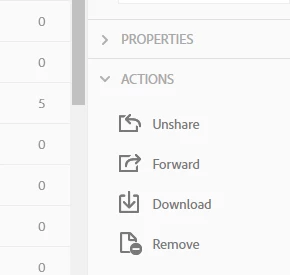
3- Select "Unshare" underthe Actions.

4- Now, if the end user will click on the link then the "Page Not Found" message would appear.

Let us know if this works.

Regards,

Akanchha

1 reply

AkanchhaS8194121
AkanchhaS8194121Correct answer
Legend
July 5, 2018

Hi Mikecai,

If Iunderstand correctly, you have shared a document link using Adobe Scan app and now would like to unshare the file?

This can be done, but online via web browser https://cloud.acrobat.com/sentfiles  not through the Adobe Scan.

1- Login to web https://cloud.acrobat.com/sentfiles

2- Select the file that you have shared as link.

3- Select "Unshare" underthe Actions.

4- Now, if the end user will click on the link then the "Page Not Found" message would appear.

Let us know if this works.

Regards,

Akanchha

Participant
April 10, 2019

No funciona. En la web no aparecen los documentos que se han compartido en la aplicación de adobe scan como propios, así que solo se puede eliminar el vínculo pero no el archivo. Lo único q deja hacer és eliminar el documento de la app, pero a través del link se puede ver igual.