Exit
  • Global community
    • Language:
      • Deutsch
      • English
      • Español
      • Français
      • Português
  • 日本語コミュニティ
  • 한국 커뮤니티
0

Can't Download Apps Because of Error Code P22

Guest
Mar 22, 2020 Mar 22, 2020

Hi. I have a case-sensitive computer, and I am trying to download Adobe apps. I created a non-case sensitive drive on my computer, and I am trying to download the apps to the drive. However, they just keep downloading to my computer, then giving me the P22 error. Every post I've read says "download the Adobe Apps Manager thingy and change the download location". Well, I'd do that but as I said before:
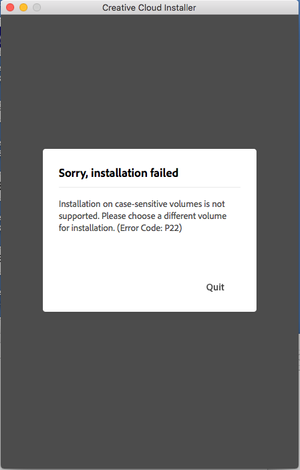
Screen Shot 2020-03-22 at 7.07.25 AM.png

How do I change the installation volume? All it says is 'Quit'!

TOPICS
Creative Cloud , Installation
260
Translate
Report
Community guidelines
Be kind and respectful, give credit to the original source of content, and search for duplicates before posting. Learn more
community guidelines
LEGEND ,
Mar 22, 2020 Mar 22, 2020
LATEST

You need a case insensitive system volume too. Consider dual boot if you really need a case sensitive one.

Translate
Report
Community guidelines
Be kind and respectful, give credit to the original source of content, and search for duplicates before posting. Learn more
community guidelines

