


can't reinstall fuse (beta)

Copy link to clipboard
Copied
Hi guys. I accidentally uninstalled fuse and now it won't let me reinstall it. I went to the Adobe website and tried from there but that didn't work either. Any advice? thx


 5
Replies
5
5
Replies
5


Copy link to clipboard
Copied
Maxweinand, in what way is Fuse not installing? Do you receive an error message? What operating system are you attempting to use Fuse CC on?
For information on how to locate the errors recorded within the log files see https://helpx.adobe.com/creative-cloud/kb/troubleshoot-download-install-log-files.html.
Copy link to clipboard
Copied
Jeff_A_Wright Its just not installing. No error messages and nothing. I'm on mac (latest OS version) and have tried to reinstall CC multiple times. Any Ideas?
Copy link to clipboard
Copied
I am sorry to hear that, Maxweinand. If there are no errors, then I have no suggestions on how to resolve the problem. Please contact our support team directly at https://helpx.adobe.com/contact.html so that the error can be discovered and resolved.

Copy link to clipboard
Copied
I have a similar issue. I'm trying to install Fuse for the first time, but the installation process doesn't seem to work. And like Maxweinand, I am not seeing any errors. Here are the steps I took:
Creative Cloud Desktop App
- On macOS Catalina 10.15.3, opened the Creative Cloud desktop app
- Searched for Fuse in the search, found "Fuse (desktop)" app
- Clicked on the card on the search results page:

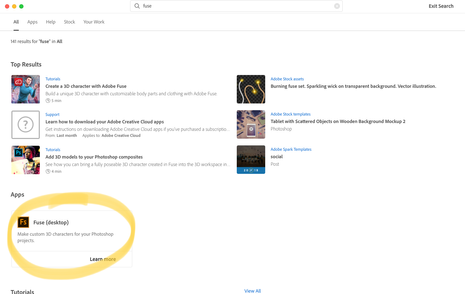
Current behaviour: Was brought back to the Apps page, and nothing happened – no indication that the app is installing. Got the following message when quitting Creative Cloud:
"If you quit now, the following processes will stop working:
• Active installs and updates
Hide Creative Cloud to keep working without interruption. (With 'Cancel', 'Quit', and 'Hide' action buttons)
Expected behaviour: Fuse to be added to my Apps page, showing an installation progress bar to indicate that the app is installing.
Creative Cloud Online
- On macOS Catalina 10.15.3, used Safari 13.0.5 to sign into my Creative Cloud account
- Navigated to the Fuse product page via the search bar (https://creativecloud.adobe.com/apps/all/desktop/pdp/fuse)
- Clicked on the blue 'Install' button
- Dialog opened: "Do you want to allow this page to open “Creative Cloud Desktop App.app”?" (With 'Cancel' and 'Allow' action buttons)
- Clicked Allow
- Received this message in my browser window:
- Creative Cloud desktop app opened
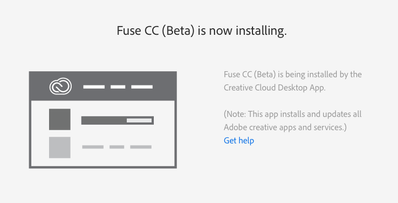
Current behaviour: Same as above.
Expected behaviour: Same as above.

Copy link to clipboard
Copied
Having the exact same issue as above... just a loop of finding the icon, selecting it and being taken back to an app install screen where Fuse isn't an option.


 AdChoices