Copy link to clipboard
Copied
Hi,
I'm trying to install Creative Cloud on my iMac and the installation keeps failing.
Here is the message I get:
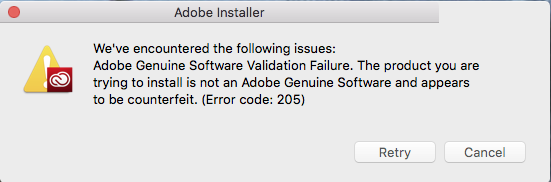
I've read the faqs, and have tried to disable my computer's firewall as well as Avast. I've tried installing multiple times and it's still not working.
System specs:
OS X El Cpitan Version 10.11.6 (15G31)
Processor: 2.7 GHz Intel Core i5
Memory: 16 GB 1600 MHz DDR3
Graphics: NVIDIA GeForce GT 640M 512 MB
Any advice?
Thanks!

Creative Cloud Help / Error downloading Creative Cloud applications
http://helpx.adobe.com/creative-cloud/kb/error-downloading-cc-apps.html
Copy link to clipboard
Copied
Creative Cloud Help / Error downloading Creative Cloud applications
http://helpx.adobe.com/creative-cloud/kb/error-downloading-cc-apps.html
Copy link to clipboard
Copied
Thank you. I just resolved this, it may have had to do with the version, I found a link to another Creative Cloud installer in the forums.
Copy link to clipboard
Copied
So you had to find an older version of the CC app in order for it to update properly vs. the download on the CC downloads page?
I'm having this same issue trying to update the CC app. It stops about 41% into updating, and I've tried downloading a new installer on a couple different browsers.
Do I have to wipe my computer of anything Adobe and try again?
Copy link to clipboard
Copied
You're welcome
Copy link to clipboard
Copied
Moving to Creative Cloud Download & Install​
Get ready! An upgraded Adobe Community experience is coming in January.
Learn more

