Exit
  • Global community
    • Language:
      • Deutsch
      • English
      • Español
      • Français
      • Português
  • 日本語コミュニティ
  • 한국 커뮤니티
0

help needed to cancel subscription

New Here ,
Aug 07, 2018 Aug 07, 2018

hello. can you help me on how to cancel my account?

the product i subscribed is Adobe Acrobat Pro DC with services (one-year) and i thought it has a yearly payment only and not a monthly payment. i just want to cancel it now.

i have read the customer support but the instructions are not applicable. i have clicked the Manage Account but the page doesnt have a 'cancel subscription" button.

anyone from the group can help me about this?

thank you

TOPICS
Creative Cloud
510
Translate
Report
Community guidelines
Be kind and respectful, give credit to the original source of content, and search for duplicates before posting. Learn more
community guidelines

correct answers 1 Correct answer

Community Expert , Aug 08, 2018 Aug 08, 2018

Please take a look here:

How to cancel your Adobe Creative Cloud plan or membership 

If this isn't help, try to enable popups and cookies in your browser or use another browser.

If this doesn't help the contact Adobe Support (click below).

Be sure to remain signed in with your Adobe ID before accessing the link below

Creative Cloud support (all Creative Cloud customer service issues)

https://helpx.adobe.com/contact/support.html

(Chat help: Mon - Fri  5am - 7pm  (US Pacific Time) <=== NOTE DAYS AND TIM

...
Translate
Community Expert ,
Aug 08, 2018 Aug 08, 2018

Please take a look here:

How to cancel your Adobe Creative Cloud plan or membership 

If this isn't help, try to enable popups and cookies in your browser or use another browser.

If this doesn't help the contact Adobe Support (click below).

Be sure to remain signed in with your Adobe ID before accessing the link below

Creative Cloud support (all Creative Cloud customer service issues)

https://helpx.adobe.com/contact/support.html

(Chat help: Mon - Fri  5am - 7pm  (US Pacific Time) <=== NOTE DAYS AND TIME)

My System: Intel i7-8700K - 64GB RAM - NVidia Geforce RTX 3060 - Windows 11 Pro 25H2 -- LR-Classic 15 - Photoshop 27 - Nik Collection 8 - PureRAW 5 - Topaz Photo

Translate
Report
Community guidelines
Be kind and respectful, give credit to the original source of content, and search for duplicates before posting. Learn more
community guidelines
New Here ,
Aug 08, 2018 Aug 08, 2018

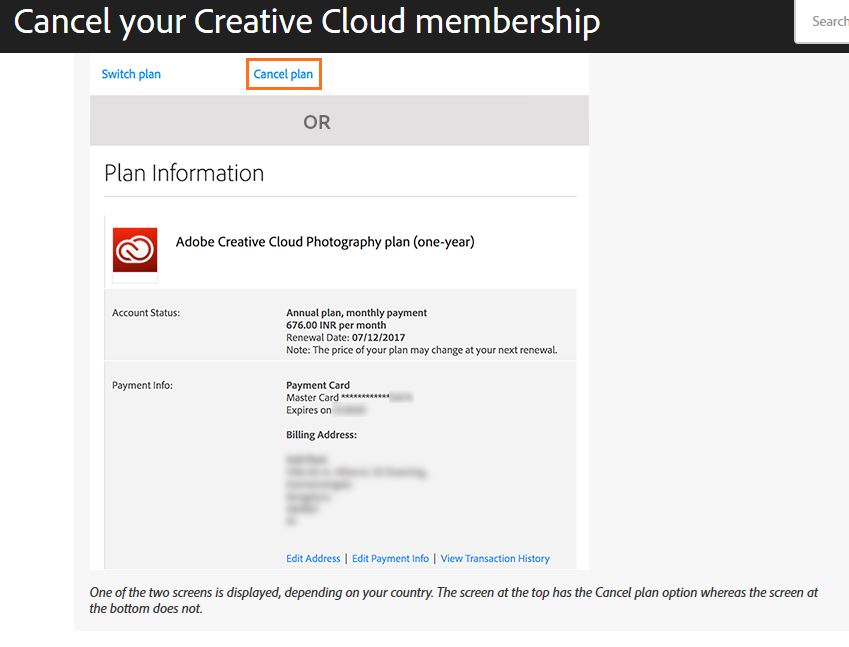
i have followed that link you provided sir, and as you can see on the image i attached below, the screen/image that displays after following instruction 3 is the image indicated in image 2. There is no "cancel plan" button. so what to do next? that is my concern.Capture.JPG

Translate
Report
Community guidelines
Be kind and respectful, give credit to the original source of content, and search for duplicates before posting. Learn more
community guidelines
Community Expert ,
Aug 09, 2018 Aug 09, 2018
LATEST

a76371896  schrieb

...

so what to do next?

...

As a I worte in my answer you have to contact the Adobe support if the steps in the linked document doesn't help

My System: Intel i7-8700K - 64GB RAM - NVidia Geforce RTX 3060 - Windows 11 Pro 25H2 -- LR-Classic 15 - Photoshop 27 - Nik Collection 8 - PureRAW 5 - Topaz Photo
Translate
Report
Community guidelines
Be kind and respectful, give credit to the original source of content, and search for duplicates before posting. Learn more
community guidelines