Exit
  • Global community
    • Language:
      • Deutsch
      • English
      • Español
      • Français
      • Português
  • 日本語コミュニティ
  • 한국 커뮤니티
0

Re: Error Code: U44M2P7 When trying to update Camera Raw

New Here ,
Apr 08, 2018 Apr 08, 2018

Hi

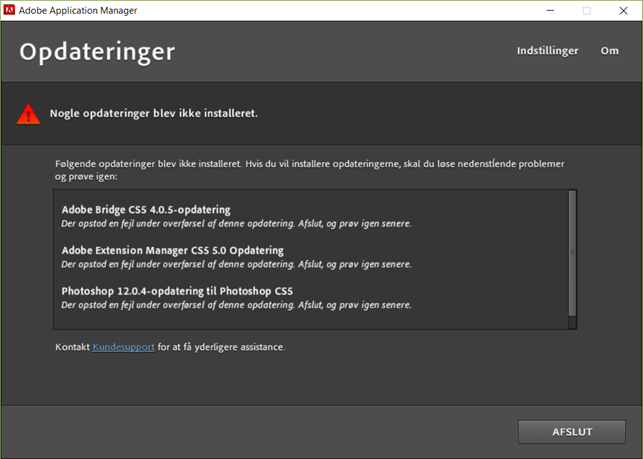
I do get these errors when saying yes to an pop-up with update.

Nobody seems to know about this.

I am working on a HP, win 10, Intel corei7 etc.

Why

389
Translate
Report
Community guidelines
Be kind and respectful, give credit to the original source of content, and search for duplicates before posting. Learn more
community guidelines

correct answers 1 Correct answer

Adobe Employee , Apr 09, 2018 Apr 09, 2018

(Branched out as a new thread)

Hi Mortens53982975,

Could you please translate the error message written in the screenshot to English for us? That would be really helpful in understanding and resolving the issue.

If you are getting the same error message as mentioned in the above post "Error Code: U44M2P7 " then I would recommend trying the troubleshooting given here to resolve it: "Installation failed" error U44M1P7 with Adobe Creative Cloud or Adobe Creative Suite 6 updates"

Let us know if this hel

...
Translate
Adobe Employee ,
Apr 09, 2018 Apr 09, 2018
LATEST

(Branched out as a new thread)

Hi Mortens53982975,

Could you please translate the error message written in the screenshot to English for us? That would be really helpful in understanding and resolving the issue.

If you are getting the same error message as mentioned in the above post "Error Code: U44M2P7 " then I would recommend trying the troubleshooting given here to resolve it: "Installation failed" error U44M1P7 with Adobe Creative Cloud or Adobe Creative Suite 6 updates"

Let us know if this helps.

Translate
Report
Community guidelines
Be kind and respectful, give credit to the original source of content, and search for duplicates before posting. Learn more
community guidelines