Exit
  • Global community
    • Language:
      • Deutsch
      • English
      • Español
      • Français
      • Português
  • 日本語コミュニティ
  • 한국 커뮤니티
0

Update installation failed, Photoshop CS6

LEGEND ,
Sep 26, 2015 Sep 26, 2015

I am a creative cloud subscriber, I have the latest Photoshop and Lightroom installed and running without problems. I also have Photoshop CS6 installed. This morning the creative class application manager indicated an update for Photoshop CS6. Installation failed, and this message was displayed
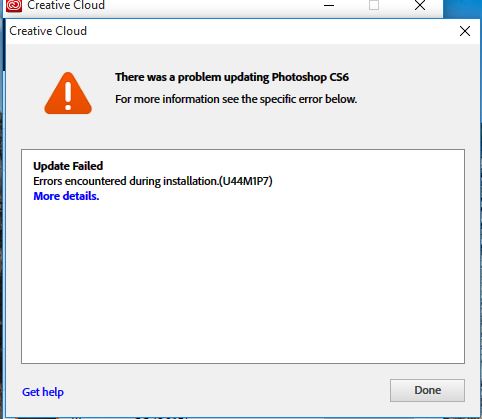
Capture.JPG

I came to this forum and did a search on the error code. I followed the instructions, and renamed the folder. I tried the installation again, and it failed again. It created a new folder with the same name as the one I deleted, but there were only four files and no subfolders. The one that I renamed has a subfolder have a lot more files in the main folder. Should I delete the new folder and rename the old one to what it should be? Incidentally, I'm using Windows 10, 8 GB RAM, integrated graphics (no graphics card).

548
Translate
Report
Community guidelines
Be kind and respectful, give credit to the original source of content, and search for duplicates before posting. Learn more
community guidelines
LEGEND ,
Sep 26, 2015 Sep 26, 2015

Sorry, it should have read creative cloud application manager.

Added later: I did rename the old folder back to what it should be (of course, renaming the new one). I haven't done a lot of testing, but Photoshop CS6 seems to function properly. It opened a raw file into Camera Raw. I didn't use Bridge. Maybe I should just not do Photoshop CS6 updates since it's working. I'm only holding onto it in the very unlikely case that I ever drop the creative cloud subscription. I don't expect that to ever happen.

Translate
Report
Community guidelines
Be kind and respectful, give credit to the original source of content, and search for duplicates before posting. Learn more
community guidelines
Adobe Employee ,
Sep 26, 2015 Sep 26, 2015

Hi James,

Please try the troubleshooting steps mentioned on the following webpage : https://helpx.adobe.com/creative-suite/kb/error-u44m1p7-installing-updates-ccm.html


Regards,

Rahul

Translate
Report
Community guidelines
Be kind and respectful, give credit to the original source of content, and search for duplicates before posting. Learn more
community guidelines
LEGEND ,
Sep 26, 2015 Sep 26, 2015

Thank you very much for the reply. When I did a search on this forum using the error code, other links took me to that very page. I have followed those instructions, the update failed, and the new folder that was created only had four files in it. No subfolders, none of the other files that were in the original folder. It was then that I asked my question.

Windows 10 Home Premium

8 GB RAM

Multiple hard drives

Also running Creative Cloud Photoshop and Lightroom

Translate
Report
Community guidelines
Be kind and respectful, give credit to the original source of content, and search for duplicates before posting. Learn more
community guidelines
Adobe Employee ,
Sep 26, 2015 Sep 26, 2015

and you have tried solution 2 and solution 3 as well, mentioned in the KB Doc?

Translate
Report
Community guidelines
Be kind and respectful, give credit to the original source of content, and search for duplicates before posting. Learn more
community guidelines
LEGEND ,
Sep 26, 2015 Sep 26, 2015
LATEST

Solution 2 seems to be oriented to Photoshop CC 2015. And I don't want to bother with reinstalling Photoshop CS6 because I'm not really using it for anything right now. As I indicated previously, Photoshop CS6 seems to be functioning as it is. Also, there are no instructions in that document you referred me to for Windows 10. There was just an update this morning, so I decided to try to run it. I think I'm going to ignore updates to Photoshop CS6 in the future.

Translate
Report
Community guidelines
Be kind and respectful, give credit to the original source of content, and search for duplicates before posting. Learn more
community guidelines