


Copy link to clipboard
Copied
Hi, I am trying to locate the html/css code so that the alert text stays within the box I created. The box is the width of the "page" and currently the code goes "off the page"
Thank you in advance for your professional assistance. Below is the code.
<div class="alert alert-danger">
<button type="button" class="btn btn-link"><strong><h3>INCLEMENT WEATHER POLICY: TEMPLE ISRAEL OF SOUTH MERRICK FOLLOWS THE SAME POLICY AS BELLMORE MERRICK CENTRAL HIGH SCHOOL DISTRICT. CLICK HERE FOR UPDATED INFORMATION <a href="http://www.bellmore-merrick.k12.ny.us/">http://www.bellmore-merrick.k12.ny.us/</a></h3></strong></button></div></div><br />
Carolyn


 1 Correct answer


Buttons are block level elements. And you have way too much text in yours. It will work much better if you keep your button separate from main text. See screenshot illustrating the problem and my solution below,
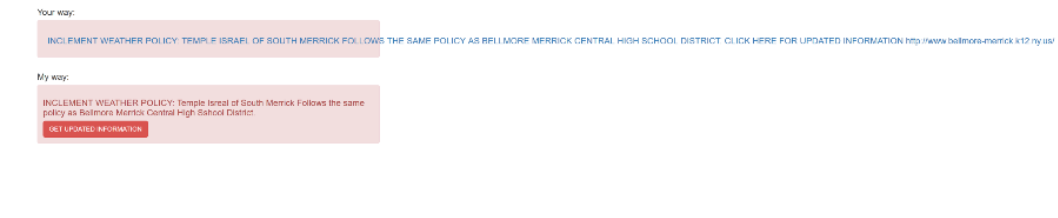
Here's the code I used:
<div class="container-fluid">
<div class="row">
<div class="alert alert-danger">
<h3>INCLEMENT WEATHER POLICY: Temple Israel of South Merrick Follows the same policy as Bellmore Merrick Central High School District. </h3>
<p><a class="btn btn-lg btn-
...
 4
Replies
4
4
Replies
4


Copy link to clipboard
Copied
What is the URL for the problem page?
Copy link to clipboard
Copied
At this time I am recreating the page due to other issues and it is not online.
Copy link to clipboard
Copied
Buttons are block level elements. And you have way too much text in yours. It will work much better if you keep your button separate from main text. See screenshot illustrating the problem and my solution below,

Here's the code I used:
<div class="container-fluid">
<div class="row">
<div class="alert alert-danger">
<h3>INCLEMENT WEATHER POLICY: Temple Israel of South Merrick Follows the same policy as Bellmore Merrick Central High School District. </h3>
<p><a class="btn btn-lg btn-danger" href="http://www.bellmore-merrick.k12.ny.us/">GET UPDATED INFORMATION</a></p>
</div>
</div>
</div>
Copy link to clipboard
Copied
Nancy,
Thank you so much. Thi9s worked perfectly. You seem to have all the answers and thank you for your professionalism.
Wishing you and everyone a very Happy Holidays and New Year.

Get ready! An upgraded Adobe Community experience is coming in January.
Learn more
 AdChoices