


- Home
- Dreamweaver
- Discussions
- Re: Bootstrap component incompatibility
- Re: Bootstrap component incompatibility

Copy link to clipboard
Copied
I'm getting an error "The component is not fully compatible with the current Bootstrap CSS/JS file (lower than V3.0)".
I've searched this forum and followed all the advice for possible solutions. Most of the previous posts with this exact topic are a couple years old.
I have cleared all preferences from exe. file, I'm in standard/live view for everything. DW17CC is up to date, running Windows 10. I get this error when trying to insert any Bootstrap component.
Site is saved and named to local folder.
Thank you in advance,
Laura


 1 Correct answer
I found the solution with the help of Adobe Support via chat and a remote session. Turns out my computer name has a special character in it which is causing the issue. The tech created a new user without any characters and it worked flawlessly.
Thank you all for the help!
Laura

 15
Replies
15
15
Replies
15


Copy link to clipboard
Copied
Have you tried linking to the newest version of Bootstrap css/js
<!-- Latest compiled and minified CSS -->
<link rel="stylesheet" href="https://maxcdn.bootstrapcdn.com/bootstrap/3.3.7/css/bootstrap.min.css" integrity="sha384-BVYiiSIFeK1dGmJRAkycuHAHRg32OmUcww7on3RYdg4Va+PmSTsz/K68vbdEjh4u" crossorigin="anonymous">
<!-- Latest compiled and minified JavaScript -->
<script src="https://maxcdn.bootstrapcdn.com/bootstrap/3.3.7/js/bootstrap.min.js" integrity="sha384-Tc5IQib027qvyjSMfHjOMaLkfuWVxZxUPnCJA7l2mCWNIpG9mGCD8wGNIcPD7Txa" crossorigin="anonymous"></script>
Copy link to clipboard
Copied
I'm assuming I paste this in the head? I tried this and hit save all and got an error "encountered a sharing violation", also the same bootstrap incompatibility error.
Nancy, I do not have the DMX Zone Extension.
Thank you for the responses,
Laura


Copy link to clipboard
Copied
How many versions of Bootstrap and jQuery do you have in your document? You only need one set.
Bootstrap CSS 3.7
jQuery latest
Bootstrap JS 3.7
Remove any others that may be appearing in the code.
Save and Preview in a browser.
Nancy
Copy link to clipboard
Copied
I removed the original bootstrap css link that appeared when I originally opened the bootstrap file and copy/pasted the css portion of code from osgood's post in the head. Save all, tried to insert a bootstrap component and I got the same error.
Does the Javascript portion of code from osgood's post go in the bottom portion of the body?
As you can probably tell I am new to the exciting world of DW. Thank you for your patience.
Laura
Copy link to clipboard
Copied
Which component are you trying to insert?
Copy link to clipboard
Copied
Containers, Buttons, and a couple others I can't remember at the moment. I know it's all of them that I've tried.
Copy link to clipboard
Copied
We need to see your code. Can you copy & paste your code into a web forum reply? Don't use email, it won't come through.
I work with Bootstrap quite a bit in a defined local site folder (C:\myTestSite).
I am able to insert Bootstrap components (at least most of them) without any hicups.
In this example, I created a new Starter page from the Bootstrap Product Template.
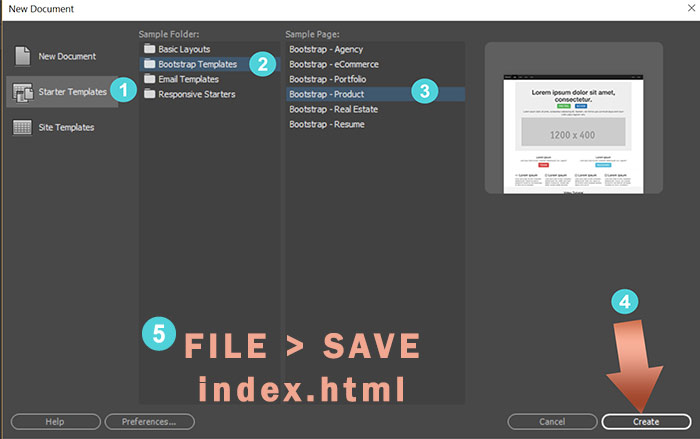
Below is a screenshot of my Files panel after saving the newly created file.
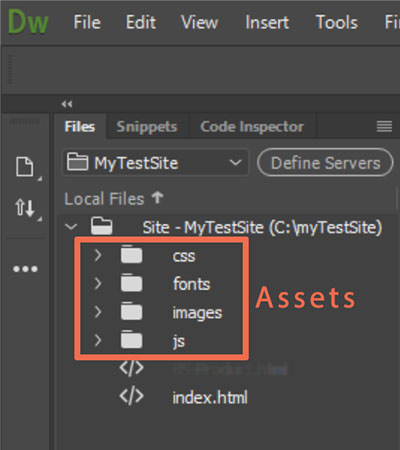
Nancy
Copy link to clipboard
Copied
<!DOCTYPE html>
<html lang="en">
<head>
<meta charset="utf-8">
<meta http-equiv="X-UA-Compatible" content="IE=edge">
<meta name="viewport" content="width=device-width, initial-scale=1">
<title>BootStrap Site</title>
<!-- Bootstrap -->
<!-- Latest compiled and minified CSS -->
<link rel="stylesheet" href="https://maxcdn.bootstrapcdn.com/bootstrap/3.3.7/css/bootstrap.min.css" integrity="sha384-BVYiiSIFeK1dGmJRAkycuHAHRg32OmUcww7on3RYdg4Va+PmSTsz/K68vbdEjh4u" crossorigin="anonymous">
<style type="text/css">
@import url("main.css");
</style>
<!-- HTML5 shim and Respond.js for IE8 support of HTML5 elements and media queries -->
<!-- WARNING: Respond.js doesn't work if you view the page via file:// -->
<!--[if lt IE 9]>
<script src="https://oss.maxcdn.com/html5shiv/3.7.2/html5shiv.min.js"></script>
<script src="https://oss.maxcdn.com/respond/1.4.2/respond.min.js"></script>
<![endif]-->
</head>
<body>
<!-- jQuery (necessary for Bootstrap's JavaScript plugins) -->
<script src="js/jquery-1.11.3.min.js"></script>
<!-- Include all compiled plugins (below), or include individual files as needed -->
<script src="js/bootstrap.js"></script>
</body>
</html>
Not sure if it matters, but I didn't use a template like in your screenshots, I created new without. Hope this helps!
Thanks again,
Laura
Copy link to clipboard
Copied
I cleaned up the comments and other nonsense that DW inserts.
I used the default Bootstrap CSS file that DW creates for you.
And then I inserted a Carousel component inside the ROW div.
It worked great for me. This is the resulting code.
<!DOCTYPE html>
<html lang="en">
<head>
<meta charset="utf-8">
<meta http-equiv="X-UA-Compatible" content="IE=edge">
<meta name="viewport" content="width=device-width, initial-scale=1">
<title>BootStrap Site</title>
<!-- Bootstrap -->
<link href="css/bootstrap.css" rel="stylesheet">
<!--custom css-->
<link href="main.css" rel="stylesheet">
</head>
<body>
<div class="container">
<div class="row">
<!--INSERTED CAROUSEL COMPONENT HERE-->
<div id="carousel1" class="carousel slide" data-ride="carousel">
<ol class="carousel-indicators">
<li data-target="#carousel1" data-slide-to="0" class="active"></li>
<li data-target="#carousel1" data-slide-to="1"></li>
<li data-target="#carousel1" data-slide-to="2"></li>
</ol>
<div class="carousel-inner" role="listbox">
<div class="item active"><img src="images/Carousel_Placeholder.png" alt="First slide image" class="center-block">
<div class="carousel-caption">
<h3>First slide Heading</h3>
<p>First slide Caption</p>
</div>
</div>
<div class="item"><img src="images/Carousel_Placeholder.png" alt="Second slide image" class="center-block">
<div class="carousel-caption">
<h3>Second slide Heading</h3>
<p>Second slide Caption</p>
</div>
</div>
<div class="item"><img src="images/Carousel_Placeholder.png" alt="Third slide image" class="center-block">
<div class="carousel-caption">
<h3>Third slide Heading</h3>
<p>Third slide Caption</p>
</div>
</div>
</div>
<a class="left carousel-control" href="#carousel1" role="button" data-slide="prev"><span class="glyphicon glyphicon-chevron-left" aria-hidden="true"></span>
<span class="sr-only">Previous</span></a><a class="right carousel-control" href="#carousel1" role="button" data-slide="next">
<span class="glyphicon glyphicon-chevron-right" aria-hidden="true"></span><span class="sr-only">Next</span></a></div>
<!--/row--></div>
<!--/container--></div>
<script src="js/jquery-1.11.3.min.js"></script>
<script src="js/bootstrap.js"></script>
</body>
</html>
Copy link to clipboard
Copied
Thank you for the reply, Nancy. Using your instructions/code exactly I'm still getting the same error. I can click yes on the error and it will allow me to continue but surely there is an underlying issue. It occurs with 17 BS components I tried. Just in case my error is different than others, mine reads:
"The component is not fully compatible with the current Bootstrap CSS/JS file (lower than v3.0). A new Bootstrap CSS/JS file will be created and linked from the document," Do you want to continue?
I can click yes and the code and BS component are inserted but I can't imagine this is the way DW is supposed to work with BS.
Thank you,
Laura
Copy link to clipboard
Copied
Do you have all the latest updates for DW?
I'm curious which version of Bootstrap is in your CSS and JS files. It should be the latest.
/*!
* Bootstrap v3.3.7 (http://getbootstrap.com)
Copy link to clipboard
Copied
Yes, DW is updated, I triple checked. I tried uninstalling and reinstalling to see if that did anything but it didn't.
the version of Bootstrap in my CSS and JS files are exactly as you listed above.
Not sure what the next step is. Thanks again for your time,
Laura
Copy link to clipboard
Copied
I found the solution with the help of Adobe Support via chat and a remote session. Turns out my computer name has a special character in it which is causing the issue. The tech created a new user without any characters and it worked flawlessly.
Thank you all for the help!
Laura
Copy link to clipboard
Copied
Thanks for that update. I'm glad Tech Support identified the problem.
Nancy
Copy link to clipboard
Copied
By any chance do you have the Bootstrap extension from DMX Zone? Disable it. It's a conflict with the latest Bootstrap versions.
Nancy

Get ready! An upgraded Adobe Community experience is coming in January.
Learn more
 AdChoices