


- Home
- Dreamweaver
- Discussions
- Re: Chronic problem uploading files to server
- Re: Chronic problem uploading files to server
Chronic problem uploading files to server

Copy link to clipboard
Copied
[Nancy was extremely helpful to me in November. I hope she won't mind assisting me resolve a new DW CC problem that I've experienced daily for seven months.]
My problem deals with DW's uploading of files (which are generally small "HTML" and "jpg" files). This has been happening with v. 21.0 and v. 20.2. I removed my antivirus apps and browser extensions but those efforts weren't helpful. I also deleted and replaced Dreamweaver's cache files but that was also ineffective in correcting this problem.
For the past two weeks, I've e-communicated with my host to see if it was a server-side problem. It tweaked a number of ht-access settings and the mod_expires extension but the problem continues, every time I attempt to upload one or more of my local files to the server.
Basically, after selecting the files I want to upload, I click the upload icon to put the files; after a few seconds, I get a notice saying: "File activity incomplete." It shows how many of the selected files were NOT completely uploaded. I also get a small, white circular "failure" icon (that you can see in my attached screenshots) corresponding to those files that weren't uploaded on each attempt.
I then clicked the upload icon again, waited a few seconds, and found a smaller number of the same files that were not uploaded. I make this repeated uploaded attempt numerous times until all the selected files have been confirmed as "File activity complete."
Please see the progression in the following screenshots. Thanks.
First screenshot: Seventeen files failed to upload.

Screenshot #2: Nine files failed to upload.

Screenshot #3: Four files failed to upload.

Screenshot #4: One file failed to upload.

. . . The following upload attempt successfully uploaded to the server.
It seems to me that what my server technician says has merit: "Since the FTP connection is working fine and the files are getting uploaded after some tries, this may be due to issues with Dreamweaver, not the FTP server."
Add to that the following details that I discovered this morning when attempting to upload files from a different directory.

It cites this in the "Details" drop-down section: "Internal data error. Failed to receive network data."
Does that detail help focus on the problem's cause?
I hope very much that this problem has already been evaluated and its resolution has been disclosed on this forum. Correcting this chronic problem will save me lots of wasted time during my daily workflow.
Thanks, in advance, for your help in resolving this issue.
Warren


 17
Replies
17
17
Replies
17


Copy link to clipboard
Copied
Maybe the problem isn't DW.
Do you have plenty of empty server space? If your server is full, it won't accept new files.
Can you upload files with a dedicated S/FTP client like FileZilla?
Copy link to clipboard
Copied
Hello, Nancy!
I'm glad to receive your prompt e-reply.
Regarding your first inquiry, my server technicians checked capacity the moment I presented the problem to them. They saw no concern with empty server space. Am I correct that this next screenshot confirms to you that there's sufficient empty space on my server?

Regarding your second suggestion, I've not tried FileZilla to test this uploading concern. I'd dabbled with it a couple of years ago but found it much more cumbersome to learn how to use than DW's built-in FTP process.
Is there an extremely easy-to-download-and-utilize FTP client from which to choose for this next simple uploading test?
Warren
Copy link to clipboard
Copied
You must be on a no-frills hosting plan because 10GB of server space is nothing. Most shared hosting plans offer 100GB or more.
The only way to rule out a problem with DW is to find out if you can upload with another FTP app. There are several. Use whichever one you like. FileZilla is the one I prefer because it's free, fast and simple to use. The interface is a lot like DW's Expanded Files panel with remote files on one side and local files on the other.
Open FTP client.
Log-in to remote server and directory.
Select files/folders from local hard drive.
Right-click and select upload.
If everything works as expected, you have a reliable way to transfer files while you continue to troubleshoot Dreamweaver. If it doesn't work, you know the problem isn't with Dreamweaver.
Copy link to clipboard
Copied
Yes, my server account is small. I maintain two directories for local churches. I have no clients. Hopefully, there's no problem with my having a tiny no-frills hosting plan, right?
Regarding setting up an FTP client for this test, I'll do that when my workload provides the requisite time that it'll take me to familiarize myself with the process. I appreciate your including the four-step uploading directions for the FTP client; that should help
I'll get back to you soon, I hope.
Warren
Copy link to clipboard
Copied
There are plenty of low cost, Linux hosting plans that offer unlimited storage. When hosts scrimp on storage that tells me they're probably scrimping on other things too. It couldn't hurt to shop around.
https://www.pcmag.com/picks/the-best-web-hosting-services
Copy link to clipboard
Copied
Hello, again, Nancy:
I've downloaded and opened FileZilla and need your guidance before beginning the process.
Apparently, because I'd attempted to use FileZilla a few years ago, when I double-click the FZ icon, a page opened that included files from two years ago (as well as today, even though I haven't activated FZ ), as shown on this next screenshot.

How do I safely delete the old files so I can start with a completely clean screen?
And how do I determine the Host identity and User Name?
Warren
Copy link to clipboard
Copied
Just create a new site. File > Site Manager > Click the New Site button. Enter your S/FTP log-in credentials.
https://wiki.filezilla-project.org/Using
Copy link to clipboard
Copied
Hi, Nancy:
I followed you straightforward suggestion and successfully activated FileZilla. I then successfully uploaded files from a few directories using FZ, as my initial screenshots attest. I then attempted to upload one of the same directories using DW CC's built-in FTP. Sadly, the same repetitive incomplete transfers occurred.
After you review the screenshots, kindly advise me what their results imply. Then suggest who to contact so I can hopefully resolve and correct this chronic nuisance. Thanks, Nancy.
Screenshot #1 for my "Amazing Grace" directory reveals success for FZ.

Screenshot #2 for my "Carry Your Cross" directory reveals success for FZ.

Screenshot #3 for "Acts" directory reveals success for FZ.

Screenshot #4 for "Acts" directory reveals "no transfer failures" using FZ.

Screenshot #5 for my "Acts" directory reveals the first of four failure attempts using DW CC's FTP.

Screenshot #6 for my "Acts" directory reveals the second of four failure attempts using DW CC's FTP.

Screenshot #7 for my "Acts" directory reveals the third of four failure attempts using DW CC's FTP.

Screenshot #8 for my "Acts" directory reveals the fourth of four failure attempts using DW CC's FTP. The fifth attempt transferred files completely.

Kindly advise me of what these result imply and what I'm to do next and whom I'm to contact to correct this chronic problem.
Many thanks, in advance, Nancy.
Warren
Copy link to clipboard
Copied
Dreamweaver's FTP is not compatible with all hosting plans. Try connecting DW to a different web host.
Meanwhile, keep using Filezilla.
Copy link to clipboard
Copied
Do you have a suggested host or two that I can use for this testing exercise?
Warren
Copy link to clipboard
Copied
Here's one:
A Google search will reveal many more...
Copy link to clipboard
Copied
Sorry, but afterv spending almost an hour on www.000webhost.com, I cannot find how to get started. It continually prompts me to upgrade, upgrade, upgrade. See screenshot.
How do I get started with 000webhost?

Copy link to clipboard
Copied
Try using a different browser.
What happens when you click the + sign to CREATE A NEW site?
Did you receive an e-mail with your new site's FTP log-in credentials?
Copy link to clipboard
Copied
Okay . . .
I've opened Chrome for Mac.
When I click the "+ Create New Site" button, this is what appears . . .

When I click the "Not now" link on the upgrade window, it returns to this screen. . .

Yes, I received acknowledgment from 000webhost, shown here. . .

Does that hopefully help you see the snag I continually run into attempting to access 000webhost.com? Hope so!
Copy link to clipboard
Copied
Maybe I'm missing something but it looks like you have already created a site.
So open the e-mail they sent you.
Create a new site definition in Dreamweaver (Site > New Site...)
Under Servers, enter the new site's S/FTP log-in credentials and hit the TEST button to confirm you can connect to their server.
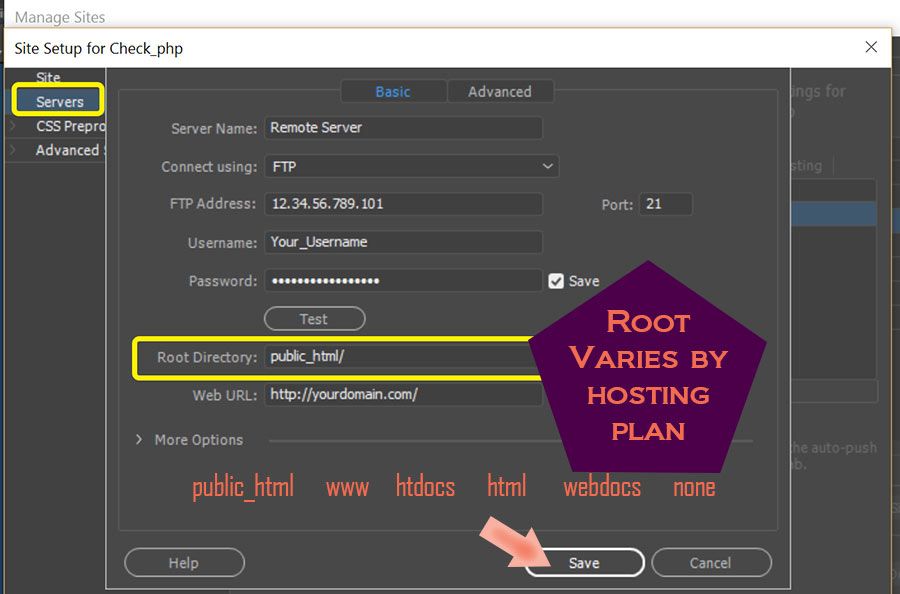
If all goes well, you should be able to upload files to their server from your DW Files Panel (UP arrow).
Copy link to clipboard
Copied
Responding to your first inquiry, I opened the e-message. Here it is in its entirety. . .

When I clicked "Start Building," the same winodw appears showing four upgrade options (see the screenshot in y previous post).
Regarding your next suggestion to "Create a new site definition in Dreamweaver ("Site > New site"), am I to start with an empty TEST site? If so, the local site folder will be empty.
Or am I to define an existing site? I cannot tell intuitively what you're suggesting in your short sentence. Kindly elaborate so I won't face further obstacles getting this test effort underway.
Thank you.
Copy link to clipboard
Copied
"am I to start with an empty TEST site? If so, the local site folder will be empty."
=========
You answered your own question. Do whatever you think is best.
For questions regarding 000webhost, consult their online FAQ.
https://www.000webhost.com/website-faq

Get ready! An upgraded Adobe Community experience is coming in January.
Learn more
 AdChoices