


Copy link to clipboard
Copied
Hello, I use Dreamweaver to open and edit .xml files (for translations), but in the last version, Dreamweaver break the coloring code at some point on the page. Can you help me to restore the complete coloring of the code on the page?
Thanks


 1 Correct answer
I do not know exactly how, but the problem, which IMHO was related to privacy and to Sierra (opening of a downloaded file), has been solved. In any case I will consider buying a dedicated software. Thank you all 

 8
Replies
8
8
Replies
8


Copy link to clipboard
Copied
XML code coloring looks OK on my end. Are you sure your XML syntax is correct?

Copy link to clipboard
Copied
Copy link to clipboard
Copied
I think sintax is ok. I tried with an old file already translated. Everything ok up to a certain point on the page, then white code. I I can‘t touch the code, but I've never had any problems. Thanks!

Copy link to clipboard
Copied
I don't think that Dreamweaver is the tool to use if you need to work on very large XML files, you are better off using a dedicated XML editor like Adobe FrameMaker (2017 release) - XML/DITA Editor
Copy link to clipboard
Copied
No doubt, but I've always used Dreamweaver without problems. The problem occurred with the latest Sierra update. Thanks for your help.

Copy link to clipboard
Copied
Check the document type dropdown menu in the bottom right of the document window to see what code-coloring rules are set for the page...
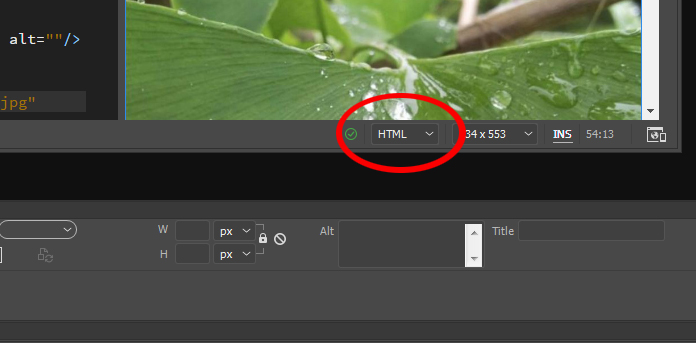
...if it's not set to XML, see if changing it makes a difference for you...


Copy link to clipboard
Copied
if you really need to handle serious work on XML environment... since many years I use XMLSPy... and never was disapointed
Correct answer by
silviacri
AUTHOR
Copy link to clipboard
Copied
I do not know exactly how, but the problem, which IMHO was related to privacy and to Sierra (opening of a downloaded file), has been solved. In any case I will consider buying a dedicated software. Thank you all 

Get ready! An upgraded Adobe Community experience is coming in January.
Learn more
 AdChoices