
Salir
  • Comunidad global
    • Idioma:
      • Deutsch
      • English
      • Español
      • Français
      • Português
  • 日本語コミュニティ
  • 한국 커뮤니티

Connect Cloudways and WooCommerce

Nuevo aquí ,
Jan 26, 2021 Jan 26, 2021

Hi there,


is there anyone who has experiences connecting Cloudways via Dreamweaver? Unfortunately the sftp connection is not working properly and the Cloudways supported is convinced that the issue is regarding the Dreamweaver application?


Kindest regards

Abidin

1.4K
Traducir
Informe
Directrices de la comunidad
Sé amable y respetuoso, muestra títulos de crédito de la fuente de contenido original y busca duplicados antes de publicar. Más información
community guidelines
Community Expert ,
Jan 26, 2021 Jan 26, 2021

If you are unable to connect you can click on Site-->Advanced-->FTP Log the next time you try to connect and let us know what error(s) you are receiving.


Also try connecting with a free FTP client like a FileZilla and see if you run into the same issue.  This data can help us determine whether it is configuration with the FTP settings or whether the issue is with the host.

Traducir
Informe
Directrices de la comunidad
Sé amable y respetuoso, muestra títulos de crédito de la fuente de contenido original y busca duplicados antes de publicar. Más información
community guidelines
Nuevo aquí ,
Jan 27, 2021 Jan 27, 2021

Thank you very much for your quick reply. I was able to connect via Filezilla and due to that Dreamweaver irritated me and I was thinking maybe the method of filling the credential could case the issue. Anyway, it seemed like the server somehow blocked the connection and I could solve this solution with placing my IP into a whitelist.

Traducir
Informe
Directrices de la comunidad
Sé amable y respetuoso, muestra títulos de crédito de la fuente de contenido original y busca duplicados antes de publicar. Más información
community guidelines
Community Expert ,
Jan 26, 2021 Jan 26, 2021

As Ben M said, use FileZilla.  It's free. 

https://filezilla.org


If you cannot connect with FileZilla, then you know the problem isn't with DW.  If FileZilla does connect, then you have an alternate way to upload files to your hosting server while you continue troubleshooting with DW.


Nancy O'Shea— Product User, Community Expert & Moderator
Traducir
Informe
Directrices de la comunidad
Sé amable y respetuoso, muestra títulos de crédito de la fuente de contenido original y busca duplicados antes de publicar. Más información
community guidelines
Community Expert ,
Jan 26, 2021 Jan 26, 2021

WooCommerce does NOT connect with Dreamweaver in any way.  WooCommerce is a 3rd party eCommerce platform for WordPress.

https://woocommerce.com/


Nancy O'Shea— Product User, Community Expert & Moderator
Traducir
Informe
Directrices de la comunidad
Sé amable y respetuoso, muestra títulos de crédito de la fuente de contenido original y busca duplicados antes de publicar. Más información
community guidelines
Nuevo aquí ,
Jan 27, 2021 Jan 27, 2021

I was thinking maybe there is a solution to connect a proper DEV site with live preview and stuff. Is that possible via Dreamweaver?

Traducir
Informe
Directrices de la comunidad
Sé amable y respetuoso, muestra títulos de crédito de la fuente de contenido original y busca duplicados antes de publicar. Más información
community guidelines
Community Expert ,
Jan 27, 2021 Jan 27, 2021

Yes you can define multiple servers within DW.  Just go to the Sites window and you will have the option to create it here, or also connect with a git repository if needed.

Traducir
Informe
Directrices de la comunidad
Sé amable y respetuoso, muestra títulos de crédito de la fuente de contenido original y busca duplicados antes de publicar. Más información
community guidelines
Nuevo aquí ,
Jan 27, 2021 Jan 27, 2021

I managed to set up everything but I am not sure how to get live previews? In example if I modify some CSS files, or PHP or JS? It would be amazing if I can get a live preview straight in the browser. Is that also possible?

Traducir
Informe
Directrices de la comunidad
Sé amable y respetuoso, muestra títulos de crédito de la fuente de contenido original y busca duplicados antes de publicar. Más información
community guidelines
Community Expert ,
Jan 27, 2021 Jan 27, 2021

You need a local testing server to preview PHP files locally.

  1. Install Xampp, Mamp or Wamp for Win or Mac.
  2. Define your local testing server in DW.


Nancy O'Shea— Product User, Community Expert & Moderator
Traducir
Informe
Directrices de la comunidad
Sé amable y respetuoso, muestra títulos de crédito de la fuente de contenido original y busca duplicados antes de publicar. Más información
community guidelines
Nuevo aquí ,
Jan 27, 2021 Jan 27, 2021

Is there any best practise maybe with a tutorial how to do that, since I never done something like that before.


Kindest regrads Abidin

Traducir
Informe
Directrices de la comunidad
Sé amable y respetuoso, muestra títulos de crédito de la fuente de contenido original y busca duplicados antes de publicar. Más información
community guidelines
Community Expert ,
Jan 28, 2021 Jan 28, 2021
MÁS RECIENTES

Install a local server accoding to the vendor's instructions.


Go to Site > Manage Sites.   See screenshots.

Move your local site folder into your local testing server's default web directory. 

On Wamp the default is www.  On Xampp and Mamp it is htdocs.  For this demonstration, I'm using Wamp server for Windows.
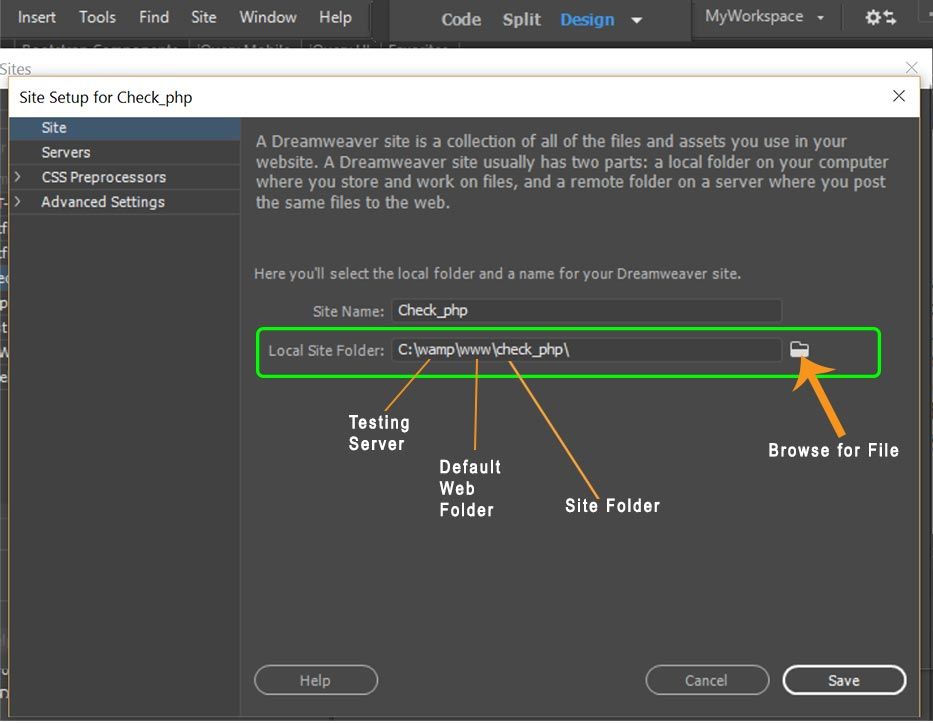
 

Local Site in Local Testing ServerLocal Site in Local Testing Server


Click the plus sign to add a new server definition and name it testing server.
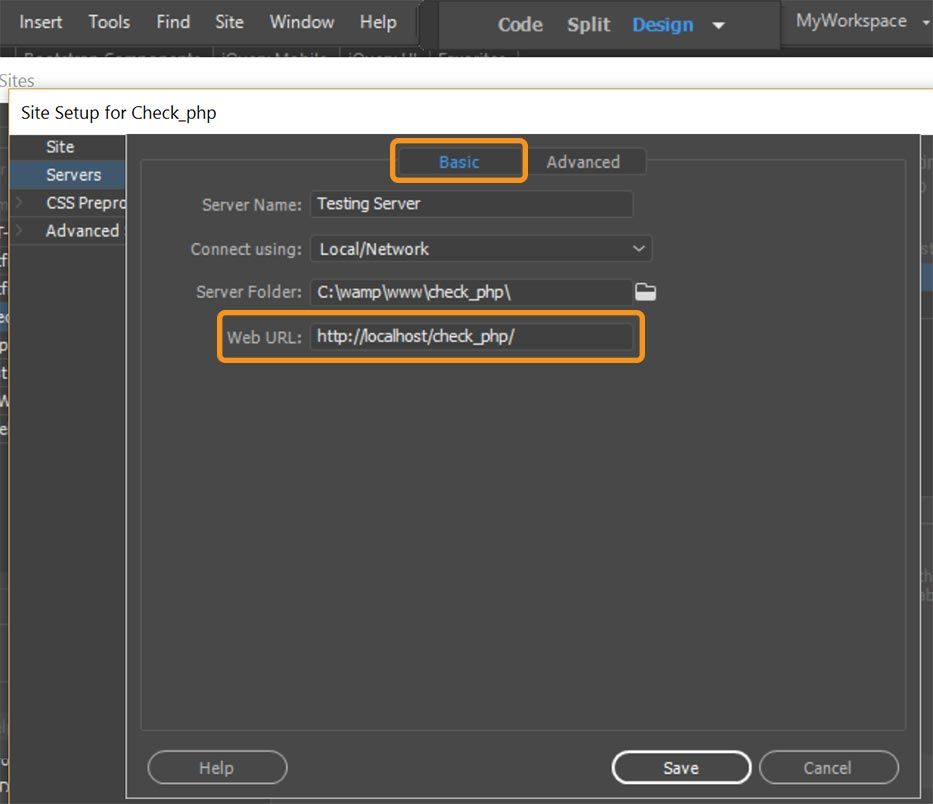
 

Servers > Basic TabServers > Basic Tab


Switch to Advanced tab and enter the server model : PHP MySQL
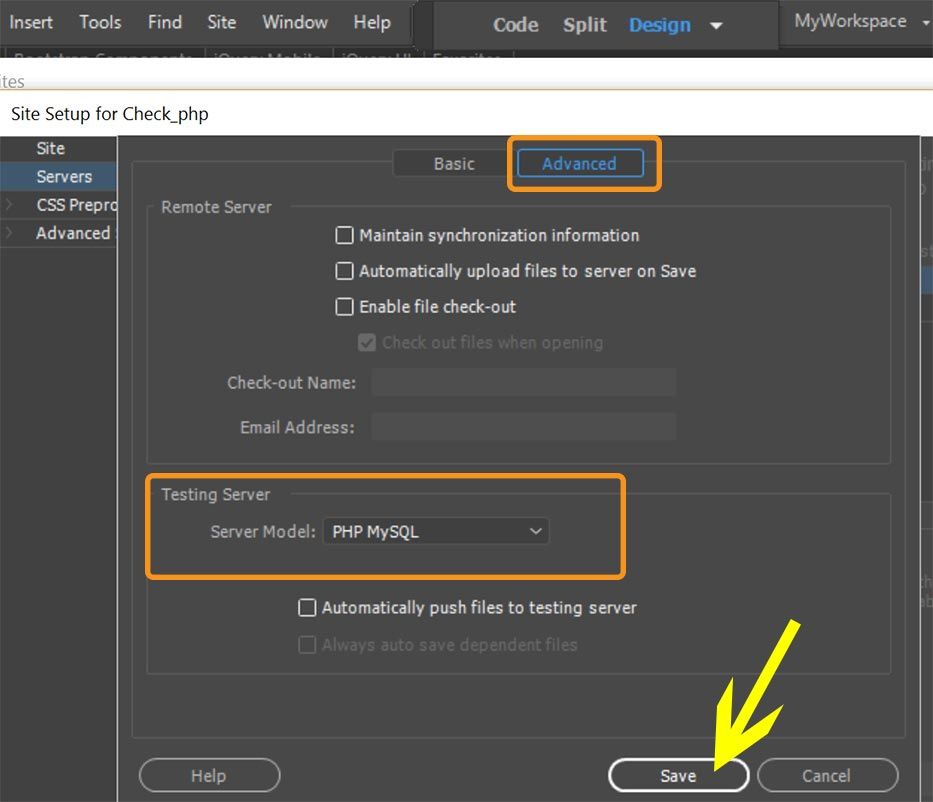
 

Advanced Tab > Server modelAdvanced Tab > Server model


Post back if you need more help.


Nancy O'Shea— Product User, Community Expert & Moderator
Traducir
Informe
Directrices de la comunidad
Sé amable y respetuoso, muestra títulos de crédito de la fuente de contenido original y busca duplicados antes de publicar. Más información
community guidelines
