


Participant
February 9, 2017
해결됨

Dreamweaver 2017 tries to close files when switching applications on Mac

  • February 9, 2017
  • 2 답변들
  • 2916 조회

This appears to be an intermittent bug, but it occurs often.

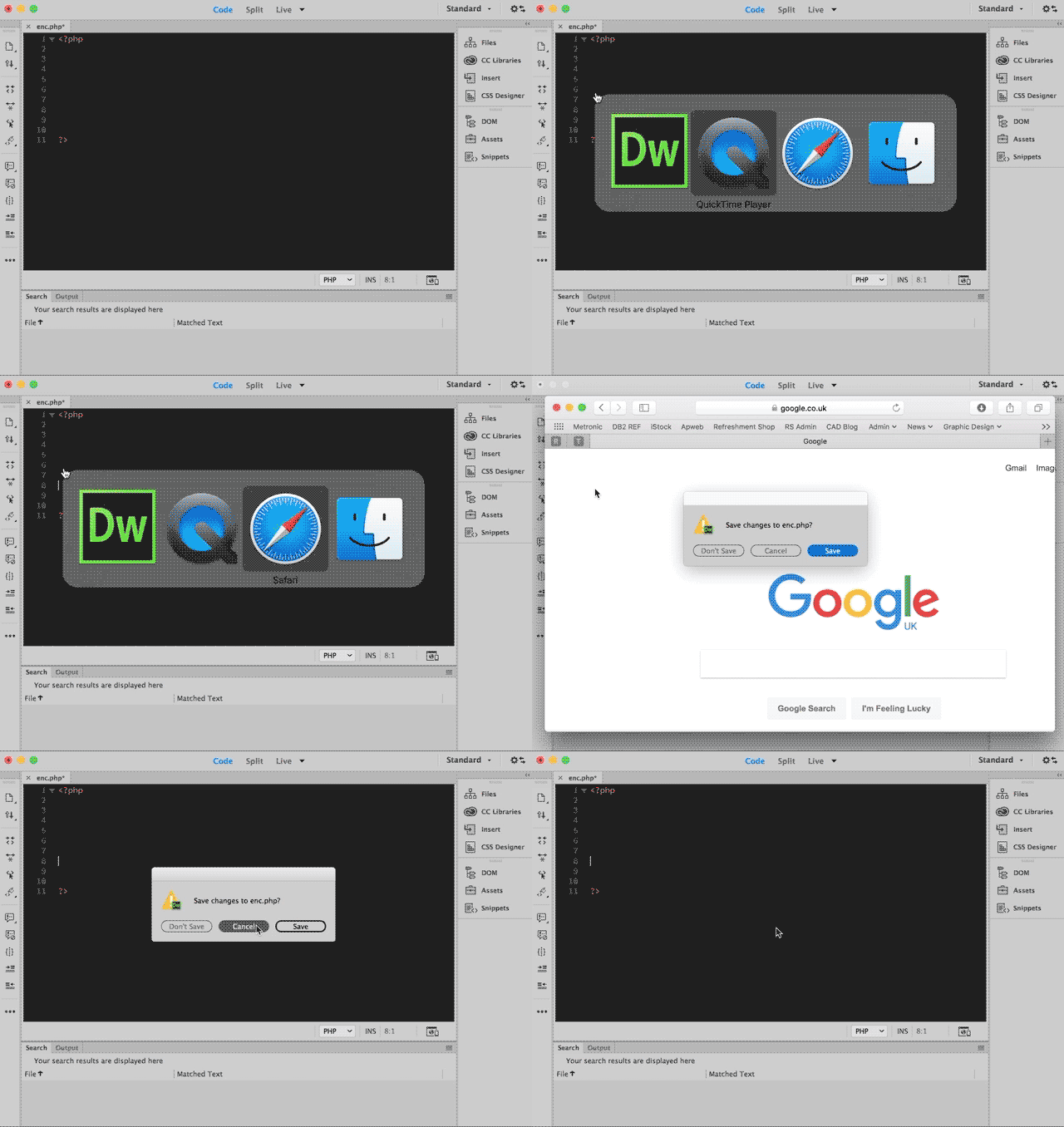
Once the bug starts, If I make a change to a file in Dreamweaver then switch to a different application, Dreamweaver brings up the close file dialogue with the 'Don't Save', 'Cancel' and 'Save' options. Obviously this is quite dangerous, as you could easily select the wrong option while the other application is launching.

Closing and reopening Dreamweaver seems to solve them problem.

Has anyone else experienced this?

Is there anything I can do about it?

Thanks.
이 주제는 답변이 닫혔습니다.
최고의 답변: Niharika Jha

Hi,

I don't know if animated gif's are supported on this forum, but I finally got round to recording this bug in action.

Not sure if it will be any help.

Thanks.


Hi,

We have raised an issue with the team with below mentioned steps and we will work on fixing this soon.

1. create a site

2. create a new php file in the site

3. in the server settings, configure a local server setup which supports php like wamp

4. define a testing server in the site

5. open the php file in full code view and live view selected from the dropdown

6. edit the file and don't save it

7. switch to some other app like safari, google chrome using Alt+Tab

If you have tried similar steps, please confirm. If not, then can you mention your steps in this thread so that we can help you better.

Regards,

Niharika Gupta

Adobe Dreamweaver

2 답변

Niharika Jha
Adobe Employee
Adobe Employee
February 9, 2017

Hi,

This is the scenario when you have a server defined and you have the setting enabled- "Automatically push files to testing server" in Site Setup dialog. So whenever you switch from DW without saving your files, the save dialog pops up automatically asking you to save it since it wants to push this file to the server.

If you don't want this to happen then while defining the server, you can disable this option- after this it won't ask you to save those files and then you need to manually put files to your server.

Regards,

Niharika Gupta

Coinadrink작성자
Participant
February 9, 2017

It may be related to that feature, but I don't have a testing server set-up on the files I am working on.

This behaviour isn't consistent either, after restarting Dreamweaver it stops.

Niharika Jha
Adobe Employee
Adobe Employee
February 10, 2017

Hi,

Can you please share a video clip demonstrating the issue that you are facing? It will be helpful for us to debug at our end then.

Regards,

Niharika Gupta

Community Expert
February 9, 2017

Can you be more specific about which switch apps action is causing this?  Is it cmd+tab, gestures?

Coinadrink작성자
Participant
February 9, 2017

Switching applications via cmd+tab and clicking their icons in the dock both cause the same issue.

I think anything that causes the Dreamweaver window to loose focus makes the application behave as if you have just tried to close the file in the current tab.