Participating Frequently
July 27, 2017
해결됨

Dreamweaver CS4 PUT and GET buttons greyed out and not working

  • July 27, 2017
  • 2 답변들
  • 1623 조회

I use dream weaver cs4 on windows 7 to update my website (that was built by someone that can no longer help us) but as of yesterday, we are unable to "site ->put" or "site-> get" (those tabs are inactive and faded out, so we cannot click on them). We have had this website for 7 years and have never had issues with dreamweaver.  This all started when we started seeing network connection error messages on our windows 7 computer, but not sure if this is related.  The website was down for 1 day, but the website is working again now, but we cannot use the "PUT" and "GET" buttons anymore to update our website. We asked for help from 3 local computer consultants and they did a test of our FTP and server connections and those are working, but they cannot help us further, as they do not specialize in dreamweaver. I have read all applicable adobe dreamweaver forum discussions on this topic, but no luck finding a solution.  I am a computer novice, so I am needing some direction and help. Thank you.
    이 주제는 답변이 닫혔습니다.
    최고의 답변: Nancy OShea

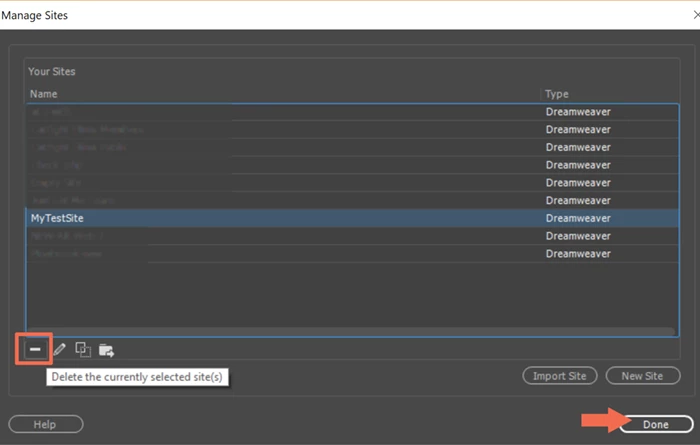
    Nancy...I think one of the computer consultants helping us ealier this week created a Site Definition and deleted the old one, but not 100% sure.  I apologize but I'm a computer dunce, are there instructions on these steps to do this?


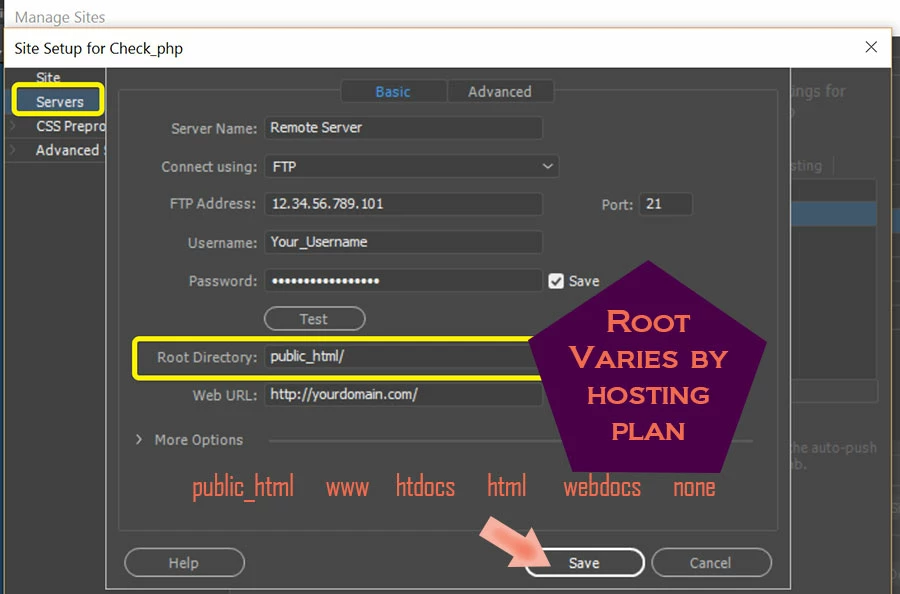
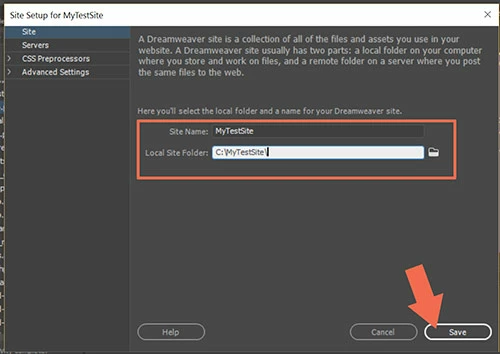
    Go to Site > New Site.

    Create a site definition.  You can use the same local folder & FTP log-in details as your current one.  My screenshots may look different than yours because I don't have CS4.  These are from CC 2017.

    Hit the TEST button to ensure the connection works.

    2 답변

    Jon Fritz
    Community Expert
    Community Expert
    July 27, 2017

    Is your Site Definition selected in the left side dropdown at the top of your Files window (f8 or Window > Files if it's not open)?

    What view is selected in the right side dropdown menu at the top of that window?

    When you click Site > Manage Sites > click the site you are working on > Edit > Servers is all of your FTP information in place?

    Participating Frequently
    July 27, 2017

    Yes, all FTP information is in place under managed sites.

    The "Design View" is selected under view

    When we go to File or Windows>Files, we don't see anything that says site definition.  We are unsure how to select a site definition or what that is...

    Participating Frequently
    July 28, 2017

    In the Files window, you should have 2 dropdown menus at the top when your site is selected, something like...

    The left side shows the site you have selected and the right gives the View for that site with the options local, remote, testing or repository (I think, in CS4).

    If your site isn't chosen in the left dropdown, it will say Desktop or Macintosh HD and the right dropdown won't show.


    Found it...thank you for the picture and further description.  "Local View" is selected at the top right of that Local Files window

    pziecina
    Legend
    July 27, 2017

    Have you worked through the ftp problems section of this help document -

    https://helpx.adobe.com/dreamweaver/kb/commontroubleshooting.html

    Participating Frequently
    July 27, 2017

    Yes.  We have tried everything on that list.

    Nancy OShea
    Community Expert
    Community Expert
    July 28, 2017

    Can you connect to your remote server with a dedicated FTP client like Filezilla or Cute FTP?

    FileZilla - The free FTP solution

    If no, then DW is not the problem.  Maybe your web host reset or changed your log-in credentials.

    If yes, then you have another way to transfer files while you trouble shoot DW.

    Nancy O'Shea— Product User & Community Expert