


- Home
- Dreamweaver
- Discussions
- Re: Dreamweaver file uploads agonizingly slow
- Re: Dreamweaver file uploads agonizingly slow
Dreamweaver file uploads agonizingly slow

Copy link to clipboard
Copied
I've been usiung Dreamweaver for many years, but within the last year uploads to my server are extremely slow. I'm using Dreamweaver 21.3 on a Mac. If I try to upload for example even a single video file by using Put, the "Background File Activity" pop up will appear, but it takes several minutes to upload even a few MB file. However, if I hover the mouse alternating back and forth over the "Hide" and "Cancel" buttons , the progress bar increases in noticeably larger bursts. If I don't do that, there only a small fraction of the progress increased, and it will take dramtically longer to complete the upload.
Also, when I try to sync with the remote server, it can take almost 2hrs to sync. Dreamweaver never worked this slow for uploads before.


 7
Replies
7
7
Replies
7


Copy link to clipboard
Copied
Why are you syncing files?
Open your files panel (F8).
Sort files by date and upload recently modified files by hitting the UP arrow.
Slow connection and data transfers are effected by four things.
1. Your Server's speed.
2. Your Internet Connection speed.
3. Your computer's CPU.
4. The amount of data that's being transfered (bandwidth).
You can try uploading with a dedicated S/FTP client like FileZilla or Transmit.
DISCLAIMER: I never sync local & remote files. To do so would be catastrophic to my workflow.
Copy link to clipboard
Copied
Yes, I've used Dreamweaver for maby years and never used sync before. I just mentioned sync because its aos slow. Normally I use "Put" by selecting the file I want to upload to the server. The problem I'm having is that simple upload is taking a huge amount of time now. If upload via FTP with Filezilla it works fine, no delays. If I upload via FTP from a PC using Filezilla or WSFTPro it works fine, no delays. So my remote server and my network connection are OK.
Using the "Put" for a file such as a small video in Dreamweaver, which uploads fast with other FTP programs I noted, is really slow with Dreamweaver. And as I mentioned, the file upload progress indicator bar on Dreamweaver barely moves except when I hover over the "Hide" and "Cancel" buttons. That's odd behavior in addition to being slow uploading.
Copy link to clipboard
Copied
Did you open More Options and tick the box for FTP performance optimization? See screenshot.
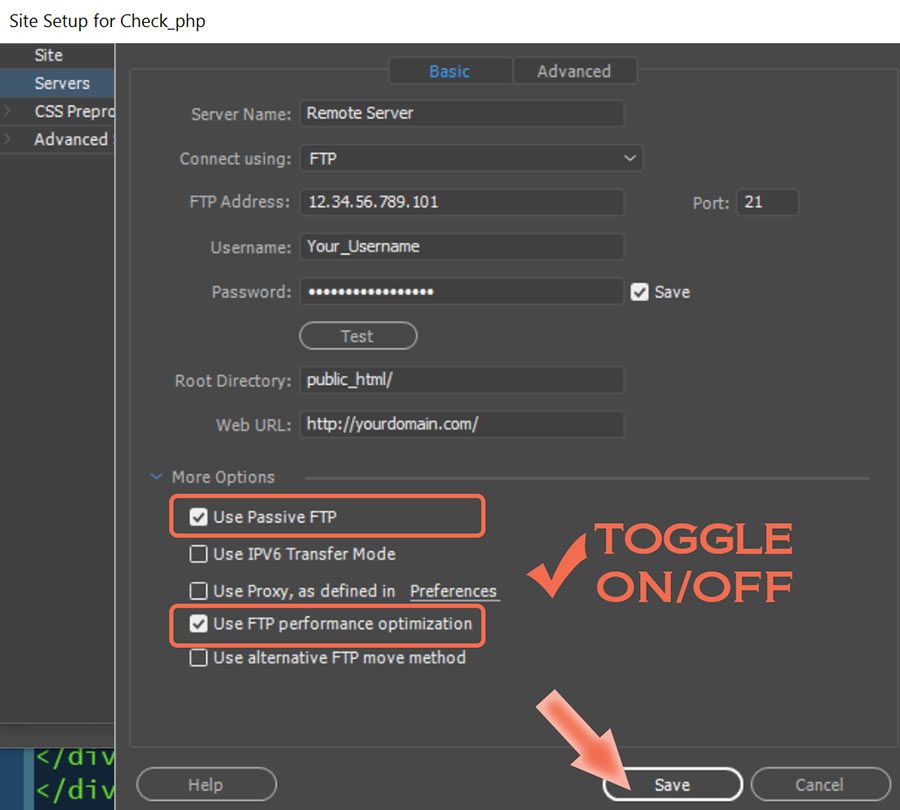
I use DW's on board FTP to upload scripts and images. But for media files (1GB or more), I prefer to use FileZilla because it's faster & more efficient. Different tools for different tasks.
Copy link to clipboard
Copied
Thank you so much for your help, I appreciate you. Yes, I already had FTP Optimization checked. I guess I'll just use Filezilla to upload anything other than a quick html page change. Just seems odd that a program designed to create websites now has problems with basic FTP. For years it worked great.

Copy link to clipboard
Copied
Uploading and syncing are 2 different processes. Syncing files is always long and takes longer the bigger your site gets. The reason for this is the first thing that an FTP client would do is to verify all modification dates on your local computer site and the remote server. Once it does it then it goes through folder by folder, file by file, and updates everything to whatever the most recent version is. If you are using a CMS, like Wordpress, and you update your remote site separately from your local site then this could cause serious issues on both sides and could lead to both sites failing to work.

Copy link to clipboard
Copied
I totally agree with what has just been said... however I would add some remarks
- if you work with DW and WP, it's important to cloak the files specific to WP that don't have to be managed by DW... so they won't be included in the file synchronization when it's required (be careful not to cloak the WP files you and/or your team are working on... plugins, child-templates among others)
- if your synchronization is very slow, it would be worthwhile to test between passive and active FTP, for that see point n°12 https://helpx.adobe.com/dreamweaver/using/connect-remote-server.html
- sending videos will necessarily use up bandwidth ... if you are only in ADSL... this bandwidth differs enormously in relation to the downstream... in clear to download a film of 10 Mo takes a few seconds... to load it a few hours
- I understand the position of not synchronizing but looking for the most recent files... it's very wise, except if like us you work in a team and therefore with several computers that will all have more recent files that are totally anachronistic... and if you also work alone, but from various tools... in these two cases, synchronization remains a very clear way of making sure of the difference between 'local' files and 'remote' files

Copy link to clipboard
Copied
Same thing I found. It is not useable at all on mac. takes forever to get html files and I don't have hours to waste on waiting for dreamweaver to respond. The only things I liked about dreamweaver was the built in view and the get and put features in an all in one app. Going to go to dump CC Dreamweaver and just use filezilla for the get and put and stick with VSCode with Live Server. Abdobe is so bloated it is worthless these days

Find more inspiration, events, and resources on the new Adobe Community
Explore Now
 AdChoices