


Copy link to clipboard
Copied
Dreamweaver hangs when I open a page that has an inline video. Is there a reason for this, (considering I have a mac I think can handle it.)?
Model Name: iMac Pro
Model Identifier: iMacPro1,1
Processor Name: 10-Core Intel Xeon W
Processor Speed: 3 GHz
Number of Processors: 1
Total Number of Cores: 10
L2 Cache (per Core): 1 MB
L3 Cache: 13.8 MB
Hyper-Threading Technology: Enabled
Memory: 64 GB
Boot ROM Version: 1037.120.87.0.0 (iBridge: 17.16.15300.0.0,0)
Serial Number (system): C02Y80RLHX8F
Hardware UUID: 990C28C5-696D-5CED-A620-2B62682085A9
Activation Lock Status: Enabled


 1 Correct answer


As a test, copy & paste this responsive embed code into a new, blank document. If it causes DW to choke, you may need to Restore Preferences.
https://helpx.adobe.com/dreamweaver/kb/restore-preferences-dreamweaver.html
<!doctype html>
<html lang="en">
<head>
<title>Bootstrap Responsive Video Examples</title>
<meta charset="utf-8">
<meta name="viewport" content="width=device-width, initial-scale=1">
<!--Bootstrap CSS-->
<link rel="stylesheet" href="https://maxcdn.bootstrapcdn.com/bootstrap/4.3
 6
Replies
6
6
Replies
6


Copy link to clipboard
Copied
Could it be that the code is faulty?
Copy link to clipboard
Copied
Hi Ben.
I don't think it is, but I'll double check. Thanks
Copy link to clipboard
Copied
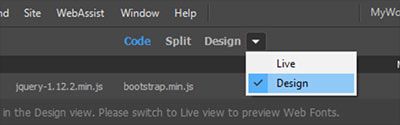
Switch to Design View (see screenshot) and disable video autoplay.
Copy link to clipboard
Copied
Hi Nancy,
That would be a good solution, but I don't like design view.
I just recall that in older versions of Dreamweaver, with a lower spec of mac, it could be handled.
Copy link to clipboard
Copied
As a test, copy & paste this responsive embed code into a new, blank document. If it causes DW to choke, you may need to Restore Preferences.
https://helpx.adobe.com/dreamweaver/kb/restore-preferences-dreamweaver.html
<!doctype html>
<html lang="en">
<head>
<title>Bootstrap Responsive Video Examples</title>
<meta charset="utf-8">
<meta name="viewport" content="width=device-width, initial-scale=1">
<!--Bootstrap CSS-->
<link rel="stylesheet" href="https://maxcdn.bootstrapcdn.com/bootstrap/4.3.1/css/bootstrap.min.css">
</head>
<body>
<div class="container">
<div class="row">
<div class="jumbotron">
<h2>Bootstrap in Dreamweaver</h2>
<p>Responsive video deomonstration.  This uses YouTube but any MP4 video will work. </p>
</div>
</div>
<div class="row">
<div class="col-lg-6">
<h2>Aspect ratio 1:1</h2>
<div class="embed-responsive embed-responsive-1by1">
<iframe class="embed-responsive-item" src="https://www.youtube.com/embed/tgbNymZ7vqY"></iframe>
</div>
</div>
<div class="col-lg-6">
<h2>Aspect ratio 4:3</h2>
<div class="embed-responsive embed-responsive-4by3">
<iframe class="embed-responsive-item" src="https://www.youtube.com/embed/tgbNymZ7vqY"></iframe>
</div>
</div>
</div>
<hr>
<div class="row">
<div class="col-lg-6">
<h2>Aspect ratio 16:9</h2>
<div class="embed-responsive embed-responsive-16by9">
<iframe class="embed-responsive-item" src="https://www.youtube.com/embed/tgbNymZ7vqY"></iframe>
</div>
</div>
<div class="col-lg-6">
<h2>Aspect ratio 21:9</h2>
<div class="embed-responsive embed-responsive-21by9">
<iframe class="embed-responsive-item" src="https://www.youtube.com/embed/tgbNymZ7vqY"></iframe>
</div>
</div>
</div>
<hr>
<div class="row">
<footer>Footer goes here.... </footer>
</div>
</div>

<!--First jQuery then Popper then Bootstrap JS-->
<script src="https://code.jquery.com/jquery-3.2.1.min.js" integrity="sha256-hwg4gsxgFZhOsEEamdOYGBf13FyQuiTwlAQgxVSNgt4=" crossorigin="anonymous"></script>
<script src="https://cdnjs.cloudflare.com/ajax/libs/popper.js/1.14.7/umd/popper.min.js"></script>
<script src="https://maxcdn.bootstrapcdn.com/bootstrap/4.3.1/js/bootstrap.min.js"></script>
</body>
</html>
Copy link to clipboard
Copied
It didn't. Thank you for the test. 🙂

 AdChoices