


- Home
- Dreamweaver
- Discussions
- Re: How do I add media queries to an existing css ...
- Re: How do I add media queries to an existing css ...

Copy link to clipboard
Copied
I started learning Dreamweaver CC 2015 about a year ago and have ploughed my way through countless tutorials.
I am a designer not a coder but somehow have managed to create a reasonable-looking test site for my client. He now wants the captions to the carousel on the home page to move below the image on smaller screens so that the image is still visible and the font size changes.
I cannot find the original Adobe tutorial I used to create the site in the first place and am floundering on how to achieve this.
Can I add a media query to my current stylesheet or do I need to make a separate style sheet?
I have looked on line for answers to my problem but they all assume greater knowledge than I have.
Here is the page:
http://http://www.warfieldpark.co.uk/testing.html
Assume I am a complete novice (which I probably still am) and give me step by step instructions if possible please!


 1 Correct answer

Probably best to hide the pagers (those circles on the images) and arrow indicators as well, otherwise you will probably have to rethink the html structure.
Css media query which will stack the caption under the images at 768px:
@media screen and (max-width: 768px) {
.carousel-caption {
position: static;
width: 100%
}
.carousel-indicators, .left, .right {
display: none;
}
}
You can add the media query to the end of your custom css file:
warfield.css

 45
Replies
45
45
Replies
45

Copy link to clipboard
Copied
Mary+8 wrote
I have been running my business for 30 years so there is no doubt of my staying power. But maybe you are right - in a year I might be doing something that appeals to me more!
Sounds to me like you are running out of steam, or just a bad phase, we all get to that place eventually. 30 years, tell me about it youve seen and done it, like myself.
Copy link to clipboard
Copied
Now you are beginning to understand where I am at the moment. I think I am running out of steam and in a bad phase!
I started out as a designer for print but had to learn web site design for my small client base. As I work on my own it there is nobody to share problems with so have to work it out for myself. Hence my use of this forum now that I am beginning to get out of my depth.
Just when I thought I was getting somewhere I find that my choice of application was unsuitable and my knowledge inadequate!!!
Copy link to clipboard
Copied
Mary+8 wrote
Now you are beginning to understand where I am at the moment. I think I am running out of steam and in a bad phase!
I started out as a designer for print but had to learn web site design for my small client base. As I work on my own it there is nobody to share problems with so have to work it out for myself. Hence my use of this forum now that I am beginning to get out of my depth.
Just when I thought I was getting somewhere I find that my choice of application was unsuitable and my knowledge inadequate!!!
I know where you're coming from. I too started out as a designer for print many years ago in the late 70's early 80's. Somewhere along the way things took a bit of a nose dive as they usually do and I felt the natural progress was moving into website building. It was still quite young 15 years or so ago when I first took the plunge, Nutscape Navigator 4, Internet Explorer 5 for Mac, GoLIve, table based layout etc those were the days when real skills were needed to make anything work. At a very early stage I realised that I was not going to be satisfied unless I had a real insight into how all this actually worked so I started on a long arduous journey delving deep into the coding that drove a lot of websites, taught myself everything by spending hours unpicking websites I liked, following the people who had the experience in the forum which preceeded this one, testing all their responses and answers religiously etc. I would have been finished 10 years ago (unemployable) if I had not forced myself down that route.
So as you can see I have a great passion for getting to the bottom of how things work rather than just sitting back and hoping a bit of software will do it all for me, its given me an extra 10 years and hopfully will see me through, if I keep investing time learning, until the end of my career in a few years time.
You should never give up until the time is right and you will always know when that time is.
Just to add I was back designing some print stuff just the other day....pure bliss. Indesign/Xpress is childs play compared to webdesign. I largely got out of graphic design as I felt it had become an unskilled job. A blindfolded donkey could learn Indesign and Xpress in a couple of hours, I wanted more, some are happy not to be challenged and will never get any further, time will come when they are redundant, excess to requirement, unless they wake up and smell the coffee.
That is also why I have an intense hatred for frameworks because they lure you into a false sense of security. You dont need to do anything, far from the truth. All frameworks are rubbish, only lazy web developers use them or are forced to use them by others, bosses for financial gain. They really bring nothing to the table in terms of skill or for the good of the developer themselves. They have releatively short shelf lives as new techniques are unveiled constantly. Frameworks can never keep up, they will always be 18 months to 2 years behind by which time everything has moved on again. Any serious web developer would stand on their own 2 feet and watch the trends. Flexbox is becoming big and so will Css Grid in a couple of years time, so invest your time wisely and look at Flexbox now and start to explore Grid. Thats my advice for anyone who takes web development seriously and see it as a long term career.


Copy link to clipboard
Copied
<All frameworks are rubbish, only lazy web developers use them...>
I totally disagree. Frameworks are nothing more than tools the same as Dreamweaver is a tool. Tools don't create great products. People do.
All too often people around here think Dreamweaver will make them an instant success at web development. That's like saying an expensive camera + Photoshop/Lightroom will make you an instant Ansel Adams. It doesn't work that way.
You can't produce anything great until you fully understand the medium and the tools you're working with. That takes practice, practice, practice.
My first Bootstrap project was not an overnight success. Quite the opposite. It was born out of many, many focused hours of work with it to see what it could and couldn't do for me. Once I felt comfortable and competent with it, then I began using it in production. I certainly would never dive into a new framework & new software on a client project until I understood exactly what I was doing first. That's the only responsible way to work for people.
Nancy
Copy link to clipboard
Copied
https://forums.adobe.com/people/Nancy+OShea wrote
<All frameworks are rubbish, only lazy web developers use them...>
I totally disagree. Frameworks are nothing more than tools the same as Dreamweaver is a tool. Tools don't create great products. People do.
All too often people around here think Dreamweaver will make them an instant success at web development. That's like saying an expensive camera + Photoshop/Lightroom will make you an instant Ansel Adams. It doesn't work that way.
You can't produce anything great until you fully understand the medium and the tools you're working with. That takes practice, practice, practice.
My first Bootstrap project was not an overnight success. Quite the opposite. It was born out of many, many focused hours of work with it to see what it could and couldn't do for me. Once I felt comfortable and competent with it, then I began using it in production. I certainly would never dive into a new framework & new software on a client project until I understood exactly what I was doing first. That's the only responsible way to work for people.
Nancy
Apart from the disagreeing about frameworks I think youre just echoing what I have been saying, so I'll take that as a compliment, thanks.

Copy link to clipboard
Copied
Hi Mary, first let me say that if you would like that this discussion stops now, then please let us know, and someone will 'lock' this discussion to prevent further posts.
Having said that, the reason I and other regular contributors discuss such issues as we are doing now, is because we want to improve Dw and what it offers users such as yourself, and experienced coders also. A lot has been written by none coders in a similar situation to yourself, regarding the lack of options offered by Dw when it comes to modern web development, as code is required to do everything, and I am the first to admit, there is no easy option if you do not wish to learn code.
I would recommend Adobe Muse, which is probably the best solution for none coders, (though the way it works and the code it produces, I would not have considered as a good solution, except in my worst nightmares) I would say that if you learn html and css, the world, (so to speak) opens up to you when it comes to what is possible in web design and development. Over the years I have tried to get Dw to incorporate a more visual layout system as an option, with much better html5 and css support, plus make its use more intuitive for those like yourself, as I think that once someone is shown what is possible, using good code, that is easy to read and understand, they will become more interested in learning and using code.
That of course requires making the code produced, simple, yet compliant. A goal which I think would be achieved easier if solutions like Bootstrap were not 'built in' to Dw, but offered as extensions.
Copy link to clipboard
Copied
Hi pziecina,
I think everyone benefits from a frank discussion and it is obvious that there are many different views on DW.
I have acquired some knowledge of html and css just through experimentation. It is just that it is not one of my strengths and I am not as enthusiastic about it as the more technically minded amongst the community.
I only discovered Muse recently but having spent many hours trying to master DW and having built up a reasonable web site in it I am reluctant to change now.
I am grateful to osgood for his time and coding advice, it worked perfectly removing the dark shading and chevrons the carousel images. However, I tried to incorporate his suggested code for controlling the way the caption behaves into the web page and it has thrown several other elements out. There is obviously a conflict that I am not clever enough to spot. Is there some way using DW css to prevent the carousel background from appearing in front of the top nav bar and the page elements below it when viewed in some browsers particularly Firefox. Can I apply z index values to achieve this or is there another way?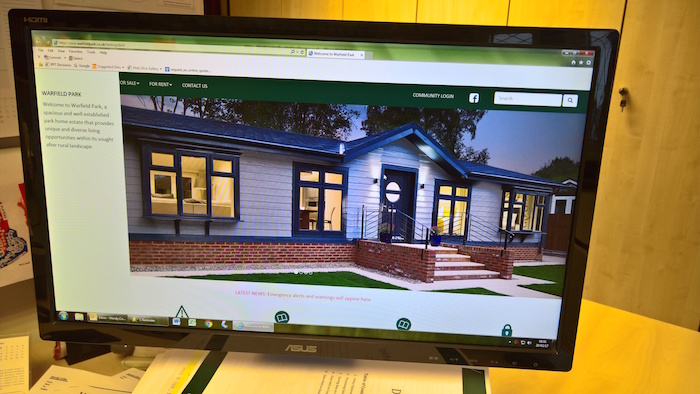
Also I still need to know how I can make it so that the hamburger menu icon when viewed on an iPhone 5 on does not disappear off-screen to the right requiring scrolling to view it.

Copy link to clipboard
Copied
I know that this is not what you asked for, but I would start with reducing the image file size. At the moment you are using a high quality PNG image which translates to 1MB in size. Changing this to a JPG image the size will be reduced to 154KB.
Have a look at the result

Copy and insert this image into your document and notice the result. I think that you should do this for each image in the slider.
Copy link to clipboard
Copied
Mary+8 wrote
There is obviously a conflict that I am not clever enough to spot. Is there some way using DW css to prevent the carousel background from appearing in front of the top nav bar and the page elements below it when viewed in some browsers particularly Firefox. Can I apply z index values to achieve this or is there
Try the below, works ok for me in Firefox, Chrome etc:
<!DOCTYPE html>
<html lang="en">
<head>
<meta charset="UTF-8">
<meta http-equiv="X-UA-Compatible" content="IE=edge">
<meta name="viewport" content="width=device-width, initial-scale=1">
<title>Welcome to Warfield Park</title>
<!-- Bootstrap -->
<link href="http://www.warfieldpark.co.uk/css/bootstrap.css" rel="stylesheet">
<link href="http://www.warfieldpark.co.uk/css/warfield.css" rel="stylesheet" type="text/css">
<style type="text/css">
a:active {
color: #07483c;
text-decoration: none;
}
a:link {
text-decoration: none;
color: #505050;
}
a:visited {
text-decoration: none;
}
a:hover {
text-decoration: none;
color: #07483c;
}
a {
font-weight: normal;
}
body,td,th {
color: #505050;
}
.carousel-captions {
position: absolute;
top: 0;
z-index: 1000;
background-color: #E9FDF9;
height: 100%;
width: 250px;
padding: 0 30px;
}
.carousel-captions h4 {
margin: 0;
padding: 0 0 15px 0;
font-size: 20px;
}
.carousel-captions p {
margin: 0;
padding: 0;
font-size: 16px;
}
.caption-vert-center {
position: relative;
top: 50%;
-webkit-transform: translateY(-50%);
-ms-transform: translateY(-50%);
transform: translateY(-50%);
}
@media screen and (max-width: 768px) {
.carousel-captions {
clear: both;
position: static;
width: 100%;
}
.caption-vert-center {
position: static;
top: 0;
padding: 30px 0;
-webkit-transform: translateY(-0%);
-ms-transform: translateY(-0%);
transform: translateY(-0%);
}
}
</style>
<!-- HTML5 shim and Respond.js for IE8 support of HTML5 elements and media queries -->
<!-- WARNING: Respond.js doesn't work if you view the page via file:// -->
<!--[if lt IE 9]>
<script src="https://oss.maxcdn.com/html5shiv/3.7.2/html5shiv.min.js"></script>
<script src="https://oss.maxcdn.com/respond/1.4.2/respond.min.js"></script>
<![endif]-->
<script type="text/javascript">
function MM_swapImgRestore() { //v3.0
var i,x,a=document.MM_sr; for(i=0;a&&i<a.length&&(x=a)&&x.oSrc;i++) x.src=x.oSrc;
}
function MM_preloadImages() { //v3.0
var d=document; if(d.images){ if(!d.MM_p) d.MM_p=new Array();
var i,j=d.MM_p.length,a=MM_preloadImages.arguments; for(i=0; i<a.length; i++)
if (a.indexOf("#")!=0){ d.MM_p
}
function MM_findObj(n, d) { //v4.01
var p,i,x; if(!d) d=document; if((p=n.indexOf("?"))>0&&parent.frames.length) {
d=parent.frames[n.substring(p+1)].document; n=n.substring(0,p);}
if(!(x=d
for(i=0;!x&&d.layers&&i<d.layers.length;i++) x=MM_findObj(n,d.layers.document);
if(!x && d.getElementById) x=d.getElementById(n); return x;
}
function MM_swapImage() { //v3.0
var i,j=0,x,a=MM_swapImage.arguments; document.MM_sr=new Array; for(i=0;i<(a.length-2);i+=3)
if ((x=MM_findObj(a))!=null){document.MM_sr[j++]=x; if(!x.oSrc) x.oSrc=x.src; x.src=a[i+2];}
}
</script>
</head>
<body leftmargin="0" style="padding-top: 0px" onLoad="MM_preloadImages('../images_main/icons/spanner_green.png','../images_main/icons/triangle_green.png','../images_main/icons/buy_brochure_green.png','../images_main/icons/rent_brochure_green.png','../Discarded/member_green.png','../images_main/icons/padlock_green.png','../images_main/icons/spanner_grey.png','../images_main/icons/triangle_grey.png','../images_main/icons/buy_brochure_grey.png','../images_main/icons/rent_brochure_grey.png','../images_main/icons/padlock_grey.png')">
<div class="container-fluid" id="wrapper"><!-- #BeginLibraryItem "/Library/navbar_default.lbi" --><nav class="navbar navbar-default">
<div class="container-fluid">
<!-- Brand and toggle get grouped for better mobile display -->
<div class="navbar-header">
<button type="button" class="navbar-toggle collapsed" data-toggle="collapse" data-target="#topFixedNavbar1" aria-expanded="false"><span class="sr-only">Toggle navigation</span><span class="icon-bar"></span><span class="icon-bar"></span><span class="icon-bar"></span></button>
<a class="navbar-brand" href="../testing.html"></a></div>
<!-- Collect the nav links, forms, and other content for toggling -->
<div class="collapse navbar-collapse" id="topFixedNavbar1">
<ul class="nav navbar-nav">
<li class="active"><a href="../testing.html" title="Link to Home page">HOME<span class="sr-only">(current)</span></a></li>
<li class="dropdown"><a href="#" class="dropdown-toggle" data-toggle="dropdown" role="button" aria-haspopup="true" aria-expanded="false">ABOUT US<span class="caret"></span></a>
<ul class="dropdown-menu">
<li><a href="about.html" title="Link to About page">About Warfield Park</a></li>
<li><a href="facilities.html">Facilities</a></li>
<li><a href="history.html" title="Link to History page">History</a></li>
<li><a href="park_information.html">Park Information</a></li>
</ul>
</li>
<li class="dropdown"><a href="#" class="dropdown-toggle" data-toggle="dropdown" role="button" aria-haspopup="true" aria-expanded="false">FOR SALE<span class="caret"></span></a>
<ul class="dropdown-menu">
<li><a href="sales_new_information.html" title="Link to For Sale page">New Homes - Information</a></li>
<li><a href="sales_new_availability.html" title="Link to For Sale page">New Homes - Availability</a></li>
<li><a href="sales_pre-owned_homes.html" title="Link to For Sale page">Previously Owned Homes</a></li>
</ul>
</li>
<li class="dropdown"><a href="#" class="dropdown-toggle" data-toggle="dropdown" role="button" aria-haspopup="true" aria-expanded="false">FOR RENT<span class="caret"></span></a>
<ul class="dropdown-menu">
<li><a href="rental_information.html" title="Link to Rental Information page">Renting Information</a></li>
<li><a href="rental_availability.html" title="Link to Rental Availability page">Current Availability</a></li>
</ul>
</li>
<li><a href="contact.html" title="Link to Contact page">CONTACT US</a></li>
</ul>
<form action="../search/search.php" method="get" target="_blank" class="navbar-form navbar-right" role="search">
<div class="form-group">
<input type="text" class="form-control" placeholder="Search" name="query">
</div>
<input type="hidden" name="search" value="1">
<button type="submit" class="btn btn-default"><span class="glyphicon glyphicon-search" aria-hidden="true"></span></button>
</form>
<ul class="nav navbar-nav navbar-right">
<li><a href="../members/index.html" title="Link to members page" target="_blank">COMMUNITY LOGIN</a></li>
<li class="col-xs-2 col-sm-2"><a href="https://www.facebook.com/warfieldpark/?fref=ts" target="_blank" id="facebook"><img src="../images_main/icons/facebook_icon.png" alt="" width="25" height="25" title="Link to Facebook page"/></a></li>
</ul>
</div>
<!-- /.navbar-collapse -->
</div>
<!-- /.container-fluid -->
</nav><!-- #EndLibraryItem --><div class="carousel slide" id="car_height" data-ride="carousel" data-interval="7000">
<ol class="carousel-indicators">
<li data-target="#car_height" data-slide-to="0" class="active"></li>
<li data-target="#car_height" data-slide-to="1"></li>
<li data-target="#car_height" data-slide-to="2"></li>
<li data-target="#car_height" data-slide-to="3"></li>
</ol>
<div class="carousel-inner" role="listbox">
<div class="item active"><img src="http://www.warfieldpark.co.uk/images_main/carousel_images/Narrow/Front_Night.png" alt="Home at Warfield Park" class="center-block image-fill">
<div class="carousel-captions">
<div class="caption-vert-center">
<h4>WARFIELD PARK</h4>
<p>
Welcome to Warfield Park, a spacious and well established park home estate that provides unique and diverse living opportunities within its sought after rural landscape.</p>
</div>
</div>
</div>
<div class="item"><img src="http://www.warfieldpark.co.uk/images_main/carousel_images/Narrow/36a_The_Larches.png" alt="Home at Warfield Park" class="center-block image-fill">
<div class="carousel-captions">
<div class="caption-vert-center">
<h4>LIFE AT WARFIELD</h4>
<p>A village in its own right; boasting a community hall, hairdresser, launderette and beauty salon. Buses regularly visit to travel into Bracknell. The park has a thriving community association that arranges many trips out and about. </p>
</div>
</div>
</div>
<div class="item"><img src="http://www.warfieldpark.co.uk/images_main/carousel_images/Narrow/34a-Harvest-Lea.png" alt="Homes to rent at Harvest Lea" class="center-block image-fill">
<div class="carousel-captions">
<div class="caption-vert-center">
<h4>RENTING AT WARFIELD</h4>
<p>Residential lodge style Park Homes can be found at Harvest Lea – a secluded area of the estate – or on the main park. Each home has its own garden and parking for two cars. Pets are welcome. </p>
</div>
</div>
</div>
<div class="item"><img src="http://www.warfieldpark.co.uk/images_main/carousel_images/Narrow/history_banner_4.jpg" alt="Warfield Park in the 1950s" class="center-block image-fill">
<div class="carousel-captions">
<div class="caption-vert-center">
<h4>HISTORY</h4>
<p>Granted its first site licence in 1947, Warfield Park now hosts more than 500 families all enjoying life in a private vista set within 100 acres of woodland.</span></p>
</div>
</div>
</div>
</div>
</div>
<div class="container-fluid"><div class="row">
<div class="col-lg-12 col-xs-11 col-md-12"> <div class="container-fluid">
<div id="alert_container"> LATEST NEWS: Emergency alerts and warnings will appear here </div>
</div></div>
</div>
<div id="wrapper_icon_row" align="center">
<div class="row" id="icon_row">
<div class="col-sm-2 col-sm-offset-0 col-lg-offset-0 col-lg-2 col-md-offset-0 col-xs-11"><a href="form.php?reason=Request for a Repair" onMouseOut="MM_swapImgRestore()" onMouseOver="MM_swapImage('spanner','','../images_main/icons/spanner_grey.png',1)"><img src="../images_main/icons/spanner_green.png" alt="Report a problem" width="50" height="50" id="spanner"></a><br>
<a href="form.php?reason=Request for a Repair" class="inline_link">REPORT A REPAIR/PROBLEM</a></div>
<div class="col-sm-2 col-lg-2 col-xs-11"><a href="emergency_contact.html" onMouseOut="MM_swapImgRestore()" onMouseOver="MM_swapImage('Triangle','','../images_main/icons/triangle_grey.png',1)"><img src="../images_main/icons/triangle_green.png" alt="Emergency contact link" width="50" height="50" id="Triangle" title="Link to emergency Contact page"><br>EMERGENCY CONTACT
</a></div>
<div class="col-lg-3 col-sm-3 col-md-3 col-xs-11"><a href="form.php?reason=Request for Sales Brochure" onMouseOut="MM_swapImgRestore()" onMouseOver="MM_swapImage('sales brochure','','../images_main/icons/buy_brochure_grey.png',1)"><img src="../images_main/icons/buy_brochure_green.png" alt="Request a sales brochure" width="50" height="50" id="sales brochure"></a><br>
<a href="/form.php?reason=Request for Sales Brochure" class="inline_link"> REQUEST A SALES ENQUIRY PACK </a></div>
<div class="col-lg-3 col-sm-3 col-md-3 col-xs-11"><a href="form.php?reason=Request for Rental Brochure" onMouseOut="MM_swapImgRestore()" onMouseOver="MM_swapImage('rental','','../images_main/icons/rent_brochure_grey.png',1)"><img src="../images_main/icons/rent_brochure_green.png" alt="Request a rental brochure" width="50" height="50" id="rental"></a><br>
<a href="form.php?reason=Request for Rental Brochure" class="inline_link"> REQUEST A RENTAL ENQUIRY PACK</a></div>
<div class="col-sm-2 col-lg-2 col-md-2 col-xs-11"><a href="../members/index.html" title="Link to member login" target="_blank" onMouseOver="MM_swapImage('community login','','../images_main/icons/padlock_grey.png',1)" onMouseOut="MM_swapImgRestore()"><img src="../images_main/icons/padlock_green.png" alt="Warfield Community login" width="50" height="50" id="community login"></a><br>
<a href="../members/index.html" class="inline_link">COMMUNITY LOGIN </a></div>
</div>
</div>
</div><!-- #BeginLibraryItem "/Library/footer.lbi" --><footer id="footer">© Copyright 2016 Warfield Park Homes Ltd.</footer><!-- #EndLibraryItem --></div>
<!-- jQuery (necessary for Bootstrap's JavaScript plugins) -->
<script src="http://www.warfieldpark.co.uk/js/jquery-1.11.3.min.js"></script>
<!-- Include all compiled plugins (below), or include individual files as needed -->
<script src="http://www.warfieldpark.co.uk/js/bootstrap.js"></script>
</body>
</html>
Copy link to clipboard
Copied
Mary+8 wrote
Also I still need to know how I can make it so that the hamburger menu icon when viewed on an iPhone 5 on does not disappear off-screen to the right requiring scrolling to view it.
In terms of why your hamburger menu is not appearing in narrow screens you have some conflict going on.
Remove id="wrapper" from the first <div class="container-fluid"> and add style="padding: 0;"> as below:
<div class="container-fluid" style="padding: 0;"><!-- #BeginLibraryItem "/Library/navbar_default.lbi" -->
I dont know what id='wrapper' does, is it important for it to be there, only you will know that?
EDITED looking at your 'wrapper' css styling most probably if you remove the min-width: 400px; your hamburger problem will go away.
#wrapper {
padding-left: 0px;
padding-right: 0px;
background-color: #FFFFFF;
margin: 0px;
-webkit-box-sizing: content-box;
-moz-box-sizing: content-box;
box-sizing: content-box;
display: block;
max-width: 100%;
/* [disabled]max-height: 0%; */
width: auto;
min-width: 400px;
}
I dont really know what the below do: The max-width of a container will always be 100% unless you tell it otherwise so no need to set it. Content-box is the default value so no need to set that either. No need to set margin: 0px; or left/right padding to 0px in my experience. You probably dont need display: block; either....hummm.
/* [disabled]max-height: 0%; */
max-width: 100%;
-webkit-box-sizing: content-box;
-moz-box-sizing: content-box;
box-sizing: content-box;
You could probably just trim everything down to the below:
#wrapper {
background-color: #FFFFFF;
}
Copy link to clipboard
Copied
Hi osgood, Thank you so much! Both solutions work perfectly.
http://www.warfieldpark.co.uk/testing.html
I will return to learning coding skills with renewed vigour!
Ben
I take your point about the image sizes but my client is adamant that he wants his web site to look as good on a huge screen as on a smart phone.
I guess I will have to work on some media queries for this but meanwhile I think it is looking a lot better than before my conversations with you all.
Many thanks.
Copy link to clipboard
Copied
Mary+8 wrote
Ben
I take your point about the image sizes but my client is adamant that he wants his web site to look as good on a huge screen as on a smart phone.
Run your site through Google Page Speed Insights and show the report to your client.
Excessive bandwidth does not mean your pictures look better on larger screens. All it does is put unnecessary strain on data usage plans, consumes excess bandwidth on your server, and causes your site to load slower for everyone. You must optimize images for the web. If your image contains enough pixels, it will look good on all screens.
Nancy
Copy link to clipboard
Copied
Mary+8 wrote
Hi osgood, Thank you so much! Both solutions work perfectly.
No problem, you're welcome.
Follow Ben and Nancys advice in regards to your images.
Copy link to clipboard
Copied
osgood, Having asked me to remove most of the visible navigation devices to scroll though the carousel my client now asks if I can make it so that when the image is clicked on it advances forwards or backwards to the next image. Any suggestions? Nancy and Ben I will look at the image sizes. I always thought that .png is better than .jpg and this is what I have been using in Photoshop when saving for web. What pixel and image size do you recommend to look good on very large monitors and yet not eat up bandwidth?
Copy link to clipboard
Copied
Mary+8 wrote
osgood, Having asked me to remove most of the visible navigation devices to scroll though the carousel my client now asks if I can make it so that when the image is clicked on it advances forwards or backwards to the next image. Any suggestions?
I'm not aware of a way that can be done but I don't use Bootstrap so maybe those that do have come acroos this request in the past and be able to help you.
If your client is concerned that the visual navigation has been completely removed from the carousel on mobile devices you can re-instate the pager circles:
@media screen and (max-width: 768px) {
.carousel-indicators {
display: block;
top: 20px;
}
}
I dont really understand your clients logic as no-one will click on an image to see if it slides unless some visual indication is available - so maybe re-instating the pager will be enough.
Copy link to clipboard
Copied
Mary+8 wrote
Nancy and Ben I will look at the image sizes. I always thought that .png is better than .jpg and this is what I have been using in Photoshop when saving for web. What pixel and image size do you recommend?
In Photoshop CC, use File > Export > Export As > JPG. PNG is fine when you need transparent backgrounds. Otherwise, use JPG (better compression for photos)..
Move quality slider to the left until your filesize is below 100 KB. Notice I have not changed height or width. This minor adjustment saves over 1 thousand KB on just 1 image. Multiply that by all your images and you understand why it's important.

You can further compress images with other utilities if you like. I use this free one for Windows called RIOT (Radical Image Optimization Tool).
Nancy
Copy link to clipboard
Copied
Mary,
I have been following this discussion from a distance, mainly because I do not want to get embroiled in another altercation.
I do feel that you have been given the wrong advice regarding the tools that you are using. To explain, I have been using Dreamweaver since the turn of the century and of late, even before Dreamweaver included the framework, I have been using Bootstrap very successfully. This is in contrast to advice that has been given to you by someone who uses an outdated version of Dreamweaver and hence has no knowledge of what Bootstrap means for the current Dreamweaver user. The fact that we can create a navbar or an accordion with the click of a button is foreign to those that do not have the latest version To show what they are missing out on, have a look at the following image

I think the time has come for you to drop this discussion because it has become too confusing and start a new discussion for each of your problems. I think that what you have achieved. I am sure that you will find people with knowledge of the tools that you are using to help you.
Copy link to clipboard
Copied
Thank you Ben. I think we have had a useful if protracted discussion but it did morph into a more general exchange of views.
I do agree that it is best to raise each problem separately and I have managed to do that in the past although it is not always that easy when topics overlap.
I agree that Dreamweaver has some very useful features and can speed up the workflow especially for someone like me who is not a coding specialist.
I have always found the forum helpful and will continue to learn by benefitting from the knowledge and experience of others.
I have not updated to CC 2017 yet although it looks as though you have, I am not keen on the look of the darker interface. Is it very different to use?
Copy link to clipboard
Copied
BenPleysier wrote
Mary,
I have been following this discussion from a distance, mainly because I do not want to get embroiled in another altercation.
I do feel that you have been given the wrong advice regarding the tools that you are using. To explain, I have been using Dreamweaver since the turn of the century and of late, even before Dreamweaver included the framework, I have been using Bootstrap very successfully. This is in contrast to advice that has been given to you by someone who uses an outdated version of Dreamweaver and hence has no knowledge of what Bootstrap means for the current Dreamweaver user. The fact that we can create a navbar or an accordion with the click of a button is foreign to those that do not have the latest version To show what they are missing out on, have a look at the following image
I think the time has come for you to drop this discussion because it has become too confusing and start a new discussion for each of your problems. I think that what you have achieved. I am sure that you will find people with knowledge of the tools that you are using to help you.

For your information I don't use DW at all. Of course you know I do have access to the lastest version of DW, so stop telling people otherwise. Fortunately I'm not missing out on anything, as you put it, because the output it provides is inferior to what is available. But of course DW cant output it because its light years behind as is Bootstrap, aimed at developers who are light years behind. That's ok, if that is where you want to be and feel comfortable being there. In that senario DW does an effective job but you still would benefit from having some code knowledge. DW, like most other editors is what it is, it can only hold your hand so far, people are maybe expecting too much from a bit of software.
The OP states:
'I don't want to learn to code and never have'
Then there's no way on earth she is going to be able to do the simple things she requires to do because Bootstrap alone aint going to help, simple. People in this forum are in denial.
I have supplied solutions to 2 out of the 3 of her issues, providing positive advice and answers that work and have been tested because I have invested time in identifying and solving the issues, rather than just pointing to Bootstrap resources or showing them pictures of how to point and click, which isnt even their problem
Copy link to clipboard
Copied
In what circumstances would I use the media query option in the css designer and how would I apply that?
I find it's much quicker to work directly with the code in your custom stylesheet. Never touch the Bootstrap CSS code. IMO, the CSS Designer Panels are clumsy & over rated. I never use them.
Nancy
Copy link to clipboard
Copied
Mary+8 wrote
I added it to the warfield.css file at the bottom as you suggested.
I must have had a browser cache issue, maybe you did/do too. As soon as I refreshed the browser it worked perfectly.
And yes you can add other properties to the media query to resize the text if that what you need to do.

-
- 1
- 2
Get ready! An upgraded Adobe Community experience is coming in January.
Learn more
 AdChoices


