


- Home
- Dreamweaver
- Discussions
- Re: More Specific Code Coloring in DW2017
- Re: More Specific Code Coloring in DW2017

Copy link to clipboard
Copied
In main.less, is there a way to be more specific with coloring code, something like the attached picture? The idea that all tags in a code type are colored the same makes for a lot of painful searching.



 1 Correct answer


I also suggest upvoting this request on uservoice
More specific code coloring in DW2017 – Adobe Dreamweaver CC: Feature Ideas

 9
Replies
9
9
Replies
9


Copy link to clipboard
Copied
What are you specifically tying to target in your PHP code theme?
Can you paste an example of the PHP code you're using and what you want to change that you can't?
Copy link to clipboard
Copied
<!doctype html>
<html>
<head>
<meta charset="utf-8">
<title>Some Document</title>
</head>
<body>
<div>
<form method="post" action="<?=$_SERVER['PHP_SELF']?>">
<label>
Name
<br>
<input type="text" name="name" style="color:#282828"/>
</label>
<button>
Save
</button>
</form>
</div>
</body>
</html>
I would like to be able to have each one of these tags as a different color as well as the CSS on the inline styling, attributes, strings, etc... Kind of like this example.
Copy link to clipboard
Copied
As far as I know, that's not possible. .cm-tag is universal -- effecting the code color of all such tags.
Learn how you can customize the colors of your code elements in Dreamweaver.
Below, I opened your code in Chrome with the Token Inspector tool. As you can see, the .cm-tag highlights all the tags.

Copy link to clipboard
Copied
That is what I was afraid of  That is not a very user friendly feature. I have used your tool to customize the colors in DW2017 and main.less but without the ability to specify specific tags it is quite useless and makes navigating thousands of lines of code very difficult.
Thank you for your quick reply
Copy link to clipboard
Copied
That is what I was afraid of That is not a very user friendly feature. I have used your tool to customize the colors in DW2017 and main.less but without the ability to specify specific tags it is quite useless and makes navigating thousands of lines of code very difficult.
I don't make the software. I'm a product user just like you.
If code colors are a deal breaker for you, go back to the 2015 version.

Copy link to clipboard
Copied
skynet.abc wrote (in reply to Nancy):
I have used your tool
Nancy wishes. Unfortunately, most of the people using this Adobe sponsored forum are users just like you. We give up our time free of charge in an effort to help each other.
In your case, I would suggest that you place your comments where it matters by submitting a feature request.
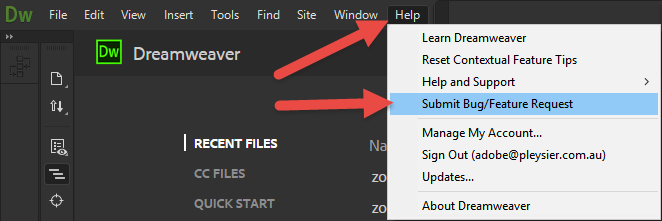
Have a great holiday season.
Copy link to clipboard
Copied
Cast your vote here: More specific code coloring in DW2017 – Adobe Dreamweaver CC: Feature Ideas
Copy link to clipboard
Copied
I also suggest upvoting this request on uservoice
More specific code coloring in DW2017 – Adobe Dreamweaver CC: Feature Ideas

Copy link to clipboard
Copied
Hi All,
We have started working on “Code Color Customization” improvements by adding support for customization of generic and language specific colors.
We have further stabilized the code coloring feature in our latest Prerelease build 15333.
You can refer to below thread for more details on code coloring customization improvements. https://forums.adobeprerelease.com/dwalpha/discussion/467/dreamweaver-build-15333-is-now-available#l...
Please join Dreamweaver beta program from below link and try out the feature.
Please go ahead and try out the build and let inflow your thoughts/suggestions. Looking forward to your valuable feedback.
Thanks
Dreamweaver Team

Get ready! An upgraded Adobe Community experience is coming in January.
Learn more
 AdChoices