


Copy link to clipboard
Copied
Hi,
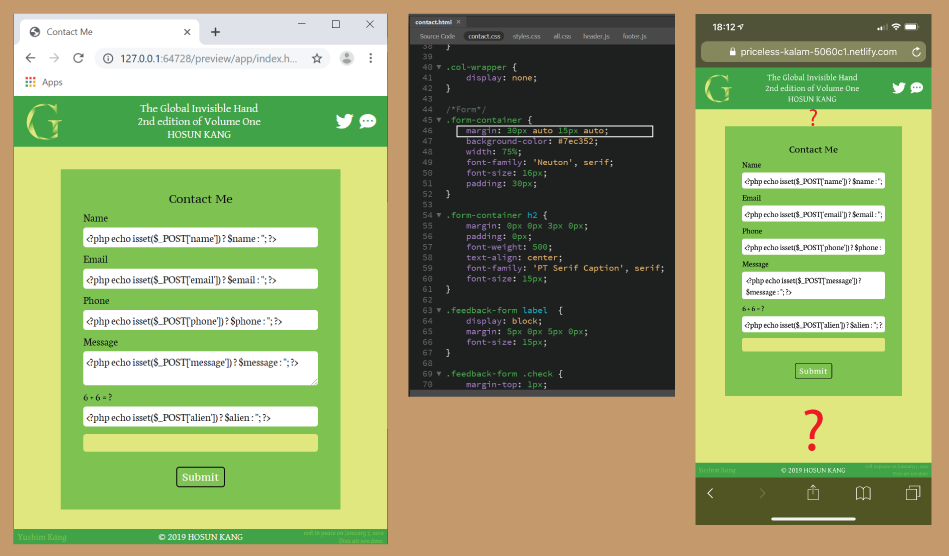
Clicking the far-right icon in <header> opens Contact Me.
I set margin to .form-container for the vertical positioning of the green box.
It looks working on PC. But it doesn't work on iPhone.
Is there any solution?
I tried
main {
display: flex;
align-items: center;
}
But it doesn't work.
https://priceless-kalam-5060c1.netlify.com/
Hosun Kang


 1 Correct answer

Try the css combination below:
The height: 97vh; compensates for the fixed footer, which takes up a bit of vertical space.
You have obviously somewhere added padding on the 'body' element which was accounting for a bit more vertical space so I have removed the padding on the body element as well in the css styles below:
.page-wrapper {
display: flex;
flex-direction: column;
height: 97vh;
}
main {
display: flex;
justify-content: center;
align-items: center;
flex: 1;
}
body {
padding: 0;
}

 2
Replies
2
2
Replies
2

Copy link to clipboard
Copied
Try the css combination below:
The height: 97vh; compensates for the fixed footer, which takes up a bit of vertical space.
You have obviously somewhere added padding on the 'body' element which was accounting for a bit more vertical space so I have removed the padding on the body element as well in the css styles below:
.page-wrapper {
display: flex;
flex-direction: column;
height: 97vh;
}
main {
display: flex;
justify-content: center;
align-items: center;
flex: 1;
}
body {
padding: 0;
}


Copy link to clipboard
Copied
That is the problem when too many different views are relayed to you. In one of my replies I gave you a very simple way to push the Footer to the bottom of the viewport if the content was not long enough. I now see a different approach where a fixed footer is mentioned and all is undone.
Have a look at a simplified version of pushing the the footer down:
<!doctype html>
<html>
<head>
<base href="/aa/">
<meta name="ac:base" content="/aa">
<meta charset="UTF-8">
<title>Untitled Document</title>
<style> /* better placed in external document */
* { /* use the reset method instead */
margin: 0;
padding: 0;
}
html {
min-height: 100%;
}
body {
display: flex;
flex-direction: column;
min-height: 100vh;
}
header { /* for demo only */
background: green;
height: 250px;
}
main {
flex: 1 0 auto;
background: yellow; /* for demo only */
}
footer { /* for demo only */
background: green;
height: 80px;
}
</style>
</head>
<body>
<header>HEADER</header>
<main>MAIN CONTENT</main>
<footer>FOOTER</footer>
</body>
</html>

Get ready! An upgraded Adobe Community experience is coming in January.
Learn more
 AdChoices